
Taxonomy in Website Design: A Practical Guide for 2026

Yusuf
Founder and lead designer at 925studios

Your navigation looked fine when the site had a product page, a blog, and a handful of resources. Then the roadmap expanded. Product marketing added use-case pages, the content team published guides under different names, and a new fintech compliance section appeared beside documentation that served a completely different audience. A founder clicks the menu and asks a simple question: where should this new page live?
That moment is rarely a navigation problem alone. It usually means the site lacks a shared classification system, one that connects content, labels, CMS fields, filters, internal links, and search. For teams building AI SaaS, Web3, and fintech products, taxonomy in website design is an operating layer that keeps monthly content changes from turning into structural debt.
A useful companion to broader website planning is the guide to the parts of a website, but taxonomy deserves its own attention. It determines how those parts relate to one another after launch. For teams evaluating content structure alongside organic growth, Rankingonai.com is also a useful resource for thinking about how search visibility fits into a wider publishing system.
Table of Contents
When Your Site Outgrows Your Navigation
The warning signs usually appear in ordinary work. A product manager asks where to publish a new page about an AI workflow. Marketing has “use cases,” product has “solutions,” and the resource center has “applications.” Three people use different labels for nearly the same idea, so the page gets placed wherever there's room.
A few weeks later, a visitor searches the site for that workflow and finds a blog post, an integration page, and a product announcement. None of them share a category, a related-content rule, or a clear route back to the product. The navigation still looks polished, but it no longer reflects how the company explains itself.
Practical rule: If editors need a meeting to decide where a page belongs, the taxonomy is already part of the product problem.
Taxonomy prevents this cycle by giving teams stable categories, subcategories, and labels before they design menus or publish templates. It's not a sitemap delivered at the end of a redesign. It's the classification layer that tells the CMS what content exists, tells navigation what to expose, and gives search a consistent relationship between related pages.
That distinction matters because a taxonomy keeps changing with the business. New integrations, audiences, compliance topics, and product capabilities arrive every month. A structure that worked for a small launch can become a liability once teams add content through separate workflows. Fixing it later often means renaming URLs, rebuilding filters, remapping redirects, retraining editors, and explaining the new system to users who already learned the old one.
The better approach is to treat taxonomy as part of product, brand, and frontend work from the start. The label a user sees in a menu should match the term an editor selects in the CMS and the category that connects related pages. When those decisions line up, the site can grow without making every new page a special case.
What Taxonomy Means on a Website
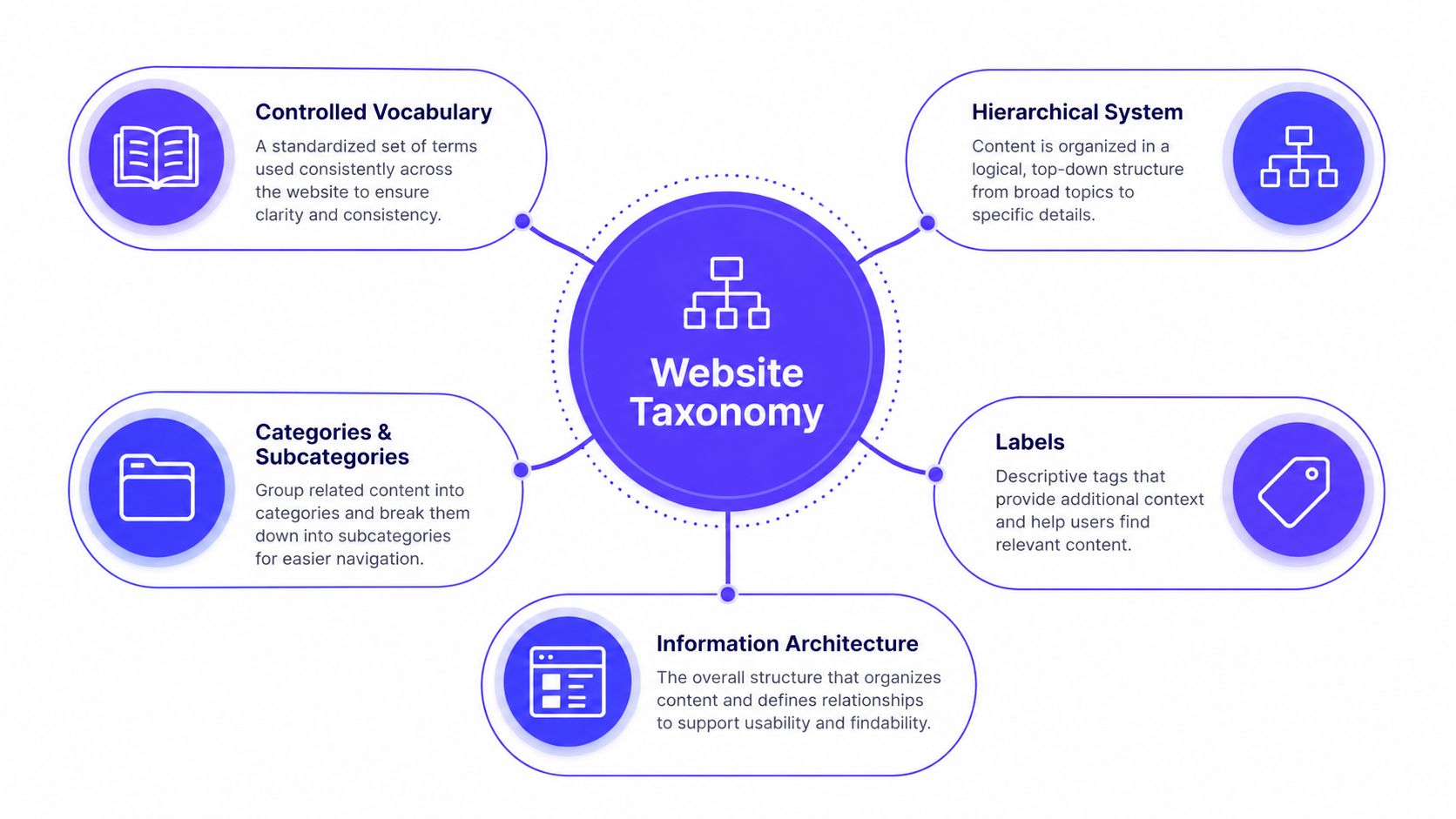
Website taxonomy is a controlled, hierarchical system for classifying content through categories, subcategories, and labels. It sits within information architecture, the broader discipline of organizing, structuring, and labeling content so people can find information efficiently. The Web Style Guide's information architecture reference describes taxonomy as the science and practice of classification, including hierarchical structures that support browsing and search.
Classification and navigation solve different problems. Taxonomy defines which categories and terms exist, how content relates to them, and which alternative routes should remain available. Navigation exposes selected paths through menus, breadcrumbs, links, and page-level calls to action. A product site might place an integration guide in a documentation hierarchy while also connecting it to an industry, user role, or feature filter.
Keep the layers separate
These terms overlap, but they aren't interchangeable:
Taxonomy: The classification system that assigns content to categories and terms.
Navigation: The visible paths, menus, breadcrumbs, and links people use to move through the site.
Sitemap: A visual or technical representation of how pages are organized.
Metadata: Additional information that describes content, such as audience, industry, format, author, or status.
Search: A retrieval experience that can draw from titles, body content, taxonomy terms, metadata, and relationships.
A controlled vocabulary prevents labels from drifting as teams publish. If the approved term is “machine learning,” editors should not introduce “ML,” “machine-learning,” and “intelligent models” as separate terms without a deliberate reason. Nielsen Norman Group's explanation of taxonomy describes a controlled vocabulary as a defined set of acceptable terms arranged in a hierarchy, supporting consistency in classification and retrieval.
Add facets without flattening the hierarchy
A hierarchy supports browsing. Facets support filtering across multiple dimensions. An AI SaaS resource might sit under “Resources,” then “Guides,” while carrying facets for industry, role, integration, and use case. Visitors can follow the primary path or combine filters without forcing every attribute into the main menu.
That separation also affects CMS design. The primary category can define a stable content relationship, while facets drive filters, related-content modules, and landing pages. Editors gain reusable fields instead of creating a new folder for every audience or topic.
For a broader view of the discipline, what information architecture means provides useful foundation. Taxonomy is one part of that system, connected to content modeling, navigation, search, and page relationships. In fast-moving SaaS, Web3, and fintech sites, keeping those layers distinct makes monthly content changes easier to manage without turning every new page into a special case.
Why a Good Taxonomy Changes Everything
A taxonomy continues shaping the product after a page goes live. It determines how users find connected information, how designers repeat interaction patterns, how editors classify new content, and how search engines interpret relationships between pages. On fast-moving SaaS, Web3, and fintech sites, those effects appear in navigation, CMS fields, filters, dashboards, and support journeys.
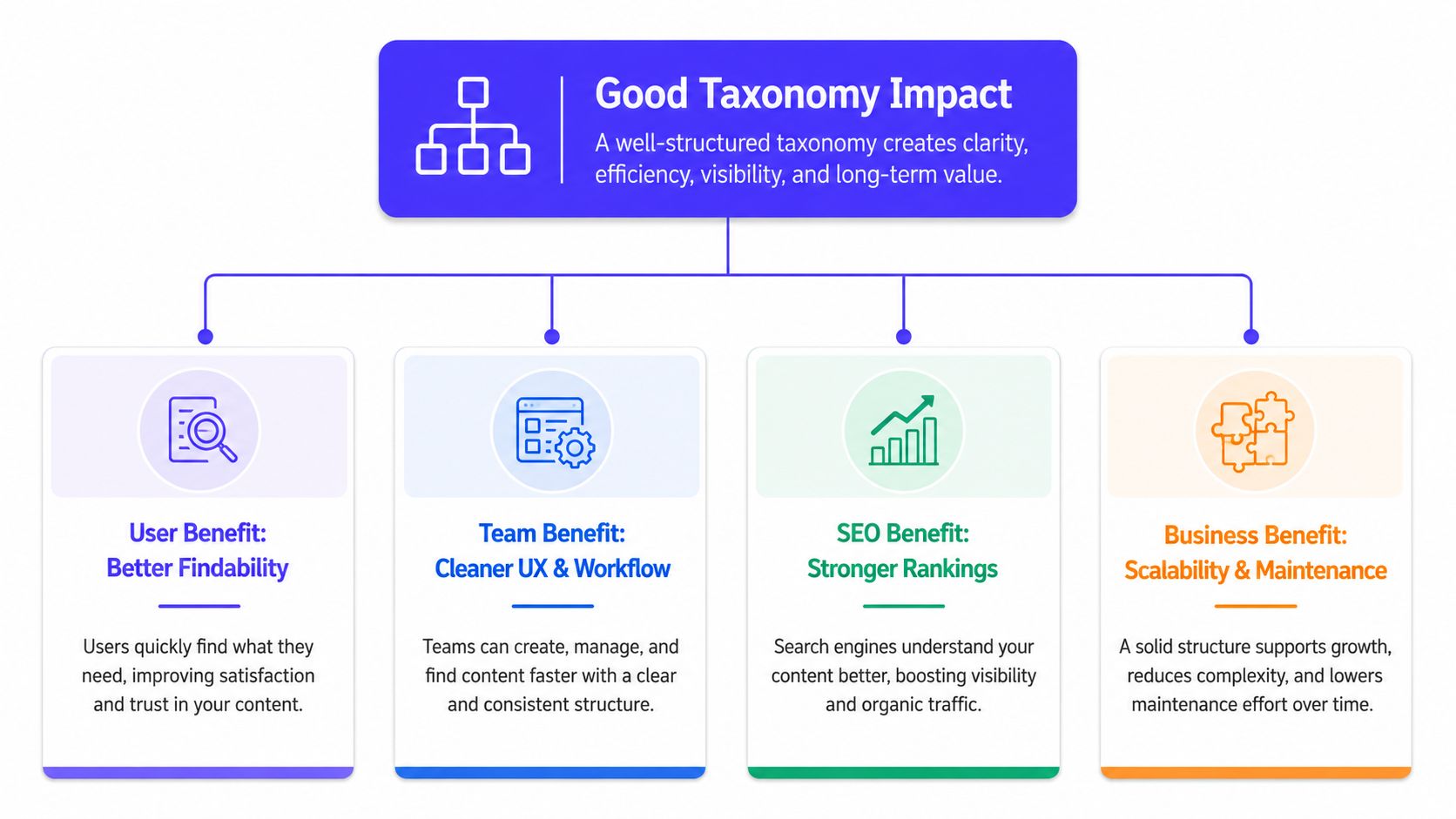
Findability improves when labels reflect tasks
A support portal shows the difference clearly. Someone investigating a failed payout may begin with the symptom, then need setup instructions, troubleshooting steps, and a status explanation. If those relationships are modeled, the portal can connect the relevant articles without requiring visitors to know which team owns payments, integrations, or account operations.
Task-based labels also help inside dashboards. A report library organized around actions such as reviewing usage, exporting data, or resolving alerts gives users a clearer route than categories based on internal departments. The taxonomy should reflect the work users need to complete.
Teams stop designing every page from scratch
A shared vocabulary gives product, marketing, and content teams common rules for classification. The same industry facet can drive a resource filter, a landing-page module, a dashboard view, and a related-content block. Designers can establish one filter pattern instead of creating a separate interaction for each library.
The benefit becomes visible after launch. If fintech, financial services, and banking are applied inconsistently, filters return unpredictable results and the interface feels fragmented. Controlled terms reduce that ambiguity before it reaches the frontend, while clear ownership gives editors a way to resolve disputed labels.
SEO gains come from clearer relationships
Search engines can interpret a site more reliably when pages have meaningful parent categories, consistent labels, and deliberate internal links. A taxonomy also helps teams decide which relationships deserve visible navigation and which should remain metadata.
Every category does not need an indexable archive. Thin or overlapping category pages can add clutter, especially when monthly publishing creates branches faster than editors can maintain them. A category earns a public page when it represents a meaningful topic, serves a clear user purpose, and has enough relevant content to support that purpose.
Teams coordinating taxonomy with broader content SEO services should make that decision in the content model. Retrofitting rules after dozens of archive pages exist usually creates redirects, overlapping URLs, and editorial cleanup.
Reuse becomes a system capability
A fintech article about payment operations can appear in a compliance hub, a product comparison, and an audience-specific collection without creating copies. The source remains one canonical item. Taxonomy and metadata decide where it appears.
That separation lets editors update the source once and refresh every connected experience. It also keeps page modules, labels, and design-system components consistent across the marketing site and product. Over time, taxonomy becomes infrastructure for publishing and product behavior, not just a folder structure.
Real Content Models for SaaS, Web3, and Fintech
There isn't one universal taxonomy for technical companies. The right model follows the questions users ask and the relationships the business needs to maintain.
An AI SaaS company often starts product-first. The hierarchy might begin with product areas, then split into features or workflows. Facets can describe industry, role, and integration, while tags capture narrower themes used across guides and release notes. A page about automated forecasting could belong to a product area, then filter by operations, finance, and a connected data platform without creating a separate branch for every combination.
A Web3 company needs a different emphasis. Visitors may care about chain, protocol layer, wallet type, governance model, or use case. Those attributes shouldn't all become primary navigation. Chain and protocol layer may work as facets, while the hierarchy organizes the core product, developer resources, and ecosystem education. Regulated or sensitive content needs explicit ownership, review status, and disclosure fields so a new label doesn't bypass governance.
Fintech usually needs more deliberate compliance modeling. Product and audience can support browsing, while compliance topic, jurisdiction, risk area, and disclosure status work as structured metadata. A resource about identity verification can serve operations leaders, product teams, and compliance readers, but the legal review state should remain a field with an owner, not a casual tag.
Model | Hierarchy depth | Primary facets | Tag use |
|---|---|---|---|
AI SaaS | Product area, workflow, resource type | Industry, role, integration, use case | Narrow themes, feature references, educational topics |
Web3 | Product or ecosystem area, resource type | Chain, protocol layer, developer role, use case | Governance themes, technical concepts, release context |
Fintech | Product area, audience, resource type | Compliance topic, risk area, jurisdiction, role | Educational themes, operational concerns, product concepts |
The trade-off is between clarity and flexibility. A hierarchy that's too detailed becomes difficult to browse. One that's too shallow forces every meaningful distinction into filters that users may never discover. Teams exploring product-led SEO for SaaS should connect taxonomy decisions to product journeys, not treat SEO pages as a separate content universe.
For the interface implications, SaaS website design is a useful reference point. The taxonomy should support the product story, not compete with it.
A Six-Step Workflow to Design Your Taxonomy
Taxonomy design works better as a project plan than as a workshop that ends with sticky notes. Each step should produce something the next person can use.
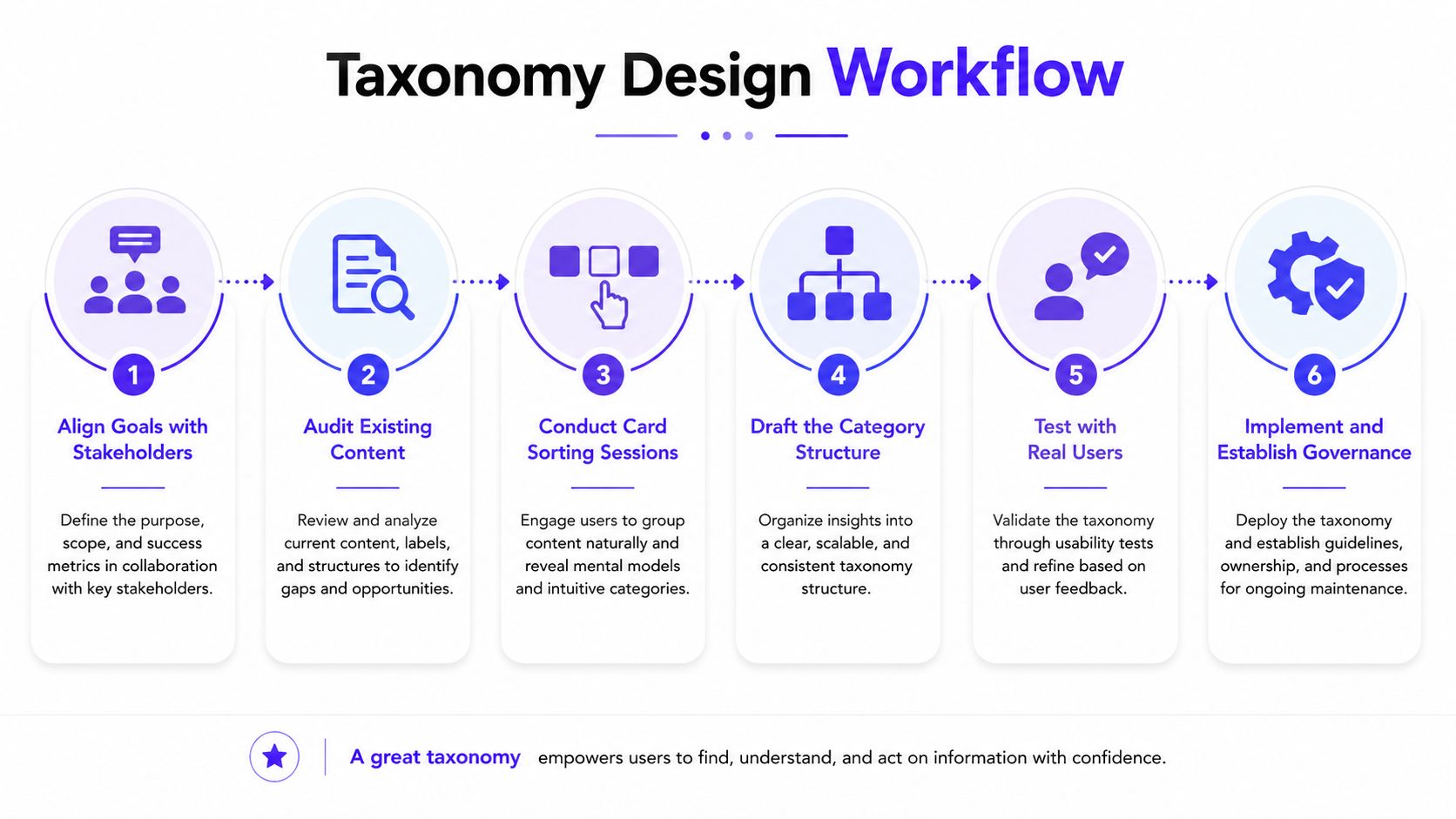
Start with stakeholder interviews
Speak with the founder, product lead, marketing owner, support lead, and the person who publishes content. The deliverable is a short list of business goals, user tasks, content types, and terms that currently cause disagreement. The practical estimate is a focused discovery block, not an open-ended research program. The common pitfall is letting the loudest internal team define the whole structure.
Audit what already exists
Export the current pages, posts, product entries, documentation, and resource items. Group them by topic, audience, format, and current location, then mark duplicates, outdated material, and content that has no clear owner. The output should be an inventory with proposed actions, merge, revise, redirect, retain, or retire. The mistake to avoid is designing an ideal future structure without understanding the content that must move into it.
Use card sorting with real users
Card sorting reveals how people group and label content in their own language. Give participants representative page titles or content descriptions and ask them to create groups or place items into proposed groups. HubSpot's overview of categories, associations, and navigation design describes card sorting as a core way to derive navigation structures from user mental models, alongside tree testing and first-click testing.
Draft the structure, then challenge it
Turn the sorting patterns into categories, subcategories, facets, and approved labels. Document why each term exists and what content qualifies for it. Don't aim for a perfectly symmetrical diagram. Complex products sometimes need exceptions because overlapping use cases or compliance topics don't fit a neat folder structure.
Validate with tree testing
Tree testing removes visual design from the question. Give users tasks such as finding an integration guide or locating a disclosure policy, then observe where they look in the proposed structure. Yale's guidance on content taxonomy and labeling emphasizes user-centered categories, card sorting, tree testing, and governance. The checkpoint is whether users can predict where content belongs, not whether the diagram looks clean.
Model it in the CMS and soft launch
Create the actual fields, relationships, filters, URL rules, and editorial guidance. Launch the structure on a controlled part of the site before migrating everything. Monitor search behavior, filter use, broken paths, and editor questions. The biggest failure is treating implementation as a handoff, because a taxonomy that can't be maintained will decay immediately.
Use the workflow as a working session, then review the decisions with the people who publish and maintain the site.
Implementing Taxonomy in Your CMS, Filters, and URLs
A taxonomy becomes real when an editor can assign it without inventing a new rule. Start with content types. A product page, documentation article, case study, and blog post should have distinct models when they need different fields, templates, or publishing workflows. Taxonomy then connects those content types through shared terms.
Use a primary category as a single-select field when every page needs one stable home. Use facets as controlled multi-select fields for attributes such as industry, role, integration, or use case. Tags can support narrower cross-cutting themes, but they should come from an approved list rather than a blank input that invites spelling variations.
Make filters reflect questions
A filter should answer a user question. “Which industry do you serve?” and “Which integration does this work with?” are useful filters. A filter that exposes internal ownership, campaign names, or temporary launch labels is usually a workflow leak.
Don't reproduce the entire hierarchy inside the filter panel. The hierarchy supports the main browse path, while facets let users narrow a collection across dimensions. A SaaS resource can live under a stable resource category and still be filtered by role, industry, and integration.
Keep URLs stable
Use durable categories in URLs when the category represents a lasting part of the site. Avoid using temporary tags, campaign names, or labels that may change with the roadmap. If a category must be renamed, plan redirects and update internal links as part of the migration rather than treating the URL as an afterthought.
Internal linking should follow a simple rule. Every page gets one primary category and appears in at least one relevant facet collection or related-content block. That gives users more than one route without creating a separate copy of the content.
The CMS should also expose definitions and examples to editors. A field labeled “audience” needs guidance about who qualifies, while “industry” needs an approved list. Without those instructions, even a carefully designed model will drift as new people join the publishing workflow.
Common Pitfalls and How to Spot Them Early
Taxonomy problems rarely arrive as a dramatic outage. They show up as confusing search results, duplicate pages, empty filters, and editors creating private systems in spreadsheets.

Org-chart categories: Visitors must choose between departments instead of user tasks. Fix: Rename top-level groups around the problems, products, or audiences users recognize.
A flat structure: Every page sits beside every other page, so browsing becomes a long list. Fix: Introduce meaningful parent categories where content has a genuine shared topic.
Siloed labels: Product calls a capability “automation,” while marketing calls it “workflow intelligence.” Fix: Create one approved term and record synonyms as search or editorial guidance.
Untested navigation: The team approves a tree because it feels obvious internally. Fix: Run tree testing with people who weren't involved in creating the structure.
Tags replacing hierarchy: Editors add more labels to compensate for the absence of stable categories. Fix: Decide what belongs in the primary hierarchy, then reserve tags for narrower themes.
No owner after launch: The taxonomy becomes everyone's responsibility, which means nobody maintains it. Fix: Assign one owner, document changes, and review terms on a recurring cadence.
A shallow taxonomy isn't automatically better. Yale's guidance discusses keeping structures manageable and user-centered, but complex products may need deeper or more specialized branches when the content and user tasks justify them. The right test is not visual simplicity. It's whether users can find content and editors can classify it consistently.
Measuring Success and Running Taxonomy Long Term
Taxonomy succeeds when it improves the work around content, not when the diagram wins approval. Track signals that reveal whether people can find information and whether teams can maintain the model.
Useful measures include:
Zero-result search rate: Identify queries that return nothing, then decide whether the issue is missing content, poor synonyms, or an incomplete taxonomy.
Pages per category: Look for empty categories and overloaded ones. Both may indicate a classification problem.
Duplicate label count: Find terms that describe the same idea and merge them where appropriate.
Time to publish new content: Watch whether editors can classify and launch pages without repeated clarification.
Organic landing-page coverage: Review whether important category and topic pages receive relevant search traffic and support meaningful user journeys.
These measures need context. A category with little content may be intentional during a product launch, while a category with many pages may still be unusable if the labels don't match user language. Combine analytics with search logs, support questions, editorial feedback, and usability checks.
Give the system a lightweight operating rhythm
Assign a single taxonomy owner, even if several teams contribute terms. Keep a change log that records new labels, merged categories, renamed terms, and the reason for each decision. Review the system quarterly, or sooner when a major product area, audience, or compliance requirement changes.
A design system helps keep the visual expression consistent, but it can't decide whether a new category belongs in the model. That decision needs product strategy, content judgment, user research, and implementation discipline. 925 Studios works across product design, brand identity, website design, and frontend development, so teams can keep taxonomy decisions connected to the interfaces and publishing systems that use them.
925 Studios helps AI SaaS, Web3, and fintech teams turn taxonomy decisions into usable CMS models, clear navigation, scalable filters, and shipped product and marketing experiences. If your site structure is already slowing publishing or confusing users, visit 925 studios to discuss the redesign, brand, and frontend work needed to put the system into practice.


Let’s keep in touch.
Discover more about high-performance web design. Follow us on Twitter and Instagram.

