
Cloud Based Web Development Platform Guide for Startups

Outrank AI

Your team is five people spread across three time zones. One developer has the correct local setup, another is missing a package, and the founder is waiting for a staging link that only works on one laptop. Meanwhile, the product designer is reviewing screenshots instead of the interface customers will use.
A cloud based web development platform can fix that operating model, but it can also create a new problem. The platform may remove server work today while making costs, performance, compliance, or portability harder to control later. For an AI SaaS, Web3, or fintech startup, the right question isn't “Which platform is fastest?” It's “Which platform helps us ship this product without limiting the next one?”
Table of Contents
What a Cloud Based Web Development Platform Actually Is
A cloud based web development platform is a browser-accessible place to write code, preview changes, build applications, and deploy them on managed infrastructure. Your team doesn't need every developer to recreate the same local toolchain before contributing. The platform supplies much of the environment, while your team supplies the product code, content, integrations, and decisions.
That differs from traditional local development. In a local setup, each developer's laptop holds the runtime, dependencies, build tools, and configuration. A cloud platform centralizes those ingredients so the team can work from a consistent environment. It also differs from plain cloud hosting. Hosting gives your finished application somewhere to run. A development platform usually covers more of the path from source code to preview to production.
Think of the difference as cooking. Traditional infrastructure can feel like building your own kitchen, buying every appliance, wiring the utilities, and maintaining the equipment. A platform is a rented, fully equipped kitchen. You still choose the menu and prepare the food, but someone else manages much of the underlying facility.
Why the category matters
Google App Engine helped establish this model in April 2008, when its preview allowed developers to run web applications on Google's infrastructure without managing servers directly. The preview opened to 10,000 developers and expanded by another 10,000 four days later, reaching 20,000 developers, as documented in this annotated history of Google Cloud. That launch helped define the platform-as-a-service approach that modern web teams now recognize.
For a practical comparison of what a visual platform can involve, including Webflow costs and process is useful when you're assessing design, build, hosting, and maintenance together.
Your one-sentence explanation to a co-founder is simple: a cloud based web development platform gives the team a shared, managed path from code to deployed web product without requiring everyone to maintain the infrastructure locally.
How the Architecture Fits Together
A single code change crosses four connected layers, from development to deployment and external services. A developer edits a component in a browser-based environment. The platform stores the code, creates a preview, runs checks, builds the application, and sends the result to a hosting or runtime layer. A user's browser requests the page, while the application connects to databases, authentication, payment systems, analytics, and other APIs. Trace this path when comparing vendors. Feature lists rarely reveal where control, cost, or portability limits appear.
The four layers
The development environment is where code lives and developers work. It may include a browser editor, terminal access, shared configuration, package management, and preview environments. Test whether a new contributor can enter the project without rebuilding every dependency by hand. That setup time becomes a recurring cost as the team grows.
The CI/CD layer turns a code change into a tested deployment. Continuous integration checks the change. Continuous delivery moves an approved build toward an environment users can access. Ask whether every pull request gets a preview, whether tests run automatically, and whether production releases require explicit approval.
The hosting and runtime layer serves the application. Some platforms use managed containers, some use serverless functions, and some place static assets on a content delivery network. The abstraction determines how much control you have over runtime behavior, regions, scaling, and debugging. Confirm those boundaries before committing a regulated or fast-growing product to the platform.
The integration layer connects the application to data and external services. Authentication, databases, queues, payment providers, AI models, and observability tools all belong here. A platform that makes the first integration easy can still restrict the team if exporting data or replacing a service is difficult. Review those exit paths alongside the initial setup.
Standardization has particular value for distributed teams. Browser-accessible environments reduce setup drift, make onboarding more repeatable, and give product, design, and engineering a shared preview target. According to the Coder survey report, 60% of cloud workloads will be built and deployed using cloud development environments by 2026, while 66% of respondents already develop in CDEs. CDEs are becoming a standard delivery layer, so evaluate cost predictability, compliance controls, and portability before treating them as a default. For a related view of the broader architecture, see cloud-based app development.
Real Benefits and Real Trade-Offs
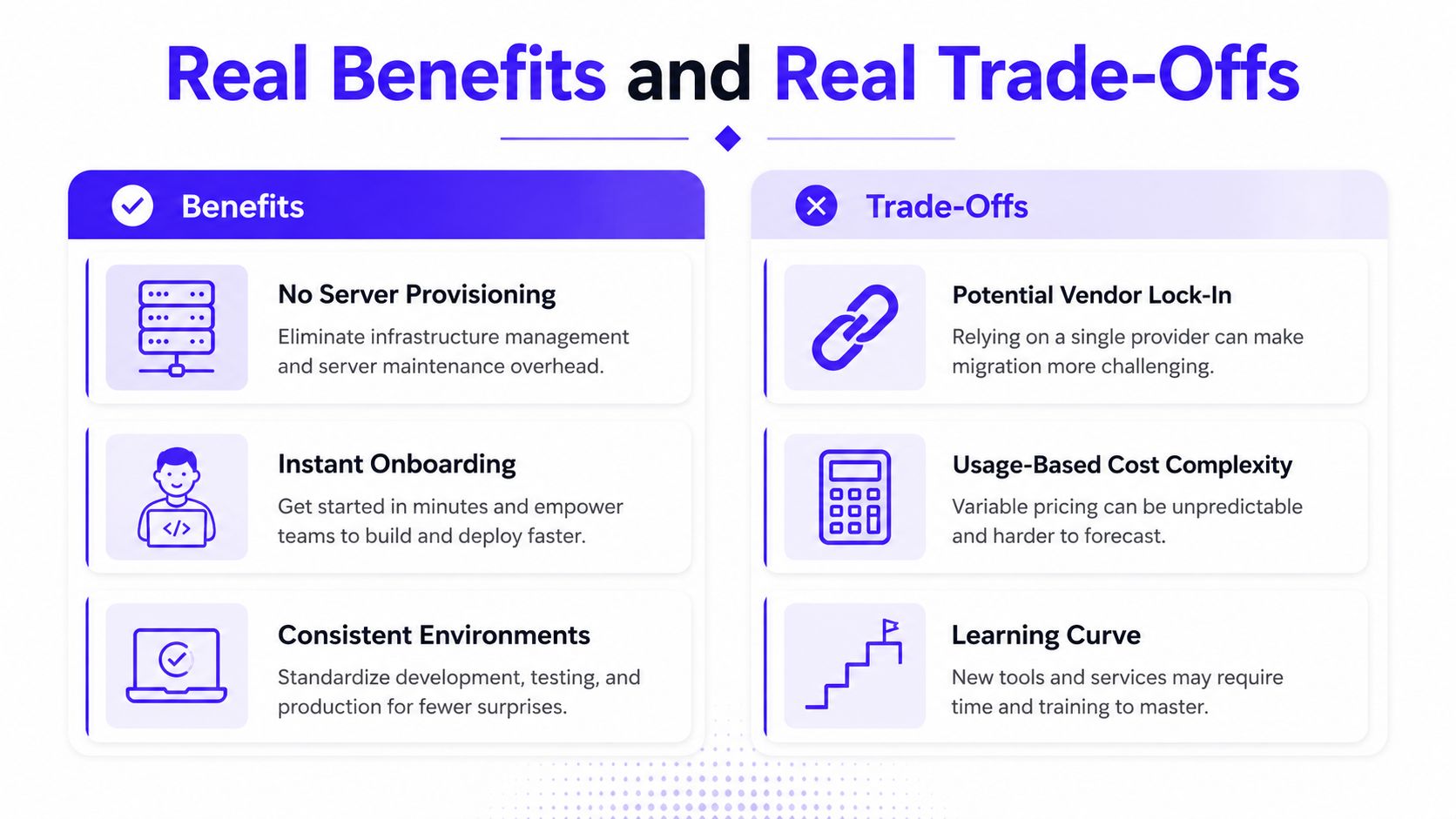
A launch can move quickly on a cloud platform, then slow under unpredictable bills, compliance work, or a difficult migration. The benefit comes from removing repeated operational tasks. The cost is accepting another company's defaults, billing model, runtime behavior, and availability model. Evaluate both before committing.
What you gain
A managed environment removes server provisioning from the critical path. Developers can focus on application behavior instead of configuring each machine. New team members get a clearer starting point because the project uses one declared environment rather than several slightly different laptops.
Consistent environments reduce the familiar “works on my machine” dispute. Shared previews let designers and marketing leads inspect the current build without local setup. Automated deployment also cuts manual steps between approval and release. Scaling becomes easier to handle for workloads with uneven demand, though the platform's pricing and limits still require review.
What you pay for
The first cost is billing complexity. Usage-based infrastructure may look inexpensive while traffic is low, then become harder to forecast as requests, storage, compute, logs, and third-party services accumulate. Require usage dashboards, budget alerts, and a clear explanation of what happens at higher volume.
The second cost is control. A platform may limit your ability to tune deterministic performance, choose low-level runtime behavior, or move workloads between providers. The third is portability. If the application depends on proprietary functions, deployment rules, identity services, or data formats, leaving may require redesigning product components, not merely moving source code.
Compliance adds another decision point. Confirm where data is processed, which controls the vendor operates, and whether the platform supports the evidence your customers or regulators require. A fast launch does not justify creating an approval problem later.
Edge placement makes the performance trade-off concrete. An edge benchmark reported bandwidth reductions of 36x to 81x, depending on provider and workload, compared with cloud pipelines, while also finding that cloud remained faster for some tasks. The edge benchmark report supports a practical conclusion: placing compute closer to users can reduce data movement and transfer costs, but it will not always deliver the lowest raw execution time.
Practical rule: Treat each platform benefit as a line item with a corresponding cost. “No servers to manage” should prompt questions about runtime control, billing visibility, compliance evidence, and exit options.
Your Platform Evaluation Checklist
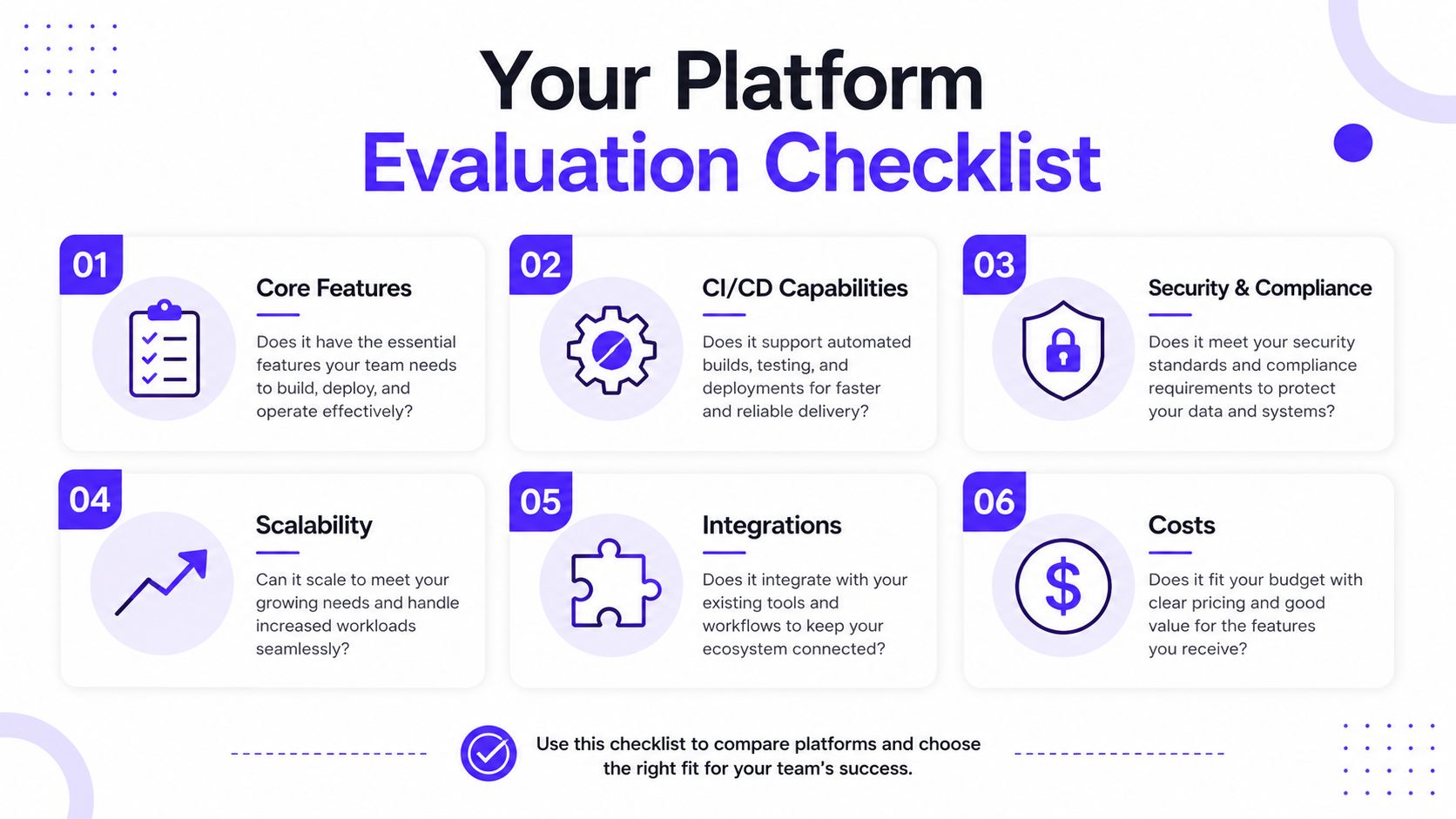
Don't ask a vendor whether the platform is scalable or secure. Ask what you can verify before signing.
Core features
Start with the daily workflow. Can developers create a preview from a pull request? Can non-engineers review that preview without local setup? Can the team inspect logs, roll back a release, and reproduce a failed build?
A pass means you can demonstrate the full path with one real feature. A fail means the vendor's demo depends on manual steps your team will repeat every week.
CI/CD capabilities
Look for automatic builds, test execution, preview deployments, approvals, and rollback behavior. Ask what happens when a test fails and whether the platform preserves enough information to diagnose the failure.
Your pass signal is a documented pipeline that your engineering lead can inspect. A platform that only provides a deploy button isn't giving you a delivery system.
Security and compliance
Compliance should match the markets and data your product handles. Google Cloud's Trust Center lists ISO/IEC 27001, 27017, 27018, and 27701, SOC 1, 2, and 3, PCI DSS, and FedRAMP, alongside alignment with GDPR and HIPAA, as described in its security framework for financial services.
That list isn't a universal approval. It is a checklist for the vendor call. Ask which services and regions each certification covers, how access is logged, where data is stored, and whether your contract supports the required controls.
Scalability and integrations
Test the platform against your real architecture, not a blank starter project. Connect the authentication provider, database, payments layer, analytics, and AI service you expect to use. Then ask how you would replace each one.
A pass means your team can identify an alternative path for every critical dependency. If one proprietary integration controls identity, data, and deployment, portability risk is already present.
Costs
Model the bill using your own product behavior. Google Cloud says customers can use more than 20 products for free up to monthly usage limits, according to its cloud pricing overview. That can make early experimentation accessible, but free allowances don't remove the need to monitor consumption.
Ask the vendor to show the cost drivers, thresholds, overages, support fees, and regional differences. For broader context on evaluating platforms as part of company change, the WebinOne digital transformation guide can help frame the operational questions. Disqualify any platform that can't explain what will change when your usage grows.

Migrating and Onboarding Without the Pain
Migration fails when teams move everything at once. A safer approach separates infrastructure changes from product risk and keeps a working rollback path throughout.
Move in controlled stages
Audit the current product. List the repositories, build commands, environment variables, data stores, authentication flows, third-party services, and release steps. Mark each dependency as portable, replaceable, or tightly coupled to the current setup.
Choose one low-risk surface. Start with a marketing page, internal dashboard, or non-critical service. Don't begin with payments, account recovery, or the database that holds your core customer records.
Build the pipeline first. Make the new environment build, test, preview, and deploy a small slice before migrating important data. This exposes configuration and permissions problems while the rollback remains simple.
Migrate data deliberately. Move data only after the application path works. Keep the original system available until you can verify authentication, writes, reads, background jobs, and monitoring in the new environment.
Document the exit. Record how to export source code, data, environment configuration, and deployment settings. If nobody can explain the exit process, the team hasn't finished evaluating the platform.
Onboarding should produce a working contribution, not a tour of documentation. Give a new developer a standard environment, one small task, a preview URL, and the commands or interface used to release it. Write down the project map, local exceptions, secrets policy, review rules, and rollback procedure on day one.
Cost onboarding deserves the same discipline. Cloud providers may let you begin without upfront spend, but consumption thresholds require active monitoring. Cloudflare Workers, for example, has a free tier with 100,000 requests per day and 10 ms of CPU time per invocation, while its paid tier starts at $5 per month and includes 10 million requests plus 30 million CPU-ms before usage-based overages, according to this Cloudflare Workers pricing breakdown. Set alerts before launch, not after the first unexpected invoice.
Workflows Where Designers and Developers Ship Together
The strongest reason to use a cloud based web development platform may be the shared working rhythm it creates. Designers shouldn't approve a static mockup while developers implement a different interpretation. They should review the same deployed interface, with the same content, breakpoints, loading states, and errors that customers will encounter.
A shared preview URL changes the conversation. Instead of sending a screenshot with “make the button feel more premium,” the designer can comment on the actual navigation, spacing, empty state, or mobile behavior. The developer can respond in the same environment, deploy another revision, and give the reviewer something concrete to assess.
A practical collaboration loop
Design establishes the system. Define typography, color roles, spacing rules, component states, and interaction patterns before the team creates dozens of one-off screens. Design tokens give the product a shared vocabulary that can travel from the design system into production code.
Development exposes constraints. The live build reveals issues static files hide, including slow-loading assets, awkward content lengths, failed API states, and responsive behavior. Designers can solve those problems while the context is still visible.
Product approves the outcome. A founder or product lead should review the deployed flow, not only the component library. The question is whether the interface explains the product, supports the task, and feels consistent with the brand.
This loop reduces handoff rounds because the team doesn't need to translate every decision through chat messages and disconnected files. It also protects brand quality. A polished identity can lose its clarity when developers substitute system defaults, compress a complex workflow, or ship an unconsidered empty state.
For teams connecting design files to a production workflow, this Figma to live website AI workflow provides a relevant reference point. The tool matters less than the operating rule: review the product early, and attach feedback to the environment where the issue exists.
925 Studios works across product design, brand identity, design systems, and frontend development, which suits teams that want one creative partner covering the path from interface decisions to shipped pixels.
Choosing by Industry, AI SaaS, Web3, and Fintech
The right platform depends on what can hurt your business. AI SaaS teams fear unpredictable model and infrastructure consumption. Web3 teams often need portability and consistent behavior across a global user base. Fintech teams carry the highest burden around compliance, sovereignty, resilience, and auditability.
The broader market context reinforces why generic platform advice falls short. Coverage of cloud-native development reports that 88% of backend developers use standardized infrastructure and that there are 19.9 million cloud-native developers worldwide, as stated in the State of Cloud Native Development report. Those figures show standardization is widespread, but they don't tell you whether a particular abstraction fits your product.

The decision matrix
Team Type | Top Priority | Second Priority | Watch Out For |
|---|---|---|---|
AI SaaS | Usage metering across model and platform services | Cost alerts tied to product actions | A low entry price that hides expanding token and runtime consumption |
Web3 | Deterministic performance and portability | Edge deployment for globally distributed users | Deep dependence on one runtime, provider-specific service, or execution model |
Fintech | Compliance coverage and data sovereignty | Multi-region resilience and recovery procedures | Certifications that don't cover the exact service, region, or data flow you use |
AI SaaS founders should connect cost telemetry to user actions. If a feature calls a model, stores a large context, or triggers background processing, the product team needs to see the resulting consumption. Cloud billing alone won't explain which workflow is responsible.
Web3 founders should test more than average response time. Run the same critical operation across the intended runtime and deployment locations, then verify that the team can move the service without rewriting the product around provider-specific features. Edge can reduce data movement, but benchmark evidence shows it isn't automatically faster for every workload.
Fintech leaders should request the control map before committing. Ask where customer data resides, how encryption and access review work, what happens during a regional disruption, and which recovery responsibilities remain with your team. Current industry discussion also places FinOps, sovereign cloud strategy, and reliability at the center of platform decisions, particularly as AI usage adds another variable to operating costs, as discussed in cloud DevOps trends for 2026. For product teams adding intelligent features to a customer-facing site, this AI website integration guide is a useful design and implementation reference.
Key Takeaways and Your Next Step
Choose the platform that matches three realities.
First, match the cost model to your growth curve. If your product's usage is difficult to predict, prioritize granular metering, clear thresholds, and alerts over an attractive starting price. Second, match the compliance path to your market. A certification list only helps when it covers the services, regions, and data flows your product uses. Third, match the portability story to your likely future. You don't need to avoid every managed service, but you should know what leaving would require.
Run a real test this week. Pick two candidate platforms and deploy the same small feature on both, preferably a customer-facing flow rather than a tutorial. Record your team's onboarding effort, preview and deployment process, bill behavior, integration friction, rollback path, and the amount of design polish that survives into production.
The right platform makes the next launch easier without making the launch after that harder.
Don't choose based on a dashboard, a free allowance, or a polished demo. Choose based on the work your team will repeat, the bill you can explain, the controls your customers require, and the code you can still move when the business changes.
925 Studios gives AI SaaS, Web3, and fintech teams one creative partner across product design, brand design, and frontend development, replacing the need to coordinate three separate hires. Visit 925 Studios to discuss a product or marketing experience that needs to move from cloud environment to polished, conversion-focused interface.


Let’s keep in touch.
Discover more about high-performance web design. Follow us on Twitter and Instagram.

