
How to Integrate AI in Website: Startup Guide 2026

Yusuf
Founder and lead designer at 925studios

You're probably in the same spot as a lot of startup teams right now. A competitor added an AI assistant to their pricing page. Another launched AI search inside their docs. Someone on your team is asking whether you should add a chatbot before the next release.
That pressure is real, but it creates bad product decisions.
Most founders don't need another floating bubble in the corner of the site. They need an AI feature that helps a user finish something faster, understand something better, or trust the product sooner. That's a product decision first, and a technical decision second. If you skip that order, you end up shipping something that looks current but feels disposable.
Table of Contents
Your Competitors Are Shipping AI Features, Now What?
The rush to integrate AI into a website usually starts with anxiety, not strategy. A founder sees three competitors add AI to onboarding, support, or content, then asks the team, “How do we get ours live?” That question sounds practical. It often leads to the wrong outcome.
The better question is simpler. What job should AI do on this site that improves the product or brand experience?
That matters more now because the web is already crowded with machine-made content and low-effort AI add-ons. As of May 2025, 74% of all new web content is generated using generative AI tools, and websites using AI for content creation publish 42% more pages per month than sites relying only on human writers, according to Ahrefs' AI statistics roundup. More output doesn't automatically create more trust. It often creates sameness.
A generic chatbot won't save a weak product story
A lot of AI features fail for one reason. They don't solve a sharp user problem.
If your visitors can't understand the product, AI should clarify the value. If prospects keep asking the same implementation questions, AI should shorten that path. If users abandon a workflow because the interface feels heavy, AI should remove friction inside the workflow itself, not sit off to the side and wait to be clicked.
Practical rule: Don't ask, “Where can we place AI on the website?” Ask, “Where does user confusion or hesitation cost us the most?”
For startup teams in AI SaaS, Web3, and Fintech, that usually means treating AI as part of the product experience, not a marketing accessory. The strongest implementations feel native. They match the interface, the tone, and the decision-making style of the company.
The real opportunity is differentiation
There's a difference between adding AI and building with it.
Adding AI is a widget. Building with AI is an experience. It might be a pricing explainer that answers only plan-fit questions. It might be a docs assistant trained on your knowledge base. It might be a lead qualification flow that routes serious buyers to the right demo path. It might be an agent that books meetings or handles account tasks in a branded full-page interface.
Founders who get this right usually start with positioning, not tooling. If your product already has a clear promise, AI should strengthen it, not blur it. That's the same discipline behind value proposition design for startup websites. A useful AI feature makes your promise easier to understand and easier to experience.
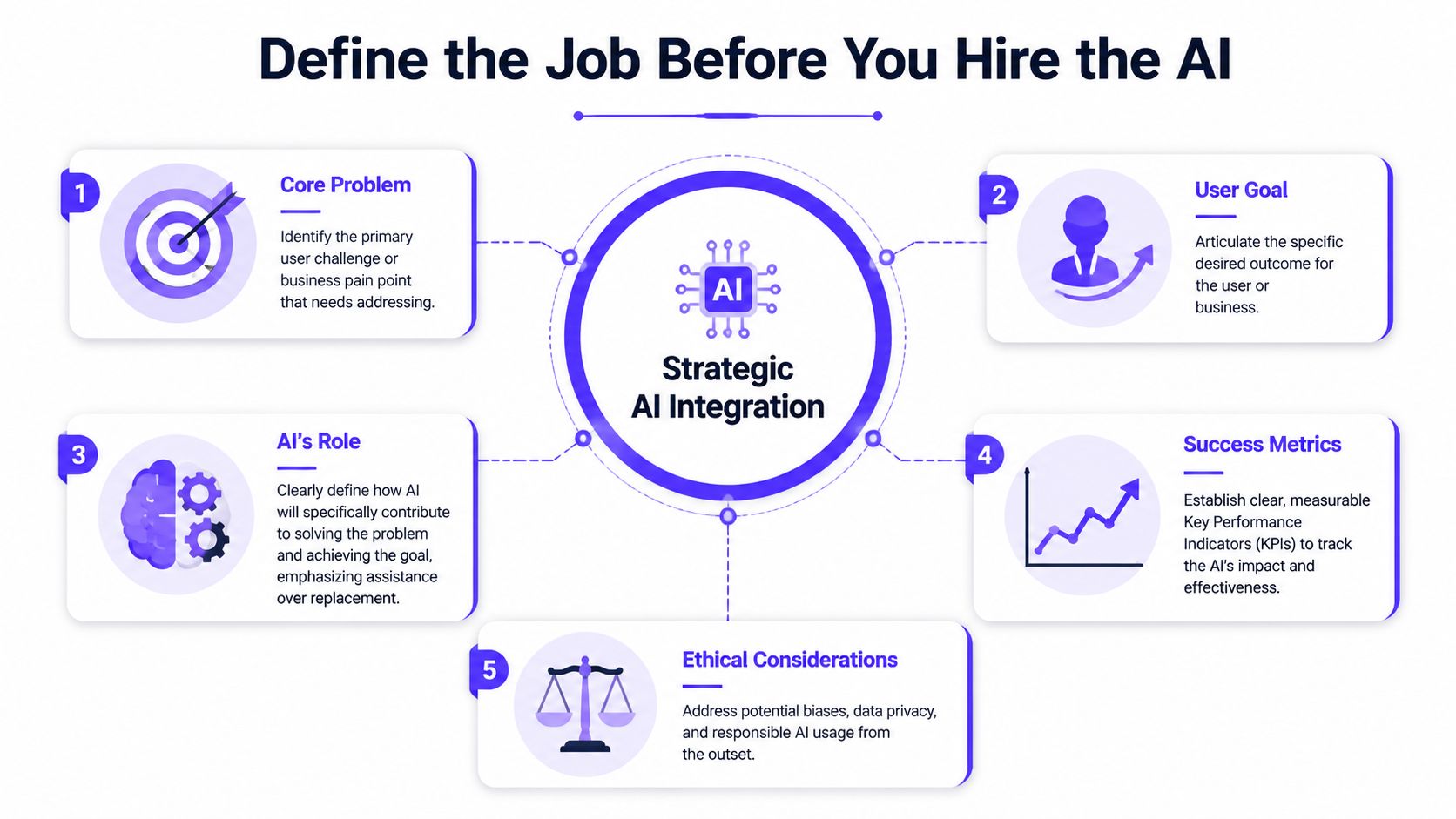
Define the Job Before You Hire the AI
The first mistake teams make with how to integrate AI in website projects is choosing a model before choosing a use case. That's backwards.
Start with one measurable outcome. Not five. Not a broad goal like “improve engagement.” One outcome that matters enough to shape product decisions. According to Anything.com's guide to integrating AI into a website, the most effective methodology starts by defining a single measurable result, such as reducing support response time by 30%, increasing product page engagement by 20%, or improving qualified lead conversion by 15%.
One job beats a vague ambition
A focused AI feature is easier to design, easier to train, and easier to evaluate.
Here's what that looks like in practice:
Support-heavy product: Use AI to answer recurring setup questions from your docs and FAQs.
Sales-led product: Use AI to qualify inbound visitors, route enterprise questions, and surface the right next step.
Complex fintech product: Use AI to explain terms, compliance concepts, or onboarding requirements in plain English.
Web3 product with trust issues: Use AI to translate technical mechanics into user language without sounding promotional.
That last point matters more than teams expect. If your product already asks users to trust something complex, the AI can't sound loose, generic, or overconfident.
Write the mission in one sentence
Before any build starts, the team should be able to say:
Who the AI helps
What task it improves
How success will be measured
A strong version sounds like this: “Help trial users understand setup steps inside the docs so support demand drops and onboarding feels easier.”
A weak version sounds like this: “Add an AI assistant to increase innovation.”
If the team can't explain the feature in one sentence, users won't understand it in one screen.
Pick metrics that force product clarity
Founders need discipline. Limit the evaluation to one primary metric and, at most, one secondary metric. Too many success measures usually mean no one knows what the feature is for.
Useful questions include:
What behavior do we want to change?
Fewer repetitive support requests, better lead quality, stronger product understanding.Where does the user currently stall?
On the pricing page, in docs, during onboarding, inside a form.What should AI handle, and what should a human still own?
Clarification, summarization, routing, and pattern recognition are usually strong fits. Sensitive decisions and edge-case judgment often still need human review.
A good founder also pressure-tests whether the feature matches the company's actual stage. If you're still searching for the right problem, it helps to revisit a few product-market fit questions for early-stage teams before building an AI layer on top of an unclear offer.
Choose Your Architecture Speed vs Control
Once the job is clear, architecture becomes a business trade-off. At this stage, teams decide how much control they want over the experience, and how much complexity they're willing to manage.
For most startups, there are three realistic paths. You can install an off-the-shelf widget, build an API-based custom feature, or self-host a model. Each path changes the user experience, your team's workload, and your ability to make the feature feel like your product.
AI Integration Architecture Trade-offs
Approach | Speed to Launch | Cost | Customization & Brand Fit | Best For |
|---|---|---|---|---|
Off-the-shelf widget | Fast | Lower setup, recurring vendor cost | Limited, often looks and behaves like a generic chatbot | Teams that need quick validation |
API-based custom build | Moderate | Build cost plus usage cost | High, you control UI, logic, prompts, and flows | Startups building AI into the product experience |
Self-hosted model | Slowest | Highest operational burden | Highest theoretical control | Teams with deep technical resources and strict requirements |
Widget installs are easy, but they come with obvious ceilings
A plugin or app is the fastest route if you need to test demand. On CMS platforms, that path can be perfectly reasonable. The trade-off is that the feature often looks borrowed. The interface, motion, response patterns, and limitations can all signal “third-party tool” instead of “core product capability.”
That's fine for a temporary experiment. It's weak if the AI is meant to carry part of your brand.
API integration is the sweet spot for most startups
For custom-coded sites, this is usually the strongest path. According to The Provato Group's breakdown of AI integration methods, React or NextJS websites generally require API integration, while WordPress tends to rely on plugins and Shopify uses dedicated apps. That distinction matters because a custom frontend can't rely on plug-and-play assumptions. Your team usually needs a backend in Python with Flask or FastAPI, or Node.js, to handle requests safely.
This route gives you room to build something that doesn't feel like a default chatbot. You can shape the interface with HTML, CSS, and JavaScript, decide where AI appears in the journey, and connect it to your product logic.
If your team is evaluating tooling and operational needs, a practical outside perspective is this guide to a platform for AI scaling. It's useful for understanding how infrastructure choices affect maintainability once the feature moves beyond a prototype.
Self-hosting buys control, but most startups don't need it first
Founders sometimes jump to “Should we host our own model?” because it sounds more defensible. In practice, it often creates engineering work that doesn't improve the user experience right away.
If you don't yet know which AI interaction your users value, self-hosting is usually premature. Better to prove the workflow, interface, and business case first. Then revisit deeper infrastructure decisions later.
The right architecture isn't the most advanced one. It's the one that lets your team ship a branded, reliable user experience without creating avoidable operational drag.
If you're weighing speed against polish, it also helps to compare what AI builders can and can't do well against a custom product approach. A piece like AI website builder vs design agency in 2026 gives a useful frame for evaluating control versus convenience.
The API-First Integration Playbook
For most funded startups and scaling product teams, the practical answer to how to integrate AI in website work is an API-first build. It gives you enough control to create a differentiated experience without forcing you to own model infrastructure from day one.
That process starts with access and restraint. According to DigitalOcean's conceptual guide to GenAI agent integration, teams need to secure API access through a developer portal, generate API keys, and begin with a small-scale pilot project (MVP) before rolling out broadly. That early pilot is where you learn whether routing, prompts, and UX assumptions hold up with real traffic.

Step one, keep the API call off the frontend
A founder doesn't need to write the code to understand the rule. The browser should not own the secret that powers your AI feature.
Your frontend, whether it's built in NextJS, React, or another stack, should send the user's request to your backend. The backend then talks to the model provider, applies your business rules, and returns a controlled response. That setup gives you a place to filter inputs, shape prompts, log failures, and manage rate limits.
If your team also needs to pass structured events into another workflow, a simple utility like integrate our conversion API can be a useful reference point for how external APIs are typically documented and wired into production systems.
Step two, train the assistant on your reality
An AI feature is only as strong as the context you give it. Generic prompts create generic answers.
A practical setup usually includes:
Training data: Your help docs, FAQ content, onboarding steps, product copy, and support language.
Prompt structure: Instructions about role, tone, boundaries, and what the assistant should refuse to answer.
Conversation flows: Rules for recurring scenarios such as plan comparisons, password resets, scheduling, or escalation.
A lot of teams miss the retrieval layer. If the assistant needs website knowledge, it should be grounded in actual site content, not improvise from general model memory. One practical method is to use the site's sitemap.xml to gather pages and iterate through them as a knowledge source, as shown in this walkthrough on preparing website data from sitemap files for AI agents.
Step three, define the system prompt like a product requirement
The prompt is part of the product. It shapes trust, clarity, and tone.
The core mechanism is straightforward. You prepend a system instruction that tells the model what role to play and what kind of output is acceptable. Keep it narrow. “You are an expert in onboarding for our B2B fintech platform. Use only approved product information. Be concise. If the answer is uncertain, say so and route the user to support.”
That kind of prompt does more for brand consistency than many teams realize.
Here's a useful demo of API-driven implementation patterns before a full rollout:
Step four, pilot before you scale
Don't send every visitor into a new AI flow on day one.
Start with one page type, one audience segment, or one narrow task. For example, use AI only on docs pages about setup, or only in a sales qualification flow for demo requests. That keeps the surface area manageable and gives the team a clean environment to evaluate quality.
Build note: The MVP should answer one category of question well. It doesn't need to be broadly intelligent. It needs to be reliably useful.
Designing the AI User Experience
Most AI features don't fail because the model is weak. They fail because the experience around the model is careless.
Users don't judge your AI in isolation. They judge the wait time, the wording, the confidence of the answer, the fallback behavior, and whether the feature feels native to the product. If it looks bolted on, they trust it less. If it speaks in a tone that clashes with your brand, they trust it less. If it gets stuck and offers no recovery path, they stop using it.

The interface should match the job
A floating chat bubble is only one pattern, and often not the best one.
If the AI helps with writing, an inline assistant inside a text field makes more sense. If the AI explains analytics or product behavior, a side panel tied to the dashboard can feel more natural. If the AI performs actions like meeting booking or guided customer service, a full-page embedded experience can work better than a tiny widget. In some builds, teams use an iframe to create that full-page feel while keeping visual consistency with the site, and some action-oriented agents connect tools like Calendly and Stripe to complete tasks, as shown in this example of embedding an AI agent for meetings and payments.
Trust is built in the states between answers
Here, product teams either look polished or amateur.
Good AI UX accounts for these moments:
Loading states: Show that work is happening. Don't leave users staring at dead space.
Streaming responses: Reveal text progressively when it improves conversational feel.
Fallback states: If the answer is uncertain, provide a next action instead of bluffing.
Source boundaries: Make it clear when the assistant is responding from your docs, policy content, or product data.
Escalation paths: Offer a handoff to support or sales when the issue needs a human.
A confident wrong answer damages trust faster than a careful incomplete one.
Prompting affects the interface more than teams expect
According to this OpenAI community discussion on focused website assistants, developers keep the assistant topic-focused by prepending a system instruction to every message, such as “You are an expert in [insert topic].” That sounds technical, but the UX impact is direct. It changes whether the feature feels sharp and purposeful, or broad and unreliable.
The same pattern applies to tone. If your brand voice is precise and calm, the assistant shouldn't sound like a hype-heavy general bot. If your users are making financial or technical decisions, every sentence should feel grounded.
For teams thinking beyond a basic assistant, this guide to implementing AI chatbots with RAG and LLMs is useful because it frames the retrieval layer and response design as part of the overall product experience, not just backend plumbing.
Shipping Responsibly Deployment, Data, and Bias
Getting the feature live isn't the finish line. It's the point where your product starts earning or losing trust in public.
A smart deployment plan covers three things. First, whether the AI is helping the user do the job it was hired to do. Second, whether the data flow is acceptable for your business and customers. Third, whether the feature works fairly across different users, not just the people who look most like your current dataset.
What to check after launch
The launch checklist should be boring and strict.
Review output quality: Read real conversations. Look for wrong answers, vague answers, and answers that sound off-brand.
Track against the original metric: If the feature was meant to reduce support burden or improve lead quality, stay focused on that result.
Monitor operational issues: Watch for cost surprises, failed calls, broken retrieval, and weak routing.
Collect product feedback: Add a simple thumbs up, thumbs down, or short feedback input near responses.
Define escalation rules: Decide when the assistant should stop and push the user toward a human path.
None of that is glamorous. All of it matters.
Data privacy is a product decision, not just a legal note
When you send user input to a third-party AI provider, you're making a trust decision on behalf of the customer. Founders need to know what data is being sent, where it is processed, and which parts of the experience should never rely on an external model call.
That usually means deciding early which content is safe for AI assistance, which workflows need stronger controls, and which sensitive interactions should remain human-led or tightly constrained.
Bias work can't be bolted on later
Most startup guides barely mention this, which is a mistake. According to Tiger Data's analysis of how AI models exclude underserved communities, teams should invest in data diversity, test for bias through fairness audits, and engage communities in co-creation so AI systems don't exclude marginalized users.
That advice matters far beyond enterprise ethics language. If your model is trained on narrow examples, your product can serve some users well and others poorly. In fintech, that can affect clarity and trust. In healthcare-adjacent products, it can shape access. In global SaaS, it can punish users whose language patterns or contexts weren't represented well in the source material.
There's also a resource reality that founders shouldn't ignore. The California Health Care Foundation's perspective on AI and underserved communities argues that equitable AI adoption also depends on funding pathways and reinvestment into the infrastructure that under-resourced teams need. That's outside the usual product tutorial, but it's part of shipping responsibly if your company serves broad or vulnerable audiences.
Responsible AI product work isn't only about model quality. It's about who the feature works for, who it fails, and whether your team is willing to look closely enough to know the difference.
If you're building an AI SaaS, Web3, or Fintech product and want the AI experience to feel like a real part of the brand, not a generic layer pasted on top, 925 Studios helps teams design and ship that kind of product. We work as one creative partner across product design, brand, and frontend development, so founders can move from rough AI concept to polished user-facing experience without splitting the work across three separate hires.


Let’s keep in touch.
Discover more about high-performance web design. Follow us on Twitter and Instagram.

