
Cloud-Based App Development: A Founder's Practical Guide

Yusuf
Founder and lead designer at 925studios

Two co-founders spend the week preparing for an investor meeting on Friday. By Monday, a sign-up campaign has worked better than expected, and the product is suddenly handling more users than the single rented server was ever designed for. The dashboard slows down, background jobs fail, and someone starts restarting services manually while customers wait.
That pressure explains why cloud-based app development has become the default for serious new products. The cloud gives a small team access to managed computing, storage, databases, queues, identity services, and deployment tools without requiring the founders to buy and maintain physical infrastructure. But infrastructure alone won't save a product. Architecture, security, cost control, developer workflow, and frontend quality all influence whether the app ships reliably and feels credible.
Table of Contents
Why Cloud-Based App Development Now
Cloud-based app development means building software so its compute, storage, databases, and queues run on infrastructure rented from providers such as AWS, Azure, or Google Cloud. Your team accesses those resources over the internet and pays according to the services and capacity it uses.
The appeal is practical. A founder can add capacity without purchasing hardware, serve users from regional data centers, and use managed services that would otherwise require dedicated operations work. A product can also begin with modest infrastructure and expand as demand develops, rather than committing a large amount of capital before the market has been tested.
The market reflects that shift. Cloud implementations held 57.35% of app development market share in 2025, according to Mordor Intelligence's app development market analysis, which forecasts cloud implementations to grow at a 21.8% CAGR through 2031. The broader app development market is projected to rise from USD 305.18 billion in 2026 to USD 618.65 billion by 2031, at a 15.18% CAGR, according to the same source. Those figures describe more than a hosting preference. They show that modern teams increasingly build, deploy, and scale products through cloud-native workflows.
Why founders default to the cloud
A fintech team can use managed databases and identity services instead of building every operational layer from scratch. An AI SaaS company can connect storage, queues, model services, and user-facing APIs without running a private data center. A Web3 product can deploy application services close to its users while separately managing wallet, custody, and chain-data concerns.
The modern stack developed quickly. AWS launched in 2002, Docker popularized containerization in 2013, Google introduced open-source Kubernetes in 2014, and the Cloud Native Computing Foundation launched in 2015, as summarized by Second Talent's cloud development statistics overview. The same summary cites container use in production rising from 24% in 2015 to 60% in 2017, based on a Cloud Native Computing Foundation survey.
The important decision isn't whether to use cloud infrastructure. It's how much complexity your product and team can responsibly carry. Your architecture choice affects security, cost, developer experience, and the interface customers use every day.
The Four Architectural Patterns That Matter
Most startup architecture decisions fit into four patterns. Choose based on workload shape, product maturity, and team capability, not because a diagram looks complex.
Serverless
Serverless functions such as AWS Lambda and Google Cloud Functions work well for event-driven tasks. Image processing, payment webhooks, scheduled notifications, and asynchronous AI jobs are good examples. The provider handles server allocation, so your team can focus on the function and its trigger.
The trade-off is less predictable startup behavior and tighter execution constraints. A month-long analysis of 85 billion user requests and 11.9 million cold starts found that cold starts reached up to 7 seconds in one region and 3 seconds in another, with results affected by dependency size, pod allocation, trigger type, runtime language, and resource choices, according to the published cold-start analysis. Don't use a function as the main request path for a highly interactive screen unless you've tested its latency profile.
Containers
Containers suit long-running APIs, custom runtimes, background workers, and applications that need a consistent execution environment. Amazon ECS, Amazon EKS, and Google Cloud Run can run containerized services while reducing the need to manage virtual machines directly.
A container is a sensible choice for an AI SaaS API with custom system dependencies or a fintech service that needs a predictable runtime. It becomes overkill when the team is still figuring out its product and has no clear deployment, scaling, or observability process.
Microservices
Microservices divide a product into separately deployable services. That can help once bounded contexts are clear, such as separating billing, identity, notifications, and analytics in a growing SaaS platform.
For a two-person team, microservices often create more work than value. Every service adds deployment configuration, logs, permissions, failure modes, data contracts, and operational decisions. Start with a modular monolith unless independent scaling or team ownership makes a service boundary necessary.
Edge compute
Edge services such as Cloudflare Workers and Lambda@Edge run logic near the user or at the network perimeter. They fit latency-sensitive reads, authentication checks, redirects, personalization, and lightweight request transformation.
Edge is useful for a globally distributed Web3 dashboard that needs fast access checks or a marketing site that personalizes content by region. It's a poor first move when your application depends on a central database, complex server-side state, or heavy computation.
Pattern | Best Fit | Watch Out For |
|---|---|---|
Serverless | Webhooks, image processing, async jobs, bursty APIs | Cold starts, execution limits, state handling |
Containers | Long-running APIs, workers, custom runtimes | Container operations and resource tuning |
Microservices | Products with clear domains and multiple engineering owners | Distributed failures and coordination overhead |
Edge | Auth checks, personalization, latency-sensitive reads | Runtime limits, data locality, debugging complexity |
Architecture should improve the daily work of the people shipping the product. For a practical framework, use measuring developer experience effectively to evaluate whether your platform removes friction or merely adds more tooling. If your product includes AI functionality, the frontend and integration decisions also deserve early attention, as outlined in this guide to integrating AI into a website.
Choosing Between IaaS, PaaS, and FaaS
The difference between IaaS, PaaS, and FaaS is how much operational responsibility your team accepts.
IaaS, or infrastructure as a service, gives you virtual machines and deep control. AWS EC2, Google Compute Engine, and Azure Virtual Machines let you decide how the operating system, networking, storage, and runtime work. Your team also owns patching, scaling, backups, high availability, and much of the incident response. Choose IaaS for legacy systems, unusual hardware or operating requirements, or a specific regulatory constraint. Don't choose it only because control sounds safer.
PaaS, or platform as a service, abstracts much of the operating system and runtime management. Services such as Elastic Beanstalk, App Engine, Heroku, and Render let a team deploy application code with less infrastructure work. You give up some flexibility and may accept more platform dependence, but a small team usually gets a better return from shipping product functionality than from maintaining servers.
FaaS, or functions as a service, runs small units of code in response to events or requests. AWS Lambda, Google Cloud Functions, and Azure Functions work well for asynchronous jobs, webhooks, scheduled tasks, and bursty APIs. They don't suit every stateful workload, and execution duration, cold starts, and state management can make them awkward as a complete application foundation.
A sensible default for early products
Start most early-stage products on PaaS, add FaaS for event handlers and background work, and move to IaaS only when a concrete compliance, performance, or systems requirement forces the decision. This keeps engineering ownership aligned with the product's actual needs.
Model | Team Owns | Typical Startup Use |
|---|---|---|
IaaS | Operating system, networking, scaling, patches, availability, application | Regulated workloads, legacy migrations, unusual infrastructure needs |
PaaS | Application code, configuration, data, access, service behavior | Early SaaS products, APIs, web applications |
FaaS | Function code, triggers, permissions, state strategy, runtime behavior | Webhooks, async pipelines, scheduled work |
The mistake is treating a service model as a permanent identity. Your architecture can evolve service by service. Keep the parts that differentiate your product close to the team, and outsource undifferentiated operations where the trade-off makes sense.
Security, Compliance, and Shared Responsibility
Moving an application to AWS, Azure, or Google Cloud does not transfer security ownership to the provider. The provider protects its facilities and underlying infrastructure. Your team remains accountable for application code, data, configuration, identity, and access rights. That division is the shared responsibility model, described in Freeform Company cloud security’s cloud security assessment.
U.K. National Cyber Security Centre and U.S. cybersecurity guidance make the same distinction. A 2024 U.S. Defense Department cloud guidance document states that the customer and cloud service provider are both accountable for securing cloud environments, as shown in the Defense Department shared responsibility guidance.
What your team still owns
Use one blunt review question: who answers the auditor or customer when this control fails? The answer should be a named team, not “the cloud.”
Layer | IaaS, such as EC2 | PaaS, such as Elastic Beanstalk | FaaS, such as Lambda |
|---|---|---|---|
Physical facilities | Provider | Provider | Provider |
Host infrastructure | Provider, with more customer configuration | Provider | Provider |
Operating system and runtime | Customer | Mostly provider | Provider-managed runtime |
Application code | Customer | Customer | Customer |
Data protection | Customer | Customer | Customer |
Identity and permissions | Customer | Customer | Customer |
Service configuration | Customer | Customer | Customer |
For fintech products, tokenization and key management can limit the systems that handle sensitive payment data. They do not remove responsibility for access controls, data flows, logging, or vendor oversight. SOC 2 readiness often enters enterprise sales discussions once larger pilots begin, so build the required evidence into delivery instead of treating it as paperwork after launch.
Web3 products carry a different risk profile. Custodial workflows, wallet permissions, private-key custody, transaction monitoring, and chain analytics providers each add a control surface. A secure cloud console cannot show who approved a transaction, how a key was protected, or what happens when an analytics vendor supplies incomplete data.
Audit test: Draw a boundary around every database, identity provider, payment service, wallet, and analytics vendor. Write the person or team responsible for each control beside it.
Set a baseline for least-privilege access, managed secrets, encryption in transit and at rest, audit logs, dependency updates, backups, and tested recovery. The provider supplies security capabilities. Your product team must configure them correctly, connect them to a reliable deployment workflow, and verify that the application's user experience does not expose sensitive actions or data.
Cost Tradeoffs Founders Miss
A prototype can look inexpensive until real customers arrive. Low usage hides cross-availability-zone transfer, NAT gateway hours, managed database IOPS, log ingestion, data egress, backup retention, and the engineering time needed to connect these services.
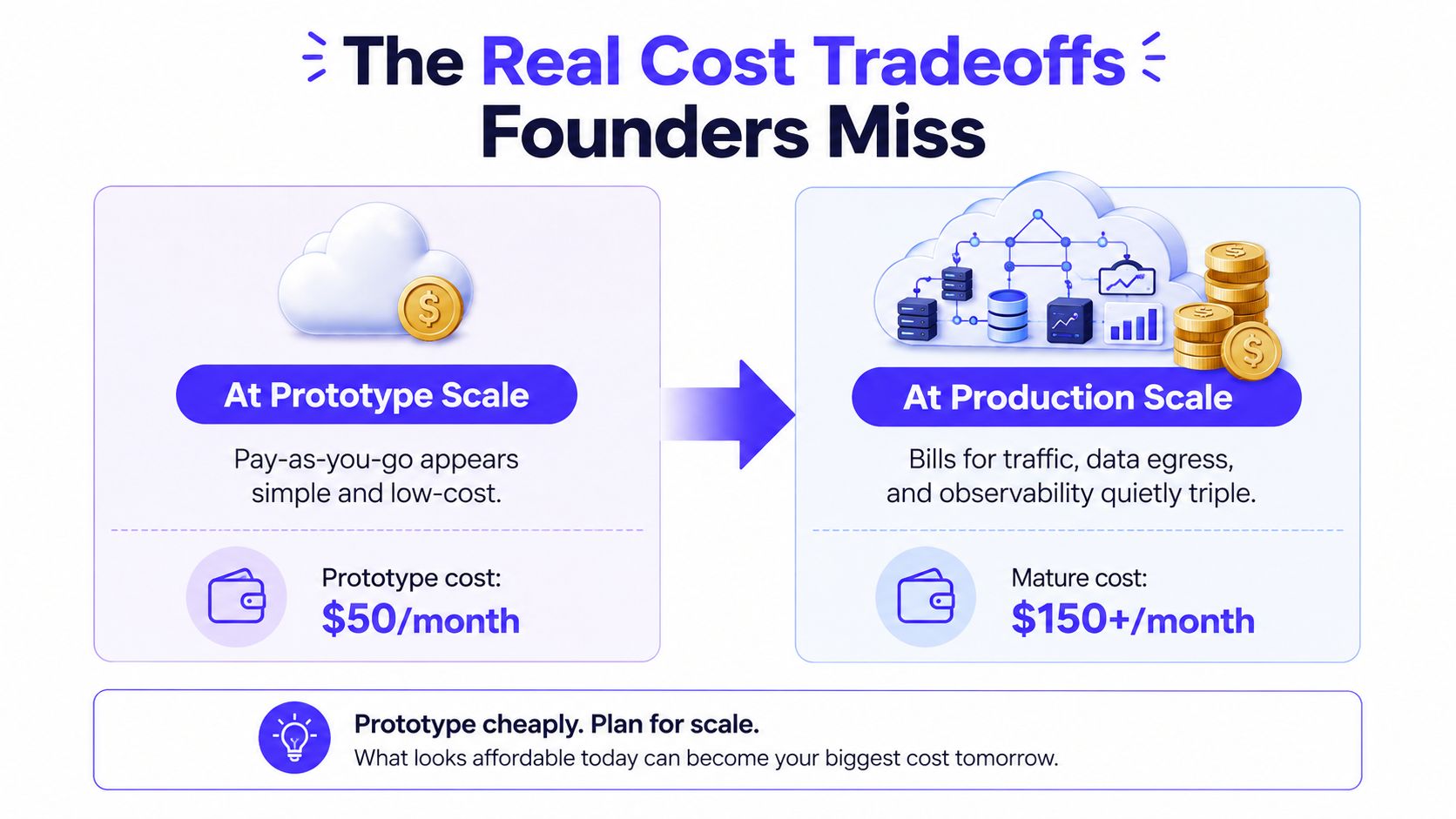
Cloud-native architecture is not automatically cheaper than a well-run virtual private server. Managed services reduce operational work, but each one adds a bill, a permission model, and another dependency. A small team can spend more maintaining platform glue than running a simpler design.
Model the runway, not just the invoice
Use an eighteen-month total cost of ownership view. Count infrastructure, observability, backups, support plans, security tooling, migration effort, and developer time spent maintaining deployment systems. A low monthly invoice becomes expensive when it forces a rewrite or demands constant manual intervention.
A rising bill can also signal genuine success. If usage, revenue, and customer value grow together, paying for managed capacity may be the right trade. Investigate increases that do not match product usage. Idle resources, duplicated data, noisy logs, and inefficient network paths often explain them.
For steady workloads, reserved capacity, committed-use discounts, and efficient instance families such as Graviton-class options can improve predictability. Make those commitments only after usage patterns are clear. Early products change shape too often for premature optimization.
Budget rule: Every new managed service needs an owner, a cost signal, and a reason it exists.
Apply the same discipline to observability. Keep enough logs and metrics to diagnose failures, then set retention policies and sample traces where appropriate. Review the bill beside product usage, not only in finance meetings. Cost control belongs in architecture reviews because cloud choices also shape developer workflow and the frontend experience. A cheaper stack that slows releases or leaves the interface unfinished is not a saving.
Shipping Workflows That Actually Work
A two-person team doesn't need a platform department. It does need a repeatable path from a code change to a monitored production release.
Start with trunk-based development and short-lived branches. Every pull request should trigger a CI job through GitHub Actions or GitLab CI that runs linting, type checks, unit tests, and a deployable container build. The point isn't ceremony. The point is catching a broken import, failed type check, or invalid build before it becomes an incident.
Make environments reproducible
Define infrastructure in Terraform or Pulumi. Store the configuration with the application, review changes in pull requests, and make preview, staging, and production environments reproducible. Avoid the classic founder trap where one person knows which console settings make production work.
Use staged promotion rather than direct deployment. A practical path looks like this:
Preview: Create an environment for each meaningful pull request so product and design reviewers can test the actual interface.
Staging: Run integration tests against representative services and data shapes before customer traffic sees the release.
Production: Promote the same build, use feature flags, and keep a rollback path that doesn't depend on someone remembering manual console steps.
A feature flag lets you deploy code without exposing an unfinished workflow. That matters for AI SaaS products where model responses, usage limits, and billing behavior may need separate validation.
Observe the product, not just the servers
Add structured logs, RED metrics, and distributed traces before your first serious customer. RED means request rate, errors, and duration. These signals tell you whether users can complete a workflow, while infrastructure dashboards alone may only show that a container is technically running.
Instrument the important paths: sign-in, payment creation, document upload, model invocation, transaction submission, and dashboard loading. Give each request a trace identifier so a slow frontend action can be connected to its API call, queue job, database query, and external vendor.
Your process should survive the loss of its most senior developer. Document deployment ownership, secrets access, rollback steps, alert destinations, and recovery procedures. For the product surface itself, a clear Figma to live website AI workflow can keep design decisions connected to implementation rather than leaving the frontend as a final handoff.
Where Design and Frontend Fit In
Cloud architecture and product UI aren't separate workstreams. The backend determines latency, data-fetching patterns, authentication handoffs, and what the browser can render on the first meaningful screen. The interface determines whether users understand a delay, trust a financial action, or abandon a workflow when one service responds slowly.
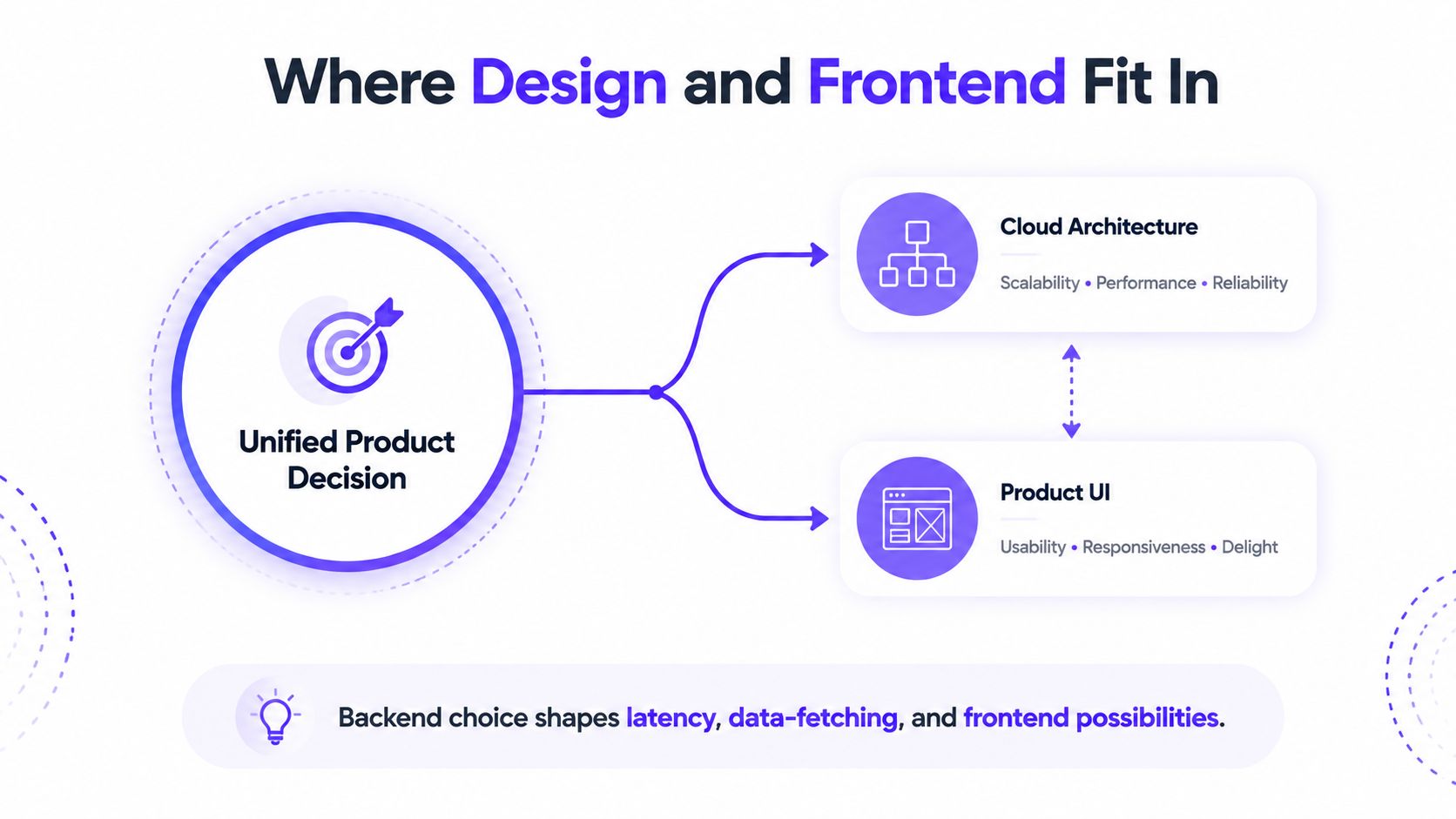
A serverless endpoint may need a loading state that explains what the product is doing instead of showing a blank panel. An AI SaaS interface can use optimistic UI for actions that don't require immediate confirmation, while clearly marking results as processing. A fintech product needs a deliberate pending state for payments or transfers, because pretending an operation is complete creates trust and support problems.
Design for distributed behavior
When data lives across microservices, the frontend needs a deliberate cache strategy. Decide which data can be stale, which actions require fresh confirmation, and what happens when one service succeeds while another fails. Don't make users reconstruct system state from a collection of inconsistent spinners.
Cloud-managed identity providers such as Cognito, Auth0, and Clerk can simplify authentication infrastructure, but the product still owns the handoff. Design expired sessions, multi-factor prompts, account recovery, permission changes, wallet connections, and organization switching as first-class states. These aren't edge cases for a serious SaaS, Web3, or fintech product.
The same principle applies to visual quality. A technically sound application can still look unfinished if typography, hierarchy, empty states, error handling, responsive behavior, and brand expression receive attention only after the infrastructure is complete. For a practical inventory of the interface surface, use this guide to the parts of a website.
Product rule: Every backend decision creates a frontend state. Design that state before customers discover it.
Outsourcing design and frontend can be a scaling lever for a small founding team. Founders often have the deepest knowledge of the differentiated cloud logic, but not enough time or design depth to turn that logic into a credible product surface. 925 studios combines product design, brand identity, website design and development, and design systems for AI SaaS, Web3, and fintech teams. One creative partner can cover the product designer, brand designer, and frontend developer responsibilities without forcing the founders to build an in-house team before the product earns it.
Migration Checklist and Final Take
A cloud migration should produce a clearer operating model, not just a new hosting bill. Use the checklist below during the same week you decide to move an existing product or harden a new one.
Discovery
Map workloads: List the web app, APIs, workers, scheduled jobs, databases, files, and third-party services.
Trace dependencies: Record which service calls which system, including payment, identity, AI, wallet, and analytics providers.
Check data location: Identify residency, retention, backup, and deletion requirements before choosing regions.
Find the bottleneck: Use evidence from errors, slow requests, failed jobs, or deployment pain to define the migration target.
Architecture choice
Choose one pattern per service: Use serverless for event-driven work, containers for long-running workloads, microservices only where boundaries are clear, and edge compute for suitable perimeter logic.
Write the reason down: Tie each choice to latency, workload shape, compliance, portability, or team capacity.
Keep the core simple: Prefer a modular application over a distributed system when a small team owns the whole product.
Plan failure states: Decide what the user sees when a dependency is slow, unavailable, or returns incomplete data.
Security baseline
Set up identity: Use a defined identity provider, least-privilege roles, and separate access for people, services, and deployment systems.
Protect secrets: Store credentials in a managed secrets system instead of source files or shared documents.
Encrypt data: Cover data in transit and at rest, then document who controls the keys.
Retain useful logs: Keep audit and application logs long enough to investigate incidents and answer customer questions.
Review vendors: Include payment, custody, analytics, AI, and identity providers in the security assessment.
Shipping readiness
Automate checks: Run linting, type checks, tests, and builds on every pull request.
Reproduce environments: Use Terraform or Pulumi so configuration doesn't live only in one person's memory.
Add visibility: Track errors, request duration, important workflows, and customer-facing failures.
Prepare rollback: Define how to reverse a release and who can do it.
Test the interface: Validate loading, empty, error, permission, responsive, and recovery states before launch.
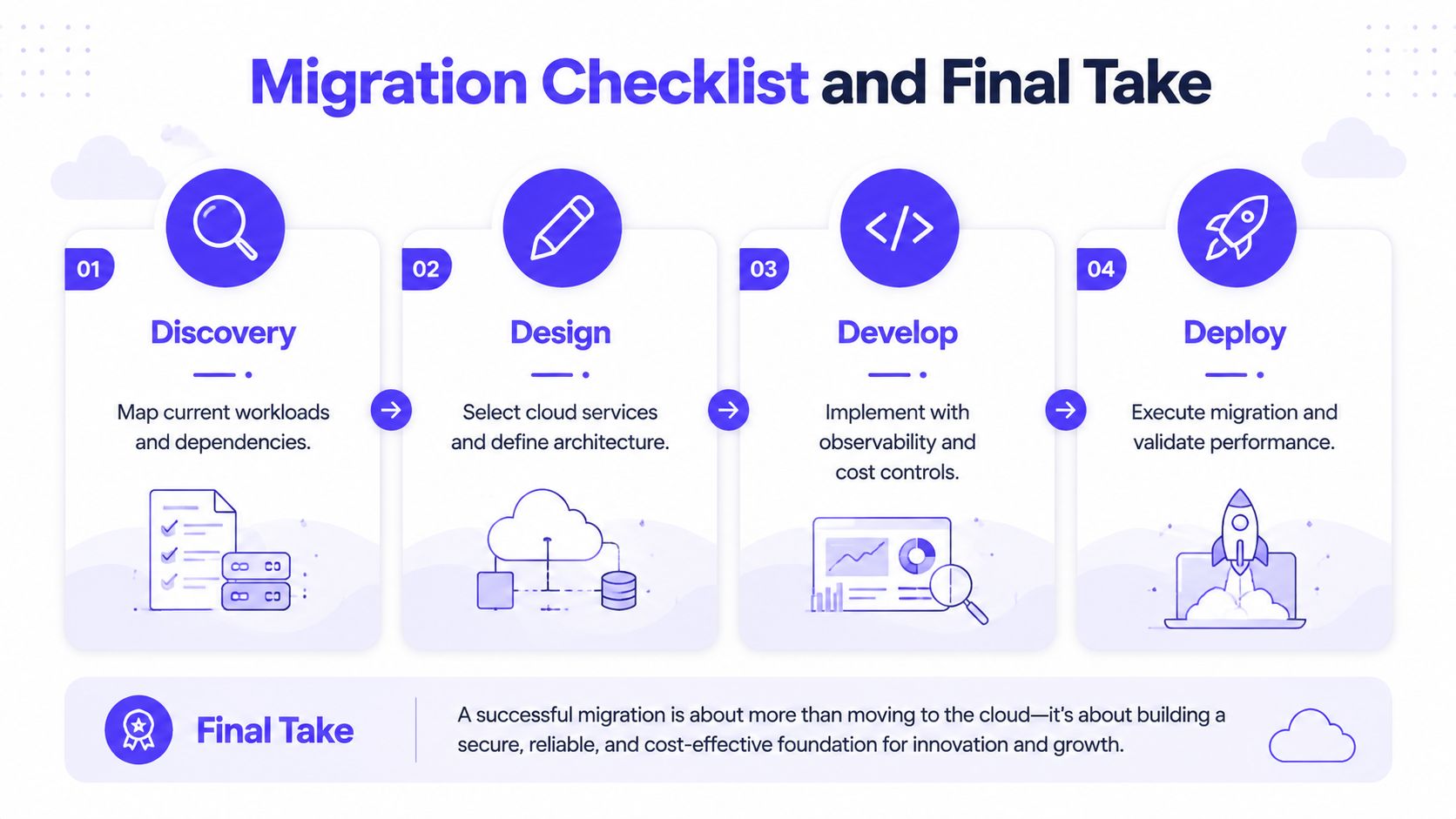
Cloud-based app development pays off when architecture, security, cost discipline, workflow, and frontend quality are decided together. Founders who connect those decisions build products that feel more reliable, communicate more clearly, and hold up better when real demand arrives.
925 studios gives AI SaaS, Web3, and fintech teams one creative partner for product design, brand identity, design systems, website development, and frontend execution. If your cloud product works technically but the interface, story, or shipped experience is holding it back, visit 925 studios to discuss the product surface you need to bring to market.


Let’s keep in touch.
Discover more about high-performance web design. Follow us on Twitter and Instagram.

