
Notification System Design for SaaS and Fintech Products

Yusuf
Founder and lead designer at 925studios

Most advice about notification system design starts with channels. Should this event use push, email, SMS, or an in-app message? That question matters, but it comes after a harder one: has the product earned permission to interrupt someone at all?
A notification system is a trust system before it's a delivery system. If users grant access reluctantly, receive irrelevant alerts, and lose control over frequency, better routing won't save retention. That's especially important for AI SaaS, Web3, and fintech products, where notifications can involve money, security, automation, and decisions users can't afford to miss.
Table of Contents
Why Most Notification Systems Fail Before They Start
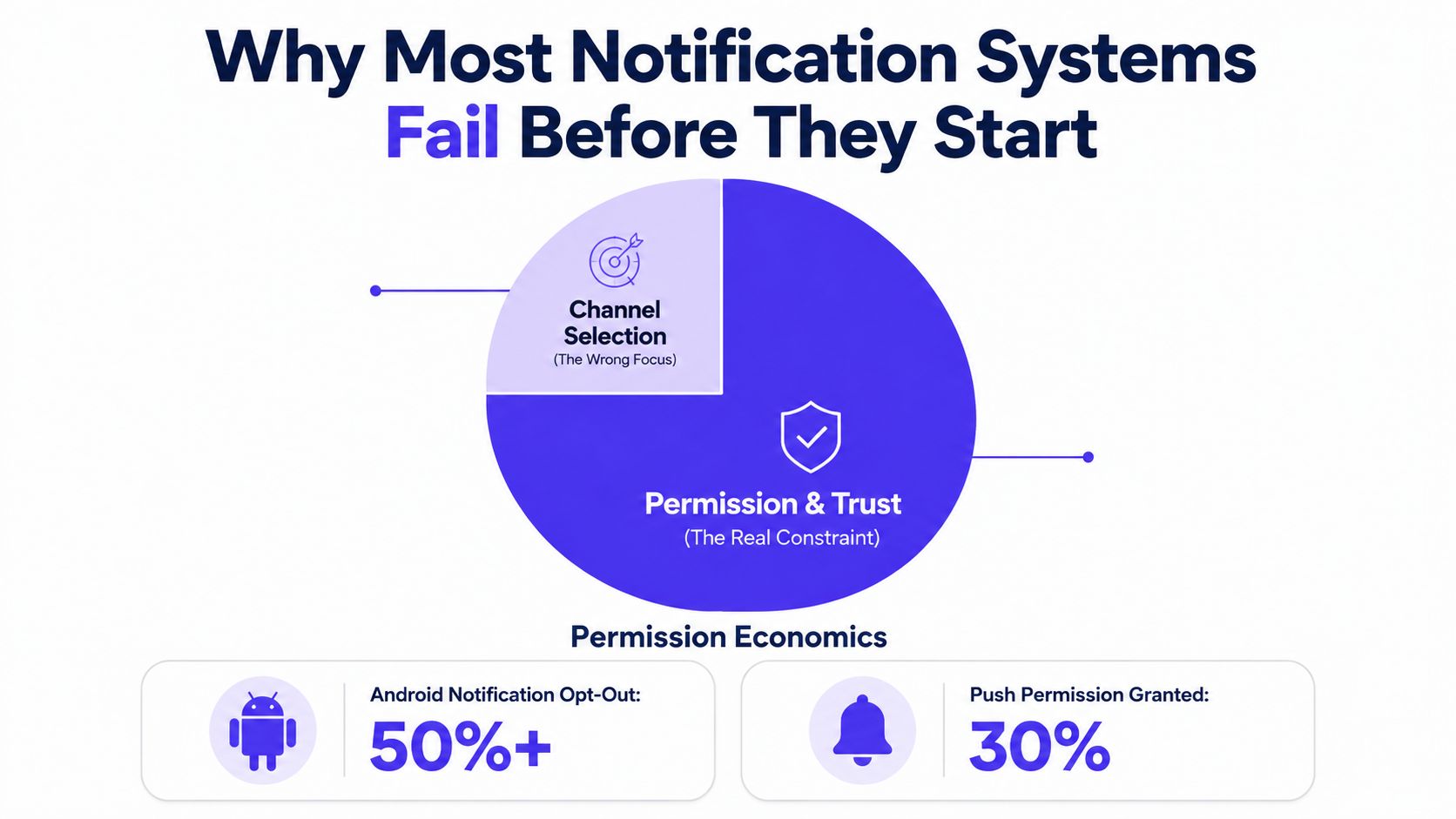
Teams often begin with infrastructure diagrams. They compare providers, configure queues, and debate whether push or email should be the default. Meanwhile, the permission prompt appears before the user understands the product, and the first messages teach them that every alert deserves the same level of attention.
That sequence creates a predictable problem. Permission is a scarce product resource, not a checkbox in onboarding. Recent benchmark data reports that Android opt-in rates fell from 85% to 67% after Android 13 brought consent behavior closer to iOS, while iOS remains around 56% to 58% and overall opt-in averages sit near 61% (Batch's mobile notification benchmark). The exact result varies by product and measurement method, but the design lesson is consistent: users are increasingly selective about which products can reach them.
Permission has to follow value
A fintech app asking for push access before showing account activity has given the user no clear reason to agree. An AI SaaS product asking for every workspace alert before a user has joined a project creates the same friction. The permission request should follow a meaningful moment, such as enabling a security alert, assigning a task, or choosing to monitor an automated workflow.
The interface should also explain the exchange in plain language. “Get notified when your transfer changes status” is useful. “Enable notifications for a better experience” says almost nothing.
The historical HCI research behind notification systems treats awareness and disruption as competing goals, not as separate concerns. Notification system design became a formal HCI topic in the early 2000s, as researchers studied how to deliver information across multiple platforms and modes while minimizing interruption (the Georgia Tech HCI paper on notification systems). Apple's introduction of push notifications with iOS 3.0 in June 2009 helped turn the pattern into a mainstream mobile and web product behavior, but scale made the original design tension more visible, not less.
Practical rule: Ask for permission at the moment the user understands the benefit, then make the setting easy to change.
Users disable notifications for several reasons: too much volume, poor timing, unclear value, and alerts that repeat information already visible in the product. A well-designed onboarding flow should therefore explain notification categories, offer sensible defaults, and link directly to preferences. Your SaaS onboarding best practices should treat notification consent as part of activation, not as a platform permission task.
For teams designing real-time notification for marketers, the same principle applies to campaigns. Real-time delivery only helps when the message is relevant enough to justify the interruption. Otherwise, every successful delivery moves the user closer to muting the entire product.
The Core Components of Effective Notification Systems
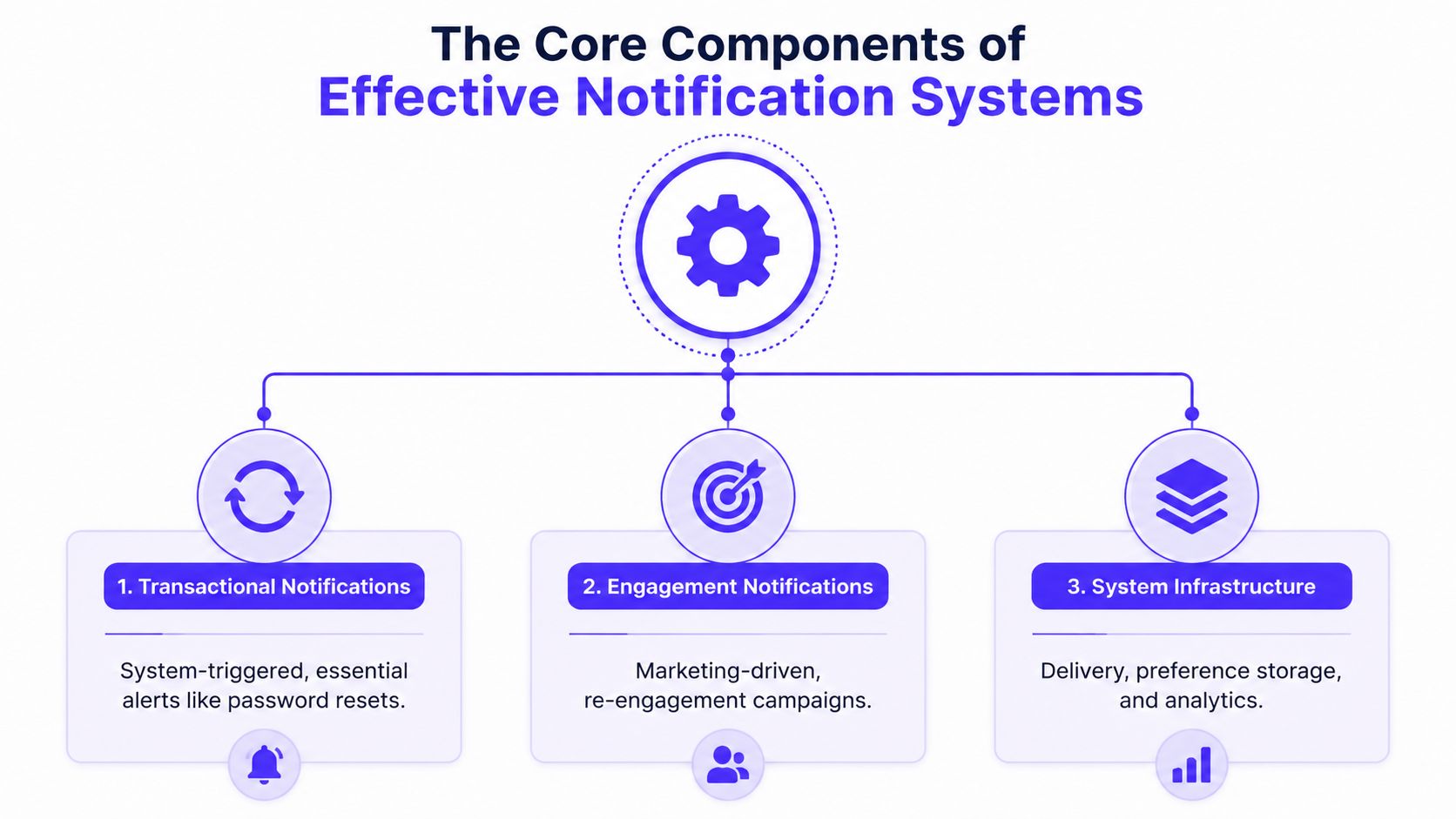
A dependable notification system has three distinct layers. Transactional notifications protect or inform the user, engagement notifications encourage useful product activity, and system infrastructure decides how preferences, delivery, and history work together.
Transactional notifications deserve different treatment
A password reset, login warning, payment confirmation, failed transfer, or one-time code carries a clear user expectation. These messages should have precise copy, a direct action, and a reliable fallback. They shouldn't share the same frequency rules as a product announcement or weekly digest.
Stripe's payment experience is a useful reference point because the message follows a concrete event and helps the user verify what happened. A fintech product should distinguish “your withdrawal failed” from “new budgeting insights are available.” Both may be important, but they don't deserve the same interruption level.
Engagement notifications need restraint
Engagement messages include comments, mentions, task assignments, reminders, recommendations, and reactivation campaigns. Products such as Linear make this manageable by exposing categories and allowing users to control how much activity reaches them. Notion uses a similar principle by keeping the full context in the workspace while using notifications to point users toward a specific page, comment, or assignment.
Progressive disclosure works better than putting every detail into the alert. The notification should answer three questions quickly: what happened, why should I care, and what can I do next? The destination should contain the deeper explanation.
Infrastructure is part of the user experience
Preference storage needs to support more than a global on or off switch. Users may want security alerts immediately, project updates in-app, account summaries by email, and marketing messages disabled. Store preferences by category and channel, along with quiet hours where appropriate.
An in-app notification center serves a different purpose from push. Push interrupts outside the product. The in-app center provides a durable history, read state, filtering, and context after the user returns. For a SaaS dashboard, it can hold lower-priority updates without forcing them into a mobile lock screen.
Component | Design responsibility | Example |
|---|---|---|
Transactional | Confirm, protect, or unblock an action | Transfer status or password reset |
Engagement | Encourage relevant activity | Assignment, mention, or reminder |
Infrastructure | Route, store, measure, and control delivery | Preferences, inbox, retries, and analytics |
Good notification system design separates these layers in both the interface and the backend. If marketing logic can accidentally override a security preference, the architecture is already too loose.
Choosing the Right Channels for Different Message Types
A channel should match the user's expected urgency, the amount of information required, and the cost of being late. Push is visible and concise, email supports detail and history, SMS reaches users directly for high-priority events, and in-app messaging preserves context inside the product.
The following targets come from an industry architecture benchmark. They're useful service-level goals, not guarantees from every provider.
Channel | Best For | P95 Target | Conversion Rate |
|---|---|---|---|
Push | Time-sensitive updates, security events, task activity | Under 5 seconds | Varies by platform and context |
Detailed summaries, receipts, account history | Under 30 seconds | Varies by campaign and context | |
SMS | OTPs, urgent account or payment events | Under 10 seconds | Varies by use case |
In-app | Durable context, lower-urgency updates, notification history | Product-dependent | Varies by product |
These targets are documented in MagicBell's notification system design reference. A product team should use them to define routing expectations, then test actual behavior by provider, region, device state, and message class.
Route by urgency, not convenience
A login challenge may use SMS or an authenticator flow, with email as a recovery path. An order confirmation might use push for immediate awareness and email for a durable receipt. A comment on a shared document can appear in-app first, then reach push only when the user has opted into that category.
SMS is powerful for short, urgent events, but it's a poor default for broad product marketing. It has high perceived intrusiveness and limited room for context. Email is more tolerant of detail, but a crowded inbox can delay action. Push works well when the user has explicitly granted permission and the message is timely. In-app is the safest place for information that matters but doesn't justify interruption.
Founders choosing message categories can use this practical guide to how to pick announcement types, then map each category to a preferred channel and fallback. For regulated products, channel decisions also need clear explanations, auditability, and user control. The fintech UX design compliance and trust guide is a useful companion when the notification affects money, identity, or risk.
Channel-aware routing should happen after the system checks permission, category preference, quiet hours, urgency, and recent notification history. “Auto” shouldn't mean “send everywhere.” It should mean “make a controlled decision based on user context.”
Building Reliable Delivery That Actually Works
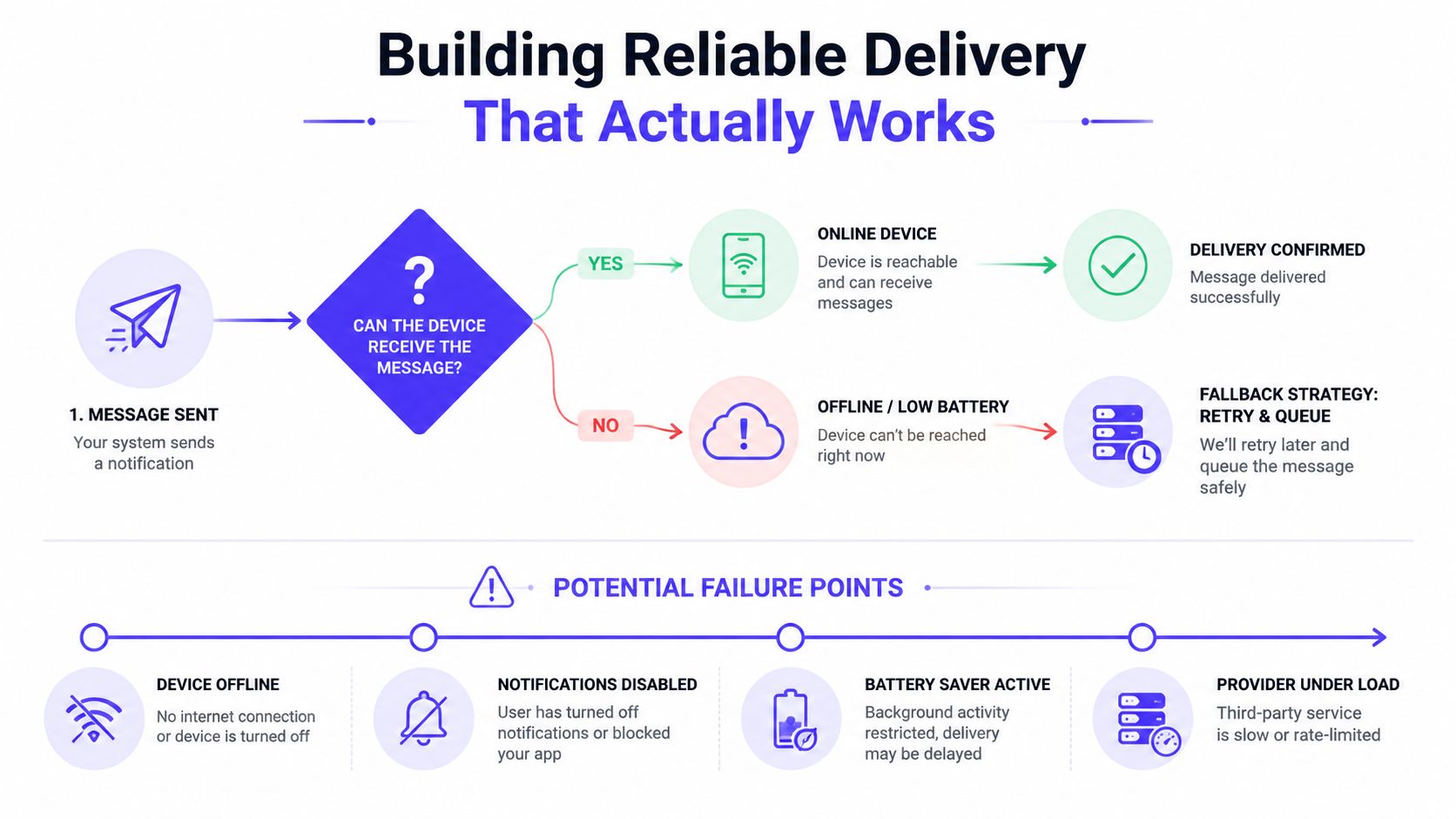
A successful API request doesn't mean the user saw the notification. APNs and FCM can drop messages when a device stays offline too long, notifications are disabled, battery saver is active, or a provider is under load. Production systems need to treat delivery as an uncertain process with recoverable failure states.
Protect the path from event to user
Start with an event record that has a stable identifier, a category, a recipient, a priority, a creation time, and a delivery status. Put delivery work behind a queue so a slow provider doesn't block the product service that created the event. The processor should check preferences and eligibility before handing the message to a channel adapter.
Use idempotency keys to prevent duplicate sends when a worker retries after an uncertain provider response. A payment event should not produce two user-facing confirmations because the first response timed out. Store provider responses and internal state transitions so support teams can explain what happened.
Push payloads also need deliberate controls:
TTL tuning: Let stale messages expire instead of arriving after the action is no longer relevant.
Collapse keys: Combine repeated updates, such as several changes to the same task, into one current alert.
Priority selection: Reserve high priority for events where delay creates real user harm.
Fallback channels: Move eligible events to email, SMS, or the in-app inbox when push cannot serve the need.
In-app history: Preserve the message in a durable feed so users can recover after an offline period.
Reliability rule: Retry transport failures, not user decisions. If someone muted a category, retries must not override that choice.
Retry logic should respect both provider behavior and attention limits. Use bounded retries, record the reason for failure, and route unresolved messages to an operational review path. Queue prioritization matters too. An OTP or transfer warning shouldn't wait behind a bulk campaign.
The delivery benchmark cited by MagicBell sets push P95 delivery under 5 seconds, email under 30 seconds, and SMS under 10 seconds (channel-specific notification delivery targets). Treat those as routing and monitoring goals. A system that reports only “sent” can't tell whether the user received anything.
A short visual walkthrough can help teams align product and engineering decisions:
Personalization and Throttling That Prevents Fatigue
Generic notifications compete with every other alert in a user's day. Context makes a message easier to recognize and more useful to act on. One benchmark reports that contextual campaigns reached an open rate of 16.3%, compared with 4.7% for generic campaigns (benchmark source on notification relevance and engagement). The gap supports a simple product decision: improve relevance before increasing volume.
Personalize the reason, not just the name
Adding a first name to a generic message isn't meaningful personalization. A useful alert reflects the user's relationship to the event. “Your model review is ready” is more informative than “New activity in your workspace.” “Your withdrawal needs approval” is stronger than “There's an update to your account.”
Use signals that the user has already provided or generated through normal product use:
Role: An administrator may need billing and security events, while a contributor needs assignments and mentions.
Object ownership: Notify people about projects, accounts, or workflows they follow.
Behavior: A user who repeatedly checks failed automations may benefit from a targeted diagnostic alert.
Preference: Let users choose categories, channels, summaries, and quiet periods.
State: Suppress reminders when the user has already completed the action.
Timing should follow the event and the user's context. A message about a failed deployment can be immediate for the owner, but a digest may suit someone who only reviews activity once a day.
Throttle before users reach for mute
Throttling isn't just a backend safeguard. It's a visible promise that the product won't turn every small event into an interruption. Group repeated events by object, suppress duplicates, and convert bursts into summaries where the individual items don't need separate action.
Keep exceptions narrow. Security alerts, account compromise warnings, and transaction failures may bypass normal promotional limits, but even these should avoid duplicate delivery and confusing retries.
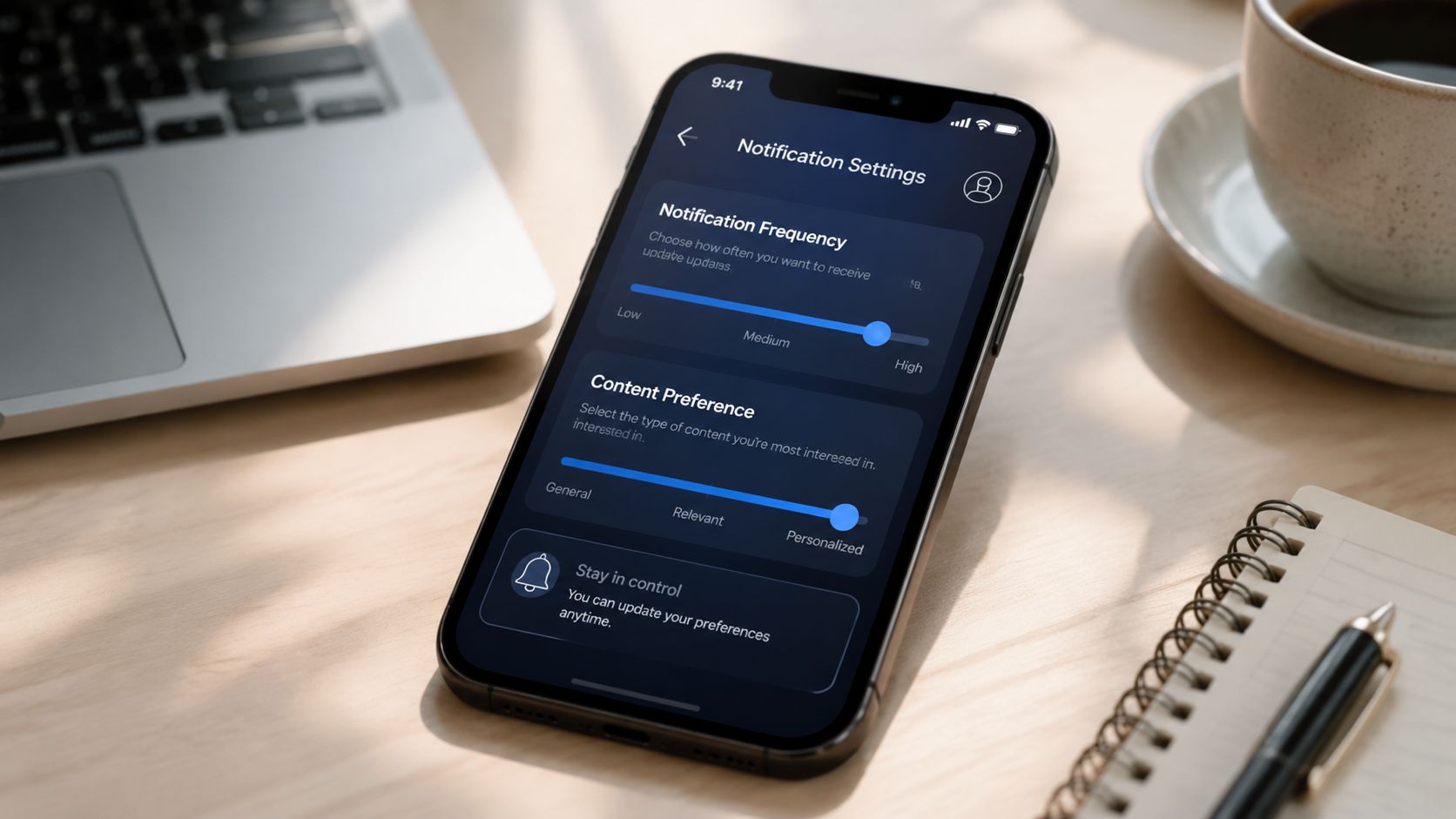
A useful preference screen shows the consequences of each choice. Instead of “Project updates,” use “New assignments, mentions, and status changes.” Let the user select push, email, in-app, or digest behavior per category. When people understand what they're controlling, permission becomes an ongoing relationship rather than a one-time grant.
Measuring What Matters in Notification Performance
Open rate is a starting point, not a product outcome. A user can open an alert, close the destination, and still receive no value. Notification analytics should connect the event to the action that justified sending it.
An industry compilation reports that 77% of people engaged with a push notification in the last month, 48% of consumers said they made a purchase because of one, and 28% of app users who click a push notification go on to buy (push notification engagement benchmarks). The same compilation reports an average conversion rate of 4.4% and app-engagement lifts of up to 88% for users who enable notifications. These figures vary by product, channel, audience, and definition, so they're directional benchmarks rather than promises.
Build a measurement chain
Track the full sequence:
Permission granted, denied, or later revoked.
Notification accepted by your system.
Provider handoff and delivery status.
Open or click.
Completion of the intended action.
Later retention, repeat use, or support contact.
This chain exposes weak messages that look successful at the surface. A campaign with strong opens but poor task completion may have good copy and a bad destination. A transactional alert with low clicks may still work if users only need confirmation.
Measure fatigue directly. Watch category-level opt-outs, global permission changes, mute actions, uninstall signals, complaint behavior, and repeated sends without meaningful action. A rising click rate alongside rising opt-outs can indicate that the system is extracting short-term response at the cost of long-term trust.
Test decisions, not decoration
A/B test the variables that change the user's decision: timing, category, channel, grouping, call to action, and permission framing. Keep the success event tied to product value, such as completing a transfer, resolving an assigned task, or returning to a workflow.
For broader conversion work, the same discipline applies in how to improve conversion rates. Don't optimize the notification in isolation. Optimize the path from event to useful action, and compare the result with the cost of lost permission.
Your Notification System Implementation Checklist
Start with the trust layer, then add delivery sophistication. A small product doesn't need every channel on day one, but it does need clear categories, durable history, and safe failure behavior.
Permission and preference controls
Name the value: Explain why each permission matters at the moment you request it.
Separate categories: Distinguish security, transactions, product activity, reminders, and marketing.
Offer control: Provide per-category channel choices, quiet hours, digest options, and a visible way to revoke access.
Audit consent: Record when a preference changed and apply the newest choice before every send.
Message and channel decisions
Define urgency: Mark each event as critical, actionable, informational, or promotional.
Choose a primary channel: Use push for timely awareness, email for detail, SMS for high-priority short messages, and in-app for durable context.
Set a fallback: Decide what happens when the primary channel is unavailable or disabled.
Write for action: Keep the alert focused on what happened and what the user can do next.
Design the destination: Deep-link to the relevant account, task, payment, or workspace state.
Reliability and safety
Queue delivery: Decouple event creation from provider calls.
Prevent duplicates: Use idempotency keys, stable event identifiers, collapse behavior, and recorded state transitions.
Handle stale events: Tune expiration and suppress alerts that no longer matter.
Prioritize carefully: Keep critical transactional events separate from campaign traffic.
Preserve history: Show eligible alerts in an in-app inbox even when push delivery fails.
Measurement and iteration
Track the chain: Measure permission, acceptance, handoff, delivery, open, action, and retention.
Watch fatigue: Review opt-outs, mutes, revocations, repeated sends, and negative feedback by category.
Review weekly patterns: Look for categories that create activity without meaningful outcomes.
Test one decision at a time: Compare timing, channel, grouping, and copy against a clear product action.
Assign ownership: Product, design, engineering, and marketing should share the notification taxonomy and rules.
Warning signs include a global mute option buried in settings, campaign alerts entering the same queue as security events, repeated messages for one object, and no record of why a notification was sent. For an AI SaaS or fintech startup, those failures quickly become product trust issues, not merely technical bugs.
925 Studios works with AI SaaS, Web3, and fintech teams on product design, brand identity, frontend development, and design systems, including the interface decisions that make complex notification behavior understandable. If your product needs a clearer notification experience and a shipped system around it, visit 925 studios to discuss the product, brand, and build work with one creative partner.


Let’s keep in touch.
Discover more about high-performance web design. Follow us on Twitter and Instagram.

