
Claude Code vs Cursor for Designers: Which Ships Better UI?

Yusuf
Founder and lead designer at 925studios

The worst advice on Claude Code vs Cursor for designers is that they're interchangeable. They're not, and if you pick the wrong one, your team ends up reviewing code in the wrong place, approving too many changes blindly, or turning a design task into a terminal chore nobody wants to own.
For founders, this isn't a tool popularity contest. It's a workflow decision about how your team turns a Figma frame into shipped UI, how many edits you want to inspect by eye, and whether you need an agent that can carry a multi-file task without constant supervision. If your product lives or dies on interface quality, that difference matters.
Decision point | Claude Code | Cursor |
|---|---|---|
Best fit | Large, multi-file implementation work | In-editor review and line-by-line correction |
Workflow style | Agent-first, delegated tasks | IDE-first, visible editing |
Designer advantage | Strong for bigger UI builds and redesigns | Strong for careful inspection and fine-tuning |
Review style | Review after the agent works | Review while you steer |
Team feel | Better when someone can delegate and trust the run | Better when the team wants to watch every change |
Table of Contents
Why Most AI Tool Comparisons Fail Designers
Most comparisons start with developer features and end with a false conclusion. They talk about autocomplete, terminal support, language coverage, and model access, then act surprised when a designer still doesn't know which tool helps ship cleaner UI. That's the wrong frame for a founder who cares about product quality.
What designers need is visual iteration, review, and handoff. A tool can be powerful and still be awkward for interface work if it hides changes behind a terminal or makes review feel detached from the screen you're designing. That's why the interaction model matters more than the marketing checklist.
Practical rule: if the team needs to inspect every change before it lands, the tool should make that easy. If the team needs to hand off a bigger task and come back to a finished branch, the tool should behave like an agent.
Cursor and Claude Code optimize for different ways of working. Cursor is built around visible editor workflows and diffs, while Claude Code is built around delegated terminal tasks and autonomous execution, which is exactly why they feel different when you're shipping product UI rather than chasing a backend refactor. That difference is easy to miss if you only read generic AI coding comparisons.
The designer-specific question is not which tool is “better.” It's which one fits the way your team wants to review design changes, protect brand consistency, and move from concept to shipped interface without creating extra handoff debt. For a broader view of why product work goes sideways when UX thinking is missing, I'd also point founders to this piece on why AI products fail without UX research.
How Each Tool Actually Works for Design Teams

Claude Code and Cursor both turn a plain-English request into code, but the day-to-day experience is different. Claude Code is a terminal-native agent, so you tell it what you want, it reads the repo, edits files, runs commands, and keeps going. Cursor is a VS Code fork with inline AI, so you stay inside the editor, inspect changes visually, and correct things line by line.
What that means in practice
If you're updating a button style across a design system, Cursor feels familiar. You can open the component, inspect the diff, and approve the change with your own eyes. That's useful when the work is surgical and you want to preserve spacing, naming, or interaction details that a model might miss.
If you're redesigning a pricing page or changing a shared layout across several files, Claude Code has the cleaner flow. You hand off the task, let it touch the files it needs, and review the result after it has completed the full pass. That fits the way interface work often happens when the design is already decided and the code just needs to catch up.
For teams that live in React Native, there's also a useful external perspective in this guide to boost React Native productivity, especially if your interface work spans mobile and web. And if your workflow leans hard on Figma handoff, this Figma MCP playbook for Claude Code shows how the agent-oriented side of the workflow behaves in a real product setting.
The daily workflow feels different
With Cursor, a designer or design-minded founder usually stays close to the code. You open the file, ask for an edit, inspect the inline diff, and nudge the result until it matches the screen in your head. That's great when you're polishing a homepage hero or a dashboard card and want tight feedback loops.
With Claude Code, you're more likely to describe a larger outcome and let the tool do the heavy lifting. It can read, edit, run tests, and iterate autonomously, which is why it suits bigger product-redesign tasks and multi-file changes better than a tool that expects constant human steering. If you'd rather review a complete branch than babysit every file, Claude Code is the stronger fit.
For a designer, the difference is control. Cursor keeps control visible in the editor. Claude Code gives up more control up front, then returns a more complete pass. That's the split founders should think about when they evaluate Claude Code vs Cursor for designers.
Performance and Accuracy in Multi-File UI Work
A design system, component library, or multi-page product flow exposes the gap between these tools. Interface work is not judged by how clever a single edit looks, but by whether the result stays consistent across files, variants, and shared patterns. Independent 2026 benchmark reporting found Claude Code reached 78% first-pass accuracy across 100 tasks, versus 73% for Cursor, and in Rust it posted 72% versus Cursor's 58%, a 14-point gap that matters when your UI work spans multiple files and shared architecture decisions. That reporting comes from SitePoint's 2026 benchmark coverage.
Why token efficiency matters to design teams
Token efficiency is not just an engineer concern. Teams shipping repeated interface iterations pay for every loop, every regeneration, and every refactor pass. Widely cited independent testing reported that Claude Code completed the same benchmark task using about 33,000 tokens while Cursor used about 188,000 tokens, roughly 5.5x fewer tokens for Claude Code. The same reporting estimated 8.5 accuracy points per dollar for Claude Code on complex tasks versus 6.2 for Cursor, which matters when a product team keeps making the same UI changes at scale. See the independent write-up from Tech Insider.
For design systems work, that gap shows up in very plain ways. Updating one color token across fifty components is not glamorous, but it is exactly where a tool either keeps the system aligned or starts drifting. If you are working through design system components, Claude Code's repository-scale reasoning gives it the edge when the task crosses files, styles, and component contracts.
Metric | Claude Code | Cursor | Impact for Designers |
|---|---|---|---|
First-pass accuracy | 78% across 100 tasks | 73% across 100 tasks | Fewer cleanup passes on bigger UI changes |
Rust benchmark result | 72% | 58% | Better fit for multi-file logic and frontend architecture changes |
Token use on same benchmark task | About 33,000 tokens | About 188,000 tokens | Lower iteration cost for repeated UI work |
Accuracy points per dollar | 8.5 | 6.2 | Better value when teams refactor often |
Claude Code also benefits from large-context reasoning, with independent comparisons reporting 200K+ context and up to 1M tokens in some tiers, while Cursor is typically around 128K to 200K effective context. A technical overview from DevTools Academy frames that as a real advantage for repository-scale work, not just a spec-sheet number.
For component work, that means fewer missed references, fewer broken variants, and less time spent fixing a partial pass. If your team's biggest pain is keeping a system consistent across many files, I would put Claude Code first and Cursor second. If your biggest pain is line-by-line correction, Cursor still has a place, which is why designers should judge these tools by workflow stage instead of picking a favorite and hoping it covers everything.
Real Designer Workflows and Use Cases
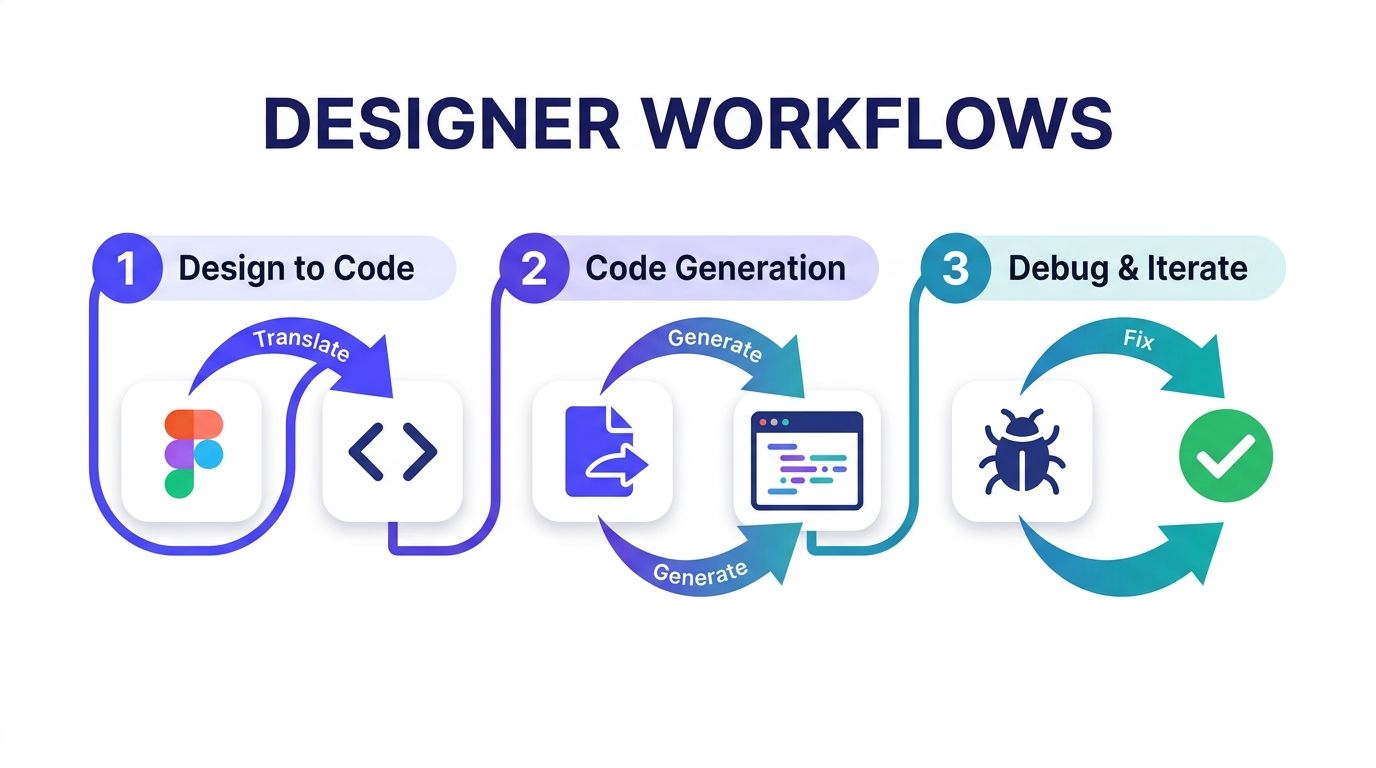
A founder rarely needs an abstract tool opinion. They need to know what happens on Tuesday afternoon when the team is trying to ship a screen, fix a bug, or polish a landing page before launch.
Figma to production UI
For Figma handoff, Claude Code works well when the goal is to translate a finished design into a working branch with multiple files touched at once. You can describe the layout, naming rules, and component behavior, then let it generate the implementation before you review the output. Cursor is better if the design is already close and you want to watch the code evolve in the editor while you fine-tune spacing, states, and responsive behavior.
Design system updates
When a designer is changing a shared button, card, or input pattern, Cursor's visual diffs are reassuring. You can inspect one component at a time, catch a style mismatch, and reject a bad edit before it spreads. For larger design-system shifts, Claude Code is the one I'd trust to carry the broader change across the repository.
Marketing pages and interactive prototypes
If the task is a marketing landing page with a clear visual target, Cursor is good for quick inspection and correction. If the task involves several sections, analytics hooks, and responsive breakpoints, Claude Code tends to finish the job more cleanly because it doesn't need you to steer every file. That makes a difference for founders shipping campaign pages under pressure.
A designer doesn't need to “use AI better.” They need the tool to match the size of the UI decision.
The handoff question founders should ask
The question is how the change gets reviewed. A visual workflow helps when brand and interaction details are fragile. An autonomous workflow helps when the task is larger than a single screen and you'd rather review the finished result than manage every step. If your team wants a broader system for turning mockups into production output, 925 Studios does that as one creative partner covering product design, brand design, and frontend development.
Prompt Examples and Implementation Patterns
Good prompts for designers are specific about structure, not just outcome. If you say “make this nicer,” you'll get generic output. If you describe the component, the states, the constraints, and the expected review style, you get something closer to production.
Start with the code shape
For a React component, ask for the component name, file scope, and the design tokens it should respect. A useful prompt sounds like this, “Update the PricingCard component to match the new Figma frame, preserve existing props, use the current spacing and type tokens, and return only the files that change.” That wording tells Claude Code to work across the repo and gives Cursor enough structure to keep the change visible.
For a design-token update, the prompt should name the system and the blast radius. Say, “Change the accent color token across the design system, update related hover and focus states, and list every component file that needs review.” That helps both tools, but Claude Code handles the broader propagation more confidently.
Use different prompts for different jobs
Component generation: Ask for a single component, the exact props it should accept, and the visual constraints from the design file.
Responsive layout: Tell the tool which breakpoints matter, which sections can stack, and what must never collapse.
Animation patterns: Name the trigger, duration intent, and fallback behavior, then ask for the implementation to stay inside existing motion rules.
Multi-file refactors: Specify the files or folders involved and ask for a clean pass instead of a patchwork edit.
Cursor shines when you want to inspect these requests as you go, especially if the change is tiny and visual. Claude Code is better when the prompt describes a bigger implementation pattern and you want it to run with the task. If you're using both, that's not indecision, it's just good workflow design.
Prompt like a reviewer, not a spectator
The best prompts sound like a senior designer talking to a senior engineer. They mention what should stay stable, what should change, and what needs review after the edit lands. That reduces back-and-forth and keeps the output closer to shipped UI instead of a rough prototype.
Cost, Security, and Team Structure Considerations
Tool choice gets expensive when founders think only in sticker price. Cost includes the number of times your team loops on a UI change, how much context the tool burns, and whether the team can trust it with unreleased product work. If you're budgeting properly, budgeting for AI development tools should sit next to design and engineering spend, not in some separate “AI experiments” bucket.
Pricing is only half the story
Claude Code and Cursor both start at $20/month for individual use, but the way they consume value is different. In the research brief, Cursor's team tier appears as a more visible editor-centered product, while Claude Code's value shows up when the task is larger and more autonomous. For founders, that means the cheaper seat isn't automatically the cheaper workflow if it takes two extra review cycles to get the same screen right.
Security also matters if you're working on proprietary interfaces, unreleased fintech flows, or sensitive Web3 product logic. The comparison material frames Cursor as offering visible editor workflows and governance features, while Claude Code is more agentic and terminal-driven. The choice becomes simple, Cursor is easier to supervise in the editor, Claude Code is easier to delegate to when you're comfortable with the AI doing more of the work.
Match the tool to the team shape
A solo designer wearing multiple hats usually benefits from Claude Code first, because it can take a larger task and reduce context switching. A design-engineering pair may prefer Cursor when they want tight review loops and explicit control over each file. A larger team with repeated UI work and a shared system should bias toward whatever makes the handoff from design review to code approval least painful.
Rule of thumb: if the team talks about “seeing every diff,” Cursor fits. If the team talks about “getting the whole branch done,” Claude Code fits.
Where 925 Studios fits
925 Studios is one option for teams that want one partner handling product design, brand design, and frontend delivery together, which is useful when the bottleneck isn't writing code, it's turning a product decision into polished UI without hiring three separate roles. That framing matters more than tool preference when the startup is still proving the product.
Clear Recommendations for Different Startup Contexts
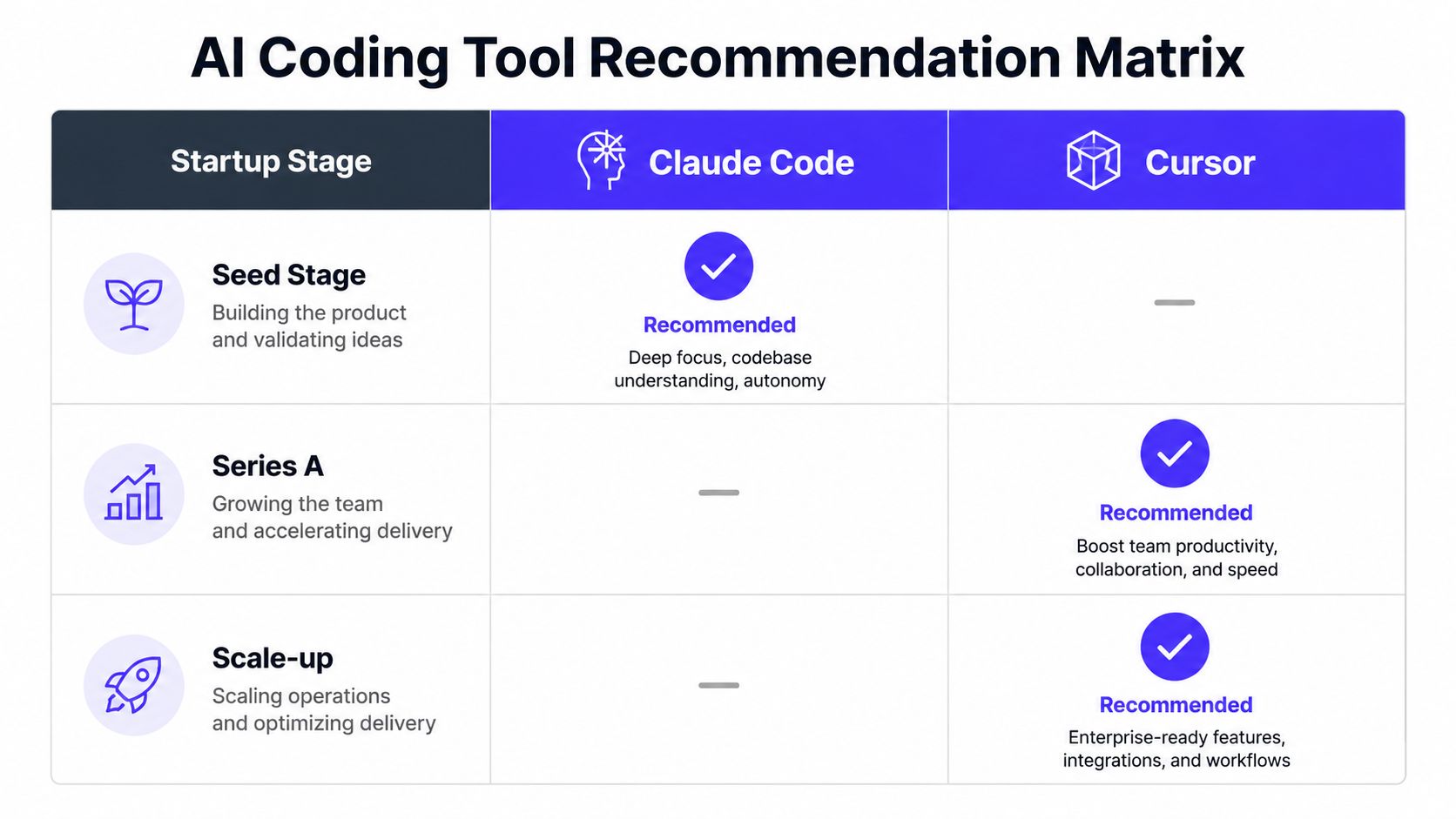
Seed-stage teams should start with Claude Code if the goal is to ship UI work with less supervision. That is the better default for founders who need screens finished, reviewed, and handed off without asking the team to adopt a new editor habit first. If a designer already works inside VS Code and wants to inspect each change line by line, Cursor can fit that workflow better, but I would not make that the starting point for a small team.
For a Series A team with a design-engineering pair, Cursor makes sense when review speed matters more than autonomy. It keeps product, design, and engineering aligned because every change stays visible in the editor before it lands. That matters when the interface is still changing quickly and founders want fewer surprises in the handoff. If the same team starts pushing heavier cross-file work, use Claude Code for those larger passes and keep Cursor for the review step.
At scale-up stage, I would move the default to Claude Code for multi-file implementation and keep Cursor for targeted refinement. That split keeps design systems cleaner and cuts down the time spent on repetitive cleanup after the main build. It fits teams that care about polished shipped UI and consistent handoff quality, not just faster typing in the editor.
My blunt recommendation is simple. Use Claude Code if you want the tool that handles bigger UI implementation with less supervision. Use Cursor if you want the tool that keeps review visible and hands-on. If you are a founder trying to turn product direction into polished interfaces without building a large in-house team, 925 Studios can handle the product design, brand, and frontend side of that workflow in one place, so the handoff stays focused on shipping instead of juggling roles.
If you want a practical setup for your own product, 925 Studios can help you decide where Claude Code belongs, where Cursor still earns its keep, and how the design-to-code handoff should work in your stack. If you want one creative partner to turn that workflow into shipped UI, brand, and frontend output, start the conversation with 925 Studios.


Let’s keep in touch.
Discover more about high-performance web design. Follow us on Twitter and Instagram.

