How to Use Figma MCP with Claude Code: The Complete Playbook (2026)

925studios
Creative agency for AI & Web3
How to Use Figma MCP with Claude Code: The Complete Playbook (2026)
Reviewed by Yusuf, Lead Designer at 925Studios
Translating a Figma mockup into production-ready frontend code used to eat 40% of a sprint. With the Figma MCP server and Claude Code working together, that same translation now takes minutes, not days. The Figma MCP server exposes your design files, components, tokens, and layout rules as structured data that Claude Code reads natively through the Model Context Protocol. The result: code that actually matches the design on the first pass, instead of the usual three rounds of pixel-pushing.
TL;DR:
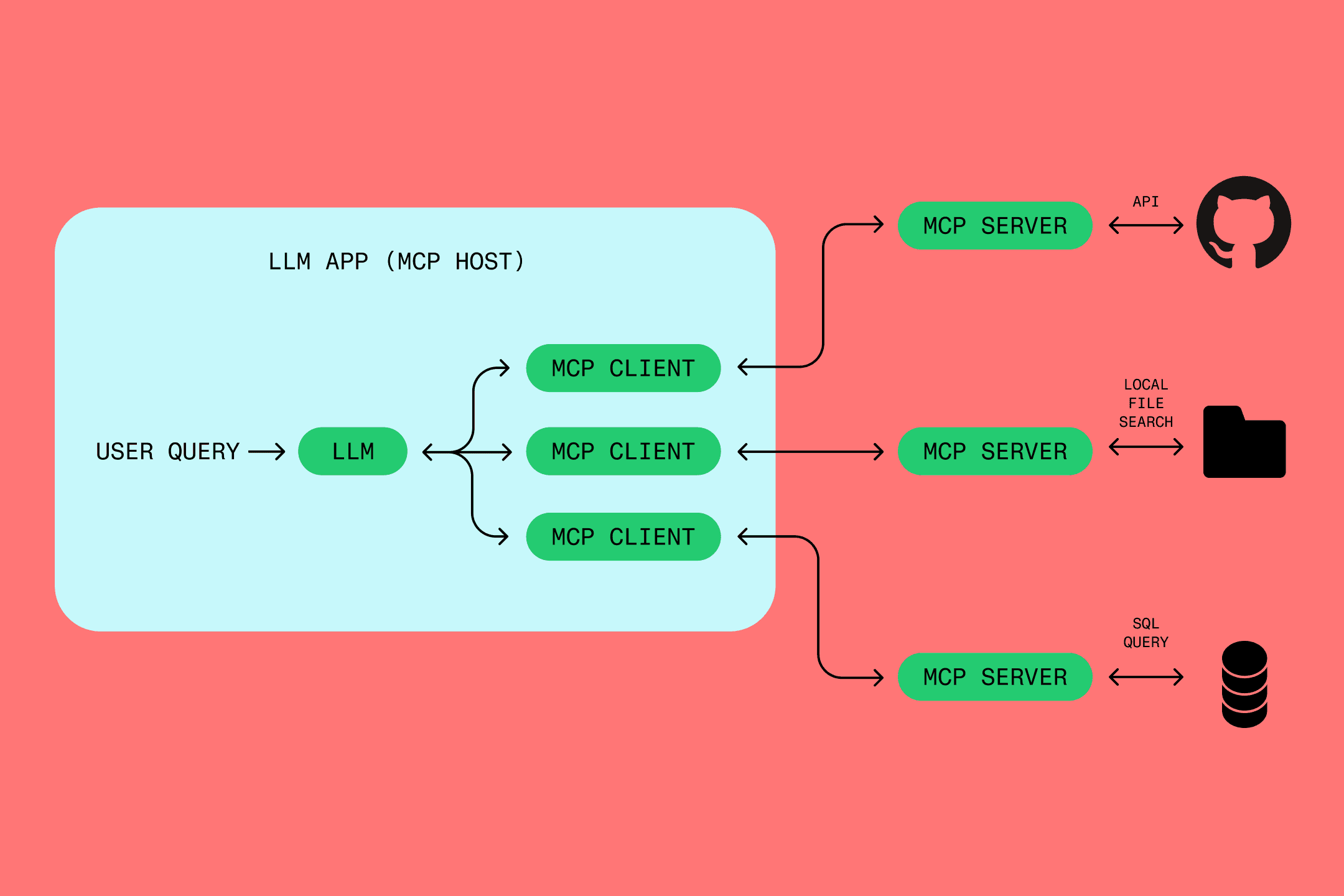
The Figma MCP server connects your design files directly to Claude Code, passing structured layout data instead of screenshots
Setup takes under 5 minutes with either the remote server (mcp.figma.com) or the local desktop server
The workflow is bidirectional: design-to-code AND code-to-canvas (shipping working UI back into Figma)
Real teams report 60-70% reductions in frontend build time using this pipeline
Limitations exist: complex animations, deeply nested component overrides, and pixel-perfect responsive layouts still need human refinement
Quick Answer: The Figma MCP server lets Claude Code read your Figma designs as structured data, including layers, components, variables, and Auto Layout rules. You connect it in under 5 minutes via the remote server at mcp.figma.com/mcp or the local desktop app. Claude Code then generates production code from selected frames, and you can push working UI back to Figma as editable layers using code-to-canvas. It works with VS Code, Cursor, Windsurf, and Claude Code terminal.
What was the old way of turning Figma designs into code?
Before MCP, the design-to-code handoff looked like this: a designer finishes a screen in Figma, marks it "ready for dev," and then a developer opens the file, squints at the inspect panel, and manually recreates every element in code. Spacing values get misread. Color tokens get hardcoded. Component variants get lost. The developer builds something that looks "close enough," the designer opens a PR and flags 15 discrepancies, and the cycle repeats.
The Figma MCP server with Claude Code eliminates the manual translation layer entirely. Instead of a developer interpreting visual output, Claude Code reads the actual design data, the same hierarchy, constraints, and tokens the designer authored. 925Studios started testing this workflow in early 2026 across client projects, and the difference in first-pass accuracy is significant. Components come through with the right props. Spacing matches. Design tokens map correctly to the codebase's variable system.
The old approach also broke down at scale. A single screen might take 2-4 hours to implement manually. Multiply that across 30 screens for a SaaS dashboard, and you are looking at weeks of implementation work that adds zero product value. Tools like Locofy, Anima, and Builder.io's Visual Copilot attempted to solve this with screenshot-based or plugin-based approaches, but they lacked the semantic understanding that MCP provides.
Need help setting up this workflow for your product team? Book a free 30-minute call with the 925Studios team.
How do you set up the Figma MCP server with Claude Code?
Setup takes under 5 minutes. You have two options: the remote server (zero install, works everywhere) or the desktop server (local, works offline). Here is the step-by-step for both.
Step 1: Choose your server type
The remote server connects to Figma's hosted endpoint at https://mcp.figma.com/mcp. It works on all seats and plans, requires no local install, and authenticates via Figma's OAuth flow. This is the right choice for most teams.
The desktop server runs locally through the Figma desktop app at http://127.0.0.1:3845/mcp. It requires a Dev or Full seat on a paid plan. Choose this if you need offline access or work with files that can not leave your local network.
Step 2: Configure Claude Code
For the remote server, add this to your Claude Code MCP configuration (in .claude/settings.json or your IDE's MCP settings):
For the desktop server, open the Figma desktop app, go to Settings, and enable the MCP server. Then configure Claude Code to point to http://127.0.0.1:3845/mcp.
Step 3: Authenticate
On first use, the remote server triggers Figma's OAuth flow. You will see a browser popup asking you to authorize the connection. Click "Allow," and you are connected. The desktop server authenticates automatically through your logged-in Figma session.
Step 4: Test the connection
Open Claude Code and paste a Figma frame URL. Ask Claude to describe the design. If it returns layer names, component structure, and styling details, your connection is working. If it returns nothing or errors, check that your Figma seat type supports the server you chose.
The Figma MCP server generates 23,000 monthly searches globally, making it the second most searched MCP server after Playwright (PulseMCP, 2025). That search volume reflects real developer demand for this exact workflow.
What is the complete Figma MCP to Claude Code workflow?
The Figma MCP server exposes several tools that Claude Code calls automatically based on your prompts. Understanding what each tool does helps you write better prompts and get cleaner output. Here is the full workflow, from design file to deployed code, broken into the steps that actually matter.
Step 1: Select and share the Figma frame
In Figma, select the frame you want to implement. Copy the link (right-click, "Copy link to selection"). Paste it into Claude Code with a prompt like: "Implement this Figma design as a React component using Tailwind CSS." Claude Code calls get_design_context under the hood, which returns the layer tree, component properties, design tokens, Auto Layout rules, and a screenshot for visual reference.
Step 2: Let Claude Code read the design context
The get_design_context tool returns structured data, not a flat image. Claude Code receives the component hierarchy (which elements are parents, children, and siblings), text content and typography styles, color values mapped to your Figma variables, spacing and padding from Auto Layout settings, component variant properties, and any Code Connect mappings you have set up. This is the key difference from screenshot-based tools. Claude Code understands your design structurally, the same way a developer reading the Figma file would.
Step 3: Generate code with project context
Claude Code generates code that matches both the design and your existing codebase. If you have a CLAUDE.md file specifying your stack (React + Tailwind, Vue + shadcn, Next.js + CSS Modules), Claude adapts the output accordingly. If you have existing components that match design elements, Claude reuses them instead of creating duplicates.
A strong prompt at this stage looks like: "Implement this design using our existing Button and Card components from src/components/ui. Use the design tokens from our Tailwind config. Match the layout exactly."
Step 4: Review and iterate
Run the code locally and compare it side-by-side with the Figma design. Use get_screenshot to capture a Figma screenshot for visual comparison. Typical first-pass accuracy sits around 85-90% for well-structured Figma files with proper Auto Layout and named components. The remaining 10-15% usually involves responsive behavior, animation timing, and edge cases like overflow handling.
Step 5: Push working UI back to Figma (code-to-canvas)
This is the feature Figma announced on February 17, 2026. Once your UI is running locally (or in staging), you can capture it back into Figma as fully editable layers. The MCP server reads your DOM structure, styles, and component boundaries, then creates corresponding Figma frames, text layers, and Auto Layout groups. Designers can then refine the captured UI directly in Figma, and the cycle continues.
This bidirectional loop, design to code to canvas to code, means design and development iterate in parallel instead of in sequence. When we run this workflow, the feedback loop drops from days to hours.
What do real prompts and outputs look like with Figma MCP?
Theory is cheap. Here are actual prompts that produce good results, along with what you should expect back from Claude Code.
Prompt 1: Full component implementation
Input: "Implement this pricing card from Figma as a React component. Use Tailwind CSS. Our design tokens are in tailwind.config.ts. Reuse the Badge component from src/components/ui/badge.tsx."
What Claude Code does: Calls get_design_context on the linked frame, reads your tailwind.config.ts for existing tokens, reads the Badge component for its API, then generates a PricingCard component that uses your actual tokens and Badge import. The output includes proper TypeScript types for the component props based on the Figma variant properties.
Prompt 2: Design system extraction
Input: "Extract all color and typography tokens from this Figma file and generate a Tailwind CSS theme configuration."
What Claude Code does: Calls get_design_context across multiple frames, collects all unique color values, font families, sizes, weights, and line heights, maps them to your existing Figma variable names, and outputs a tailwind.config.ts theme extension. Variable names from Figma (like "Primary/500" or "Text/Secondary") become Tailwind keys (like "primary-500" or "text-secondary").
Prompt 3: Multi-screen implementation
Input: "Here are 4 Figma frames for our onboarding flow. Implement all 4 screens as Next.js pages with shared layout. Use Framer Motion for page transitions."
What Claude Code does: Processes each frame sequentially, identifies shared elements across frames (header, progress bar, CTA placement), creates a shared layout component, then generates individual page components. It maintains consistent naming and imports across all 4 files.
The products that get this workflow right, Linear, Vercel, Resend, are the ones that maintain tight design-code parity. Their Figma files are well-structured with named layers, proper Auto Layout, and consistent component usage. Messy Figma files produce messy code output. That is not a Claude Code limitation, it is a design hygiene issue.
Want to see how this plays out on a real SaaS product? Explore the 925Studios case studies.
How does Code Connect improve the Figma MCP workflow?

Code Connect is Figma's system for mapping design components to code components. When you set up Code Connect mappings, the MCP server returns your actual component code instead of generating new code from scratch. This is the difference between Claude Code writing <button className="bg-blue-500 px-4 py-2 rounded"> and writing <Button variant="primary" size="md">.
Code Connect mappings tell the MCP server: "When you see this Figma component, use this code component with these prop mappings." For teams with established design systems, this is where the real time savings happen. A mapped component takes seconds to implement correctly. An unmapped one might take minutes of manual cleanup. Across a full product with 50+ components, Code Connect turns the Figma MCP workflow from "good" to "production-ready."
Teams like Shopify, GitHub, and Atlassian have publicly shared their Code Connect setups. The pattern is consistent: invest 2-3 hours mapping your core components upfront, and every future implementation benefits. Frete reported cutting frontend build time by 70% after combining MCP with proper component mapping (Builder.io, 2026).
Yusuf breaks down the Code Connect setup process in detail on the 925Studios YouTube channel.
What does the Figma MCP and Claude Code workflow not replace?
Honesty builds more trust than hype. Here is where this workflow still needs a human in the loop.
Complex responsive behavior. The Figma MCP server reads the design at a fixed frame size. It does not infer how a layout should adapt from 1440px desktop to 375px mobile unless you provide separate mobile frames. Claude Code makes reasonable responsive assumptions, but they are assumptions. Breakpoint-specific layouts still need manual review.
Animation and micro-interactions. Figma prototyping data (smart animate, overlay transitions) is not fully exposed through MCP yet. If your design includes a drawer that slides in with spring physics, Claude Code will build the drawer but guess at the animation parameters. Specify motion values explicitly in your prompts.
Deeply nested component overrides. A card component with 3 levels of nested variants, each with conditional visibility, can confuse the context extraction. The MCP server returns all the variant data, but Claude Code occasionally picks the wrong combination when the nesting is deep. Flatten complex components in Figma before running them through this workflow.
Business logic. The MCP server provides UI structure, not application logic. Authentication flows, API integrations, state management patterns, and data fetching strategies all require developer input. This workflow excels at the visual layer, not the application layer.
Accessibility refinement. Claude Code adds basic ARIA attributes and semantic HTML, but thorough accessibility testing, screen reader behavior, focus management, keyboard navigation through complex widgets, still requires human QA. Do not ship an AI-generated component to production without running it through your accessibility checklist.
Not sure where your product's design-to-code pipeline stands? Get a free UX audit from 925Studios.
What are the best practices for getting clean output from Figma MCP?
The quality of your Claude Code output directly mirrors the quality of your Figma file. Teams that invest in design file hygiene get dramatically better results from this workflow. Here are the patterns that consistently produce the cleanest code.
Name every layer. "Frame 427" becomes meaningless data for Claude Code. "PricingCard/Header/PlanName" becomes a clear component structure. Figma's auto-naming is better than it used to be, but explicit names produce explicit code.
Use Auto Layout everywhere. Frames without Auto Layout get interpreted as absolute-positioned elements. Auto Layout frames become flex containers with proper gap, padding, and alignment. This single practice accounts for most of the difference between "needs heavy cleanup" and "ships as-is" output quality.
Define and use variables. Hardcoded hex values in Figma become hardcoded hex values in code. Figma variables become design token references. If your Figma file uses variables for colors, spacing, and typography, Claude Code maps them to your codebase's token system automatically.
Keep component nesting shallow. Two levels of component nesting works well. Four levels starts producing confused output. If you have a Card that contains a Header that contains a Badge that contains an Icon, consider whether that nesting is actually necessary or just organizational convenience.
The MCP ecosystem is growing fast. Remote MCP servers have increased nearly 4x since May 2025, and MCP has crossed 97 million monthly SDK downloads with backing from Anthropic, OpenAI, Google, and Microsoft (PulseMCP, 2025). The Figma MCP server sits at the center of this ecosystem for frontend teams.
Struggling with design file quality? 925Studios helps SaaS teams structure Figma files for this exact workflow.
Frequently Asked Questions
Does the Figma MCP server work with free Figma accounts?
The remote server works on all seats and plans, including free accounts. The desktop server requires a Dev or Full seat on a paid plan. For most teams, the remote server at mcp.figma.com/mcp is the best starting point since it requires zero local installation.
Which code editors support the Figma MCP server?
Claude Code (terminal), VS Code, Cursor, Windsurf, Codex by OpenAI, Android Studio, Gemini CLI, Replit, and several others. The Figma MCP guide maintains a full list of supported clients with feature parity details.
How accurate is the code output compared to the Figma design?
First-pass accuracy typically ranges from 85-95% for well-structured Figma files using Auto Layout, named layers, and Figma variables. The remaining gaps usually involve responsive behavior at untested breakpoints, animation parameters, and complex component variant logic.
Can I use Figma MCP with Vue, Svelte, or Angular instead of React?
Yes. Claude Code adapts the output to your specified stack. Mention your framework in the prompt or define it in your CLAUDE.md project file. The Figma MCP server returns framework-agnostic design data. Claude Code handles the framework-specific code generation.
How does code-to-canvas work? Can I push code back to Figma?
Code-to-canvas, announced February 2026, captures your running UI (localhost, staging, or production) and converts it into editable Figma layers. Claude Code reads the DOM structure, computed styles, and component boundaries, then creates corresponding Figma frames. This enables a bidirectional workflow where designers and developers iterate in parallel.
What is Code Connect and do I need it?
Code Connect maps your Figma components to your codebase components. Without it, Claude Code generates new code from the design data. With it, Claude Code uses your existing components with correct props. You do not strictly need it, but teams with design systems see significantly better output quality and consistency when Code Connect mappings are in place.
How much does the Figma MCP server cost?
The remote server is included with all Figma plans at no additional cost. The desktop server requires a paid Figma plan (Dev or Full seat). Claude Code itself requires an Anthropic API key or a Claude subscription. There are no separate MCP server fees.
Is my design data secure when using the remote MCP server?
The remote server uses Figma's OAuth authentication. Design data is transmitted over HTTPS and processed in the same infrastructure as Figma's existing API. Your design files are not stored or cached by the MCP protocol. For teams with strict data residency requirements, the desktop server keeps all data local.
Building an AI-powered product or SaaS tool? 925Studios designs AI interfaces from first principles, not templates. Let's talk.
If you're building a product and want a second opinion on your UX, talk to 925Studios. 925Studios works with SaaS, fintech, healthtech, web3, and AI startups.
See the 925Studios work or book a free 30-minute call.
Follow 925Studios on Instagram and YouTube for design breakdowns and case studies.
Let’s keep in touch.
Discover more about high-performance web design. Follow us on Twitter and Instagram.

