
Should Designers Learn Claude Code: A Practical Guide For

Yusuf
Founder and lead designer at 925studios

The popular advice is too simple. It says designers should learn Claude Code because AI is changing everything, or they shouldn't because “real designers” stay in Figma. Both takes miss the part that matters for product teams: the handoff gap between a polished mockup and a shipped interface.
For founders and product leaders, that gap is where design intent gets diluted, timeline pressure piles up, and frontends drift away from the original idea. Claude Code is useful because it can sit closer to the codebase than a typical design tool, which means a designer can help close the distance between concept and implementation without waiting on every dev sprint. That's the question behind should designers learn Claude Code, not whether designers should become engineers.
The answer is usually yes, but for a narrower reason than people think. Designers don't need to become full-time coders to get value from it. They need enough fluency to direct an agent inside a live codebase, spot bad output, and keep execution aligned with the design system, the brand, and the product goal.
Table of Contents
Why the Question Matters More Than the Hype
Claude Code stopped being a novelty the moment it moved into real workflow decisions. Anthropic says people now spend an average of 20 hours per week using it, and in its observed sessions, the share of time spent debugging fell by nearly half over seven months while the value of the typical task rose by about 25% on average. That doesn't read like a toy, it reads like an execution layer for code-adjacent work, especially where planning stays human and implementation shifts to the agent. Anthropic's Claude Code expertise research
The actual pain point is handoff, not inspiration
Most design advice still assumes the bottleneck is ideation. In product teams, the bottleneck is often the handoff between a well-formed design and a working interface that still respects the original intent. That gap shows up in SaaS dashboards, marketing sites, design systems, and fintech product flows where the smallest implementation mismatch can create confusion, extra review cycles, or brand drift.
Claude Code matters because it can reduce translation overhead. Anthropic's own description of how people use it points to a workflow where humans make most planning decisions and Claude makes most execution decisions, which fits the reality of design work better than the fantasy that every designer should become a frontend engineer. The designer still decides what should exist, what the user should feel, and where the interaction needs judgment. The agent takes on more of the file-level execution.
Learning it is leverage, not identity change
That distinction matters for founders. A designer who can guide Claude Code doesn't stop being a designer. They become more effective in execution-heavy work, especially when product teams need to compress design-to-build cycles without adding another specialist to the payroll.
Practical rule: learn the tool if your team repeatedly loses time turning approved designs into production UI, not because you want designers to “code more.”
This is why the question lands differently for AI SaaS, Web3, and fintech startups. Those teams often ship complex interfaces, show lots of state, and can't afford endless back-and-forth between design and engineering. Claude Code is most interesting when the work is already close to the codebase and the designer wants more control over what ships, not just over what gets mocked up.
What Claude Code Actually Is and How It Works
Claude Code is not a canvas. It's a terminal or desktop workflow that can read files, update files, run commands, and interact with the local system, and one guide is blunt about it, there's no true design interface for it. That means it behaves more like an agent inside a repository than a visual prototyping tool. If you're expecting drag-and-drop behavior, you'll feel frustrated fast. Watch the explanation of Claude Code's workflow

Think of it as a junior developer who lives in your repo
The easiest mental model is simple. Claude Code is like a very capable junior developer who already has the project open, can inspect files, make edits, run checks, and keep going until you stop it. It doesn't just suggest text in a chat window, it acts on the codebase.
That's why it's different from asking a general chatbot for snippets. A chat model can describe an approach or draft code, but Claude Code can open the repo, read the existing structure, and work against what's there. For a designer, that matters because product quality depends on the relationship between files, components, states, and styles, not isolated answers.
What it is good at, and what it is not
It's good at changing real UI in real code. It's not a visual design environment, and it's not a replacement for Figma when the work is still in early exploration. The useful phase begins when the design has enough clarity that implementation is the issue, not whether the concept is viable.
That's why the skill set leans toward files, terminals, and editor workflows. You don't need to become a software engineer, but you do need enough comfort to move from a mockup to a shipped UI without treating the codebase like a black box. If the repo is foreign territory, Claude Code becomes harder to steer.
It's an active agent, not a passive assistant. If the output starts going off course, stop it immediately and correct the direction before it compounds the error.
For founders, that's the cleanest way to think about it. Claude Code is useful when the designer can operate close to the production environment and make decisions with the code in mind. If the team still needs a fully visual playground, this isn't that tool.
Concrete Workflows Where Designers Gain Real Leverage
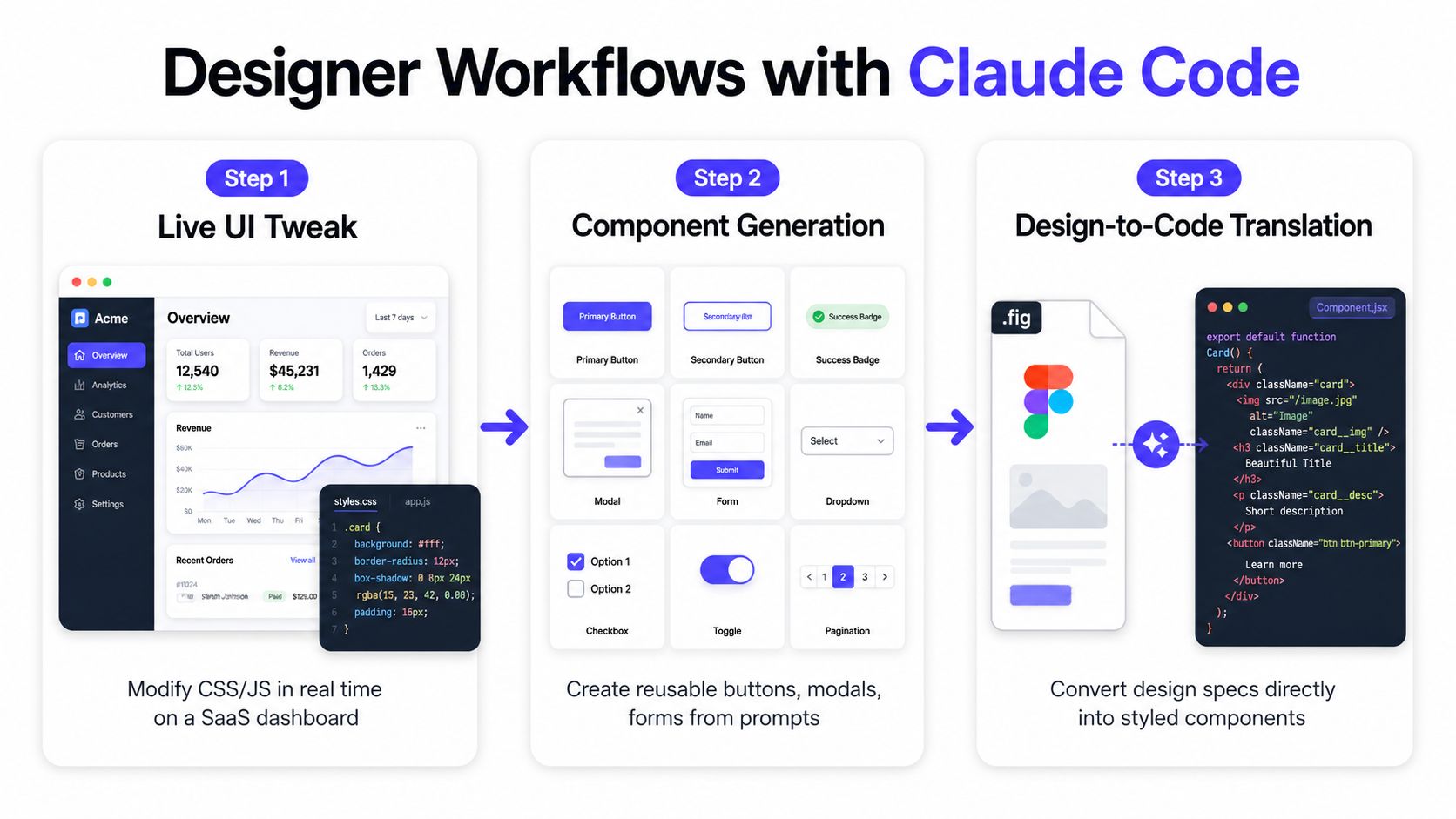
The clearest wins show up after the mockup stage, when the work needs to touch a live codebase. Builder's guide on Claude Code for designers makes this exact point, it can open an existing repository, read files, edit code, run commands, and preview the app, which cuts down the translation overhead that usually sits between design intent and implementation. Builder.io's guide for designers
Live UI changes in a SaaS dashboard
A product designer gets a dashboard screen from engineering that's close, but not quite right. The empty state needs better hierarchy, the table spacing feels cramped, and the filter behavior doesn't match the original flow. Claude Code can inspect the repo, find the relevant component, and help adjust the live UI without turning the change into a multi-day back-and-forth.
That doesn't remove judgment. It changes where judgment happens. The designer decides which state matters, what the interaction should communicate, and what should be left alone. The agent handles the code changes, which is useful when teams are trying to keep a dashboard consistent without waiting for a developer to pick it up later.
Design system updates that actually land
Design systems are where a lot of “small” work goes to die. A button variant needs a new loading state, a modal needs better spacing, or a form field needs a subtle interaction fix. Claude Code is useful here because it can work directly in the repository where the system lives, not just in a static spec.
For teams that already maintain component libraries, that means a designer can help shape reusable parts instead of only filing tickets. The handoff gap shrinks because the person thinking about the experience can also influence the implementation details. That matters in startups where the same component often shows up across product, onboarding, billing, and marketing surfaces.
For a deeper operational view on adjacent workflows, 925 Studios has a separate guide on how to use Figma MCP with Claude Code, which fits teams trying to connect design files more directly to build work.
Marketing site tweaks without waiting on a sprint
The third useful case is smaller but constant. A marketing page needs a layout adjustment, copy spacing needs cleanup, or a signup section needs to reflect the current product story. Claude Code can be handy when the designer wants to test those changes in the actual site instead of waiting for another scheduled dev slot.
That's especially relevant for founders shipping to AI SaaS, Web3, or fintech buyers, where the site is part of the product narrative and the page has to stay aligned with the evolving offer. One practical resource worth bookmarking is Prompt Builder's note on AI in design automation tips, because it sits in the same category of moving design work closer to execution without pretending the tool replaces taste.
The common thread is simple. Claude Code pays off when the designer is already working against a live system, because it compresses the part of the process where translation, context loss, and waiting usually pile up. It's less compelling when the task is still about exploring rough options on a blank page.
The Real Trade-Offs and Skills You Actually Need
The tool gets easier when the designer already has some coding literacy. A rusty development background helps people understand structure, spot architectural risks, and write prompts that map to how the repo works. Without that context, Claude Code still functions, but it needs tighter direction or it can wander into generic or mismatched UI decisions. A practical note on Claude Code for designers
The hidden cost is setup and correction
Claude Code is not magic because the output can drift if the prompt is vague or the scope is too broad. Designers have to seed the context well, understand what files matter, and interrupt the agent the moment the work is going sideways. A narrow task with clear constraints usually beats a broad “improve this page” request.
That's where the overhead lives. Small tasks can take longer to set up if the repo context isn't ready, the instructions aren't clear, or the human isn't confident enough to course-correct. A designer who expects a one-shot visual miracle will be disappointed.
Key takeaway: the agent rewards specificity. The more you know about the system, the less cleanup you pay for later.
When it helps and when it gets in the way
Claude Code helps most when the team already has a codebase that ships often and the designer can work inside it without asking for permission at every step. It gets in the way when the organization still treats design as isolated mockups, engineering as a separate queue, and every change as a formal handoff.
That's why founders should think about team structure before adding the skill to the mix. If no one owns component hygiene, file naming, or frontend consistency, Claude Code can just expose those gaps faster. If the team already works with clear patterns, it can help a designer participate in the implementation layer without creating a new bottleneck.
For a more opinionated breakdown of the skill set itself, 925 Studios has a companion post on the best Claude skills for designers, which is useful if your team is trying to decide whether to focus on design-system work, document workflows, or code-based tasks.
A quick readiness check
Repo comfort: Can the designer find files, read component names, and follow the app structure?
Scope discipline: Can the team choose one small project instead of trying to rebuild an entire feature?
Review habits: Will someone stop the agent quickly when the output is off?
Shared context: Does the team already use naming, component, and style conventions the tool can follow?
These are the constraints. If they're missing, Claude Code can still be learned, but the work needs more supervision and the payoff comes later. If they're present, the tool starts to look less like a novelty and more like a practical extension of the designer's execution range.
How Claude Code Compares to ChatGPT, Copilot, and Claude Design
The comparison that matters isn't feature count, it's stage fit. Claude Code is strongest when the work is inside a real codebase and the goal is production-ready UI. Claude Design is better when the team is still in fast visual exploration. ChatGPT is useful for quick snippets, reasoning, and drafting. Copilot fits best as an in-editor helper while someone is already coding.
Tool | Best Stage | Strength for Designers | Limitation |
|---|---|---|---|
Claude Code | Live implementation and production work | Works inside the repo, edits real files, and helps ship UI changes | Demands more context and basic repo literacy |
ChatGPT | Early thinking and ad hoc support | Fast for explanations, snippets, and brainstorming | Doesn't live inside the codebase |
GitHub Copilot | In-editor coding | Helpful while writing code line by line | Less useful for broader design decisions |
Claude Design | Early visual prototyping | Faster for quick visual exploration | Not as strong for production-ready code |
The big decision is timing. A lot of teams reach for Claude Code too early, before they know what the interface should be. In those cases, a faster visual tool is the better choice, because you're still testing the shape of the idea rather than shipping it. Recent comparisons make that trade-off explicit, Claude Design is faster for visual prototyping, while Claude Code is stronger inside the actual codebase. Claude Code for GTM teams
Use the right tool for the stage
If the designer is exploring states, layout, and composition, Claude Code can slow things down. If the designer already knows the shape of the interface and needs to make the implementation real, it starts to make sense. That's also why it's worth reading the internal comparison of Claude Code vs Cursor for designers, because the choice is often about workflow shape, not just brand preference.
Use visual tools to find the idea. Use codebase tools to ship the idea.
That framing is more useful than arguing over which model is “smarter.” Founders don't need another tool war. They need the right tool at the right stage so the product team can move from intent to working interface without extra churn.
A Practical Learning Path and First Projects
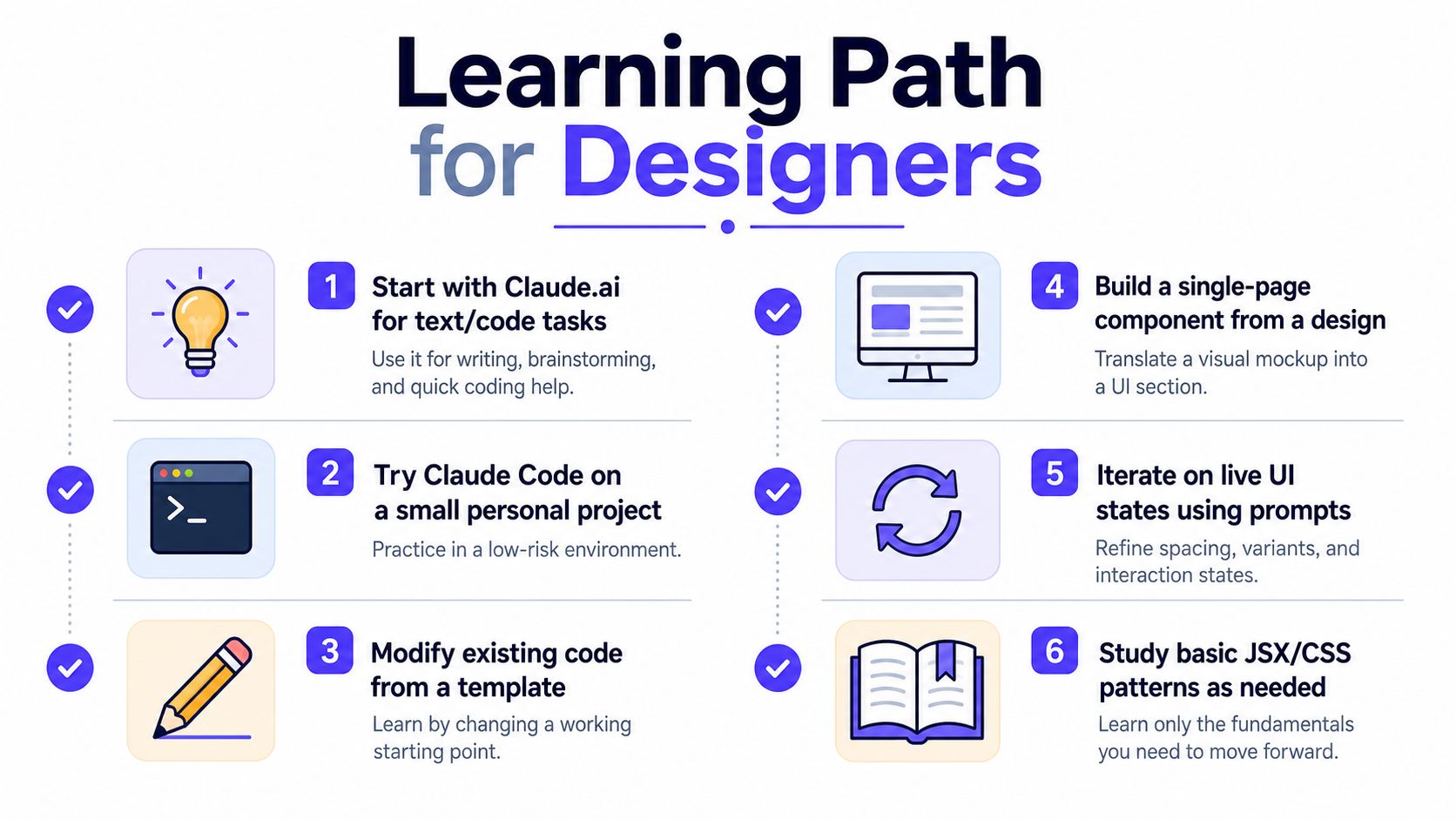
The easiest on-ramp starts before Claude Code. Several guides recommend getting comfortable with Claude.ai and Artifacts first, so you can see what model-generated code looks like before dropping into a live repo. From there, move to one scoped project, add a CLAUDE.md file for context, and only then widen the surface area. A learning path for Claude Code
Start with a small, real project
A good first project is a single component in a design system. Pick one button, card, modal, or form state that already exists, then ask Claude Code to adjust it inside the repo. That gives the designer a low-risk way to learn file structure, inspect outputs, and see how the system behaves when the code changes.
A second option is a marketing page tweak. That's usually easier to review because the scope is narrow, the visual output is obvious, and the business goal is clear. A third option is a small dashboard state, like an empty state or a filtered view, where the designer can practice working with real UI conditions instead of only static screens.
Plan before you prompt
The biggest mistake is jumping into prompting without deciding what success looks like. One tutorial is explicit about the sequence, understand the codebase first, plan before asking Claude to act, and stop the agent immediately with Escape if the output feels off. That habit matters because Claude Code keeps changing files until someone interrupts it.
A simple workflow helps:
Inspect the repo: identify the files, components, and styles that matter.
Write the plan: define the exact change and what should stay untouched.
Prompt narrowly: ask for one task, not a whole redesign.
Review the diffs: check what changed before asking for more.
Correct fast: stop the agent if the direction drifts.
Expand slowly: only widen scope after the first task is stable.
For teams that want a useful external reference on learning-code trade-offs, Codeling's piece on whether to use AI while learning to code is a sensible companion read because it captures the same tension between speed and understanding.
What a good first week looks like
By the end of the first few tasks, the designer should know how to seed context, read output, and tell the difference between a useful change and a fragile one. They don't need mastery. They need enough fluency to keep the agent pointed at the right part of the product.
That's the actual learning curve. It's not about becoming a backend specialist. It's about getting comfortable enough in the codebase to make the design-to-build loop less fragile and more direct.
What This Means for Your Product Team and Shipped Outcomes
If your team ships real product surfaces, Claude Code makes the most sense when design and frontend work are already tightly linked. It compresses the part of the process where intent usually gets lost, especially in dashboards, design systems, and marketing pages that need quick but careful updates. It also helps senior talent spend more time shaping the actual experience and less time waiting for another round of translation.
For founders, the decision is straightforward. If your designers are already close to the codebase, this skill can widen their impact without forcing a role change. If your team still treats design, brand, and frontend as three separate jobs, the tool can expose the seams more than it fixes them.
925 Studios works in that seam. It's one creative partner covering product design, brand design, and frontend implementation for AI SaaS, Web3, and fintech teams that need shipped interfaces without building a full in-house bench. In that setup, Claude Code is less of a novelty and more of a practical extension of how the work already moves.
If you want a product and brand partner that understands the gap between design intent and shipped UI, visit 925 studios. We help funded teams turn complex ideas into clear interfaces, brand systems, and frontend-ready work without adding extra handoff friction.


Let’s keep in touch.
Discover more about high-performance web design. Follow us on Twitter and Instagram.

