
AI UX Research: A Founder's Guide to De-Risking Product

Yusuf
Founder and lead designer at 925studios

You shipped the feature. The model works. Demos look sharp. Then real users arrive and hesitate.
They don't know when to trust the output. They don't understand why the answer changed. They second-guess the product at the exact moment you need confidence, activation, and repeat usage. That's the failure mode a lot of founders miss. The technical breakthrough isn't the same thing as product adoption.
AI UX research proves its worth. It's not a design luxury. It's how you find out whether people understand your system, trust it enough to act on it, and can recover when it gets something wrong. For startups, that's not academic. It decides whether a promising product becomes a used product.
Table of Contents
Why Your Brilliant AI Might Still Fail
A strong model can still produce a weak product.
Founders usually see the first warning signs in behavior, not in bug reports. Users abandon onboarding. They ignore the feature you thought would lead the pitch. Support gets questions that sound simple on the surface, but point to something deeper, like “Why did it do that?” or “Can I trust this?”
That gap matters because AI products ask people to take a risk. They aren't just clicking a button. They're deciding whether to rely on a system that can be right, wrong, vague, overconfident, or inconsistent. If that experience feels unstable, users pull back fast.
A practical reason to care is conversion. Startups that integrate AI into their UX research process report a 35% higher conversion rate on onboarding flows because AI helps identify subtle friction points humans often miss in early testing, according to Studio 925 on Clutch.
Product quality is not the same as user confidence
Founders often measure model quality and assume user confidence will follow. It doesn't. A user doesn't experience your benchmark score. They experience whether the product feels understandable, reliable, and safe to use in context.
That's why AI UX research works as risk reduction. It helps you answer questions such as:
Where trust drops: The exact moment users stop believing the system.
What needs explanation: Which outputs need rationale, provenance, or confidence cues.
How failure should look: What the product should do when the model is unsure or wrong.
Practical rule: If a user can't tell when your AI is helping versus guessing, you don't have a model problem alone. You have a product problem.
For AI SaaS, Web3, and Fintech teams, that distinction is expensive to miss. In high-stakes categories, confusion doesn't just hurt usability. It hurts signups, deposits, approvals, handoffs, and renewal conversations.
What AI UX Research Actually Is
Most founders hear “AI UX research” and think it means using ChatGPT to summarize interview notes. That's only half of it.
The cleaner way to think about it is this. AI UX research has two sides. One side helps your team research faster. The other helps your team understand how people behave around AI products in the first place.
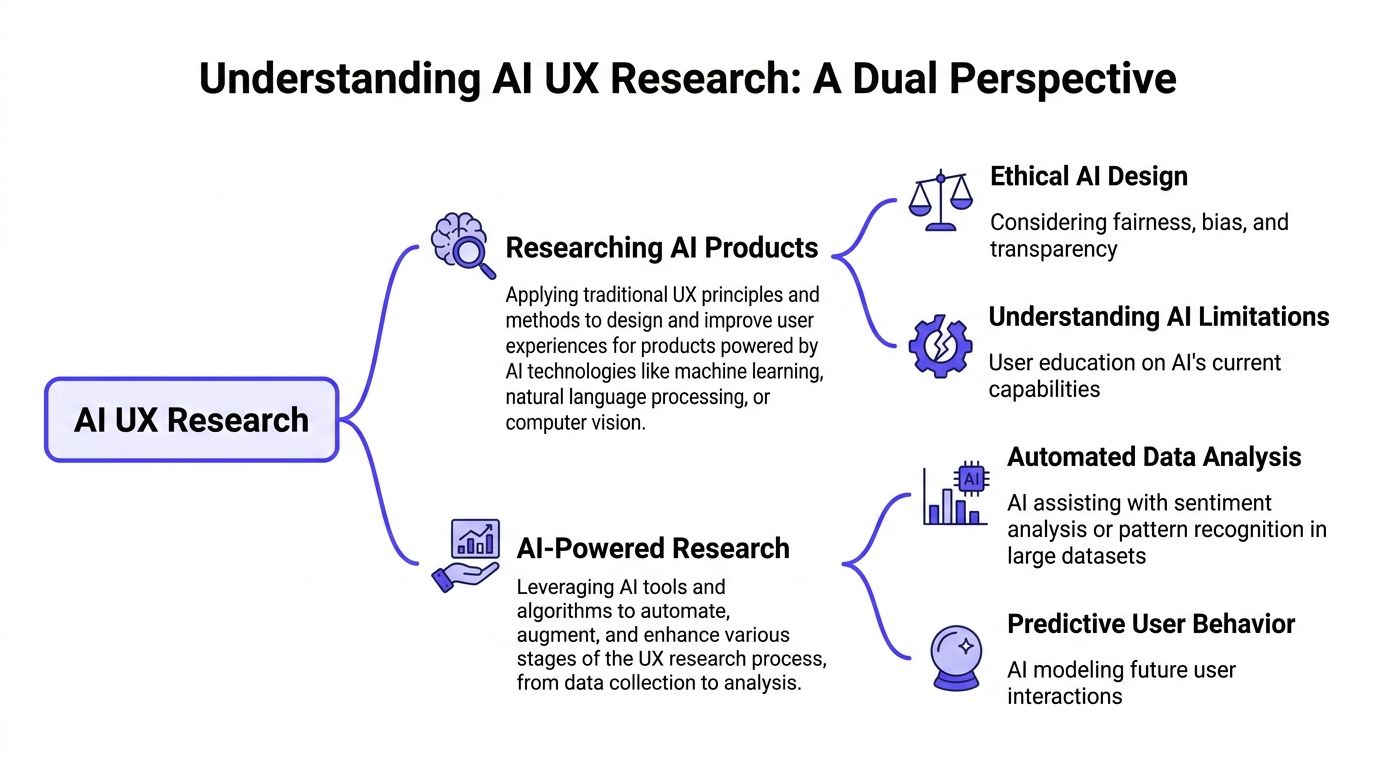
Two jobs under one label
The first job is researching AI products. That means testing whether users understand your assistant, trust the recommendation, notice uncertainty, and recover from bad output. Such research involves studying the human side of non-deterministic software.
The second job is AI-powered research. That means using AI tools to speed up transcription, summarization, clustering, tagging, and interview analysis. It's about making your research operation more efficient so you can run more learning loops in less time.
A simple analogy helps. One side is the chef tasting the food. The other side is the chef using better kitchen tools. You need both. Faster tools don't matter if nobody likes the dish. And great taste alone won't save a team that takes too long to learn.
Why founders should care now
This is no longer niche workflow experimentation. AI-assisted analysis and synthesis was identified as a top trend for 2026 by 88% of researchers, according to Lyssna's UX research trends report. That tells you where the field is moving. Teams are building research around AI, not treating it as a side experiment.
For founders, the practical takeaway is simple. If your product uses AI, then your research has to answer different questions than a normal SaaS app would. And if your team wants to move without adding headcount too early, AI can speed the operational side of research.
If you're building out the team around that work, this guide on how to find top AI UX design talent is useful because it shows what to look for when the job goes beyond standard product design.
Side of AI UX research | Core question | Typical output |
|---|---|---|
Researching AI products | Do users trust and understand the system? | Product changes to flows, copy, feedback states |
AI-powered research | How do we learn faster from users? | Faster synthesis, broader interview coverage |
A lot of teams buy AI tooling before they've defined what they're trying to learn from users. That creates speed without direction.
The Unique Research Challenges for AI Products
AI products fail in a few predictable ways, and most of them don't show up in a standard usability test.
A normal SaaS interface is mostly stable. You click a control, and the system responds in a repeatable way. AI changes that contract. The same prompt can produce different outputs. The system may sound confident while being wrong. The user may believe it understands more than it does.
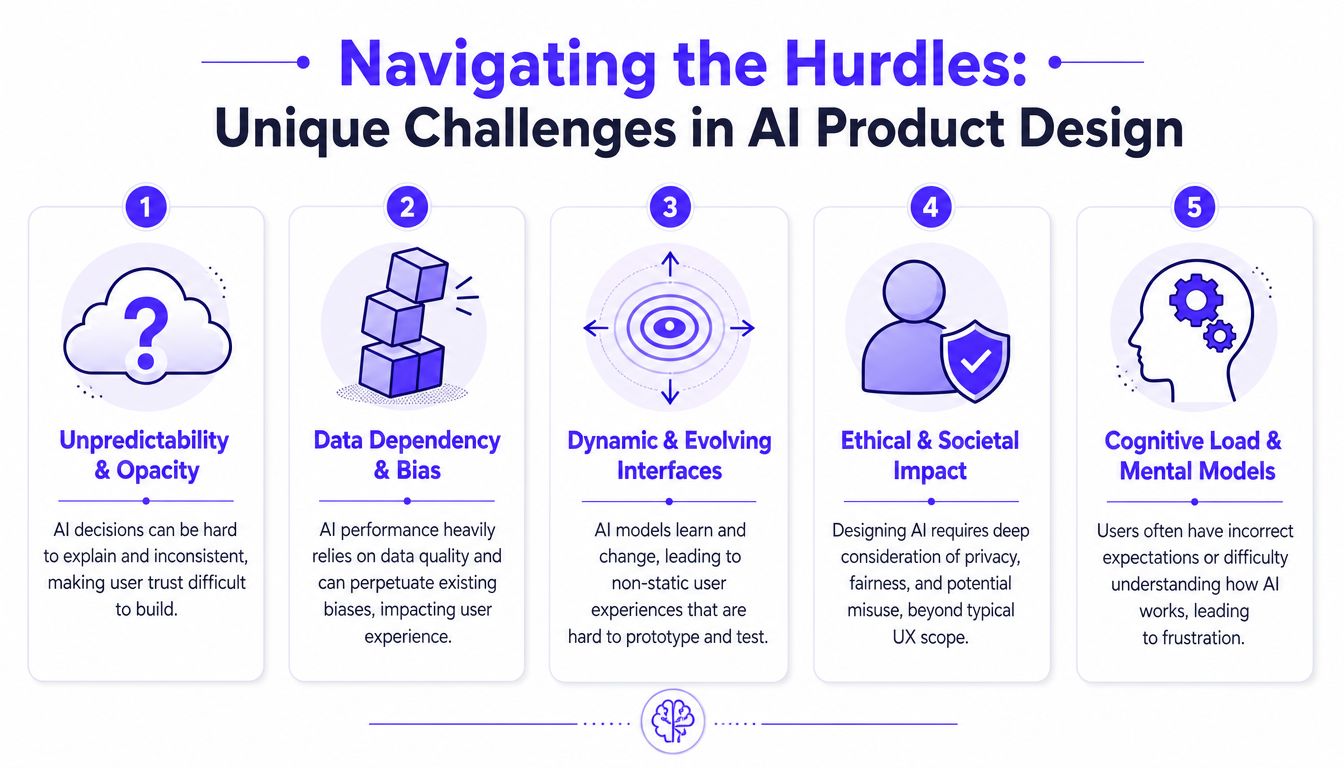
Trust breaks before retention does
The hardest part isn't always model quality. It's managing the user's mental model of the product.
A founder might build a sharp financial assistant that generates useful portfolio suggestions. But if the app doesn't explain why it recommended a move, users treat it like a black box. In Fintech, that's enough to stop action. In Web3, it can stop a wallet connection or transaction. In AI SaaS, it can kill onboarding momentum.
Research has now put a number on the gap between technical capability and human preference. The UXBench benchmark found that frontier LLMs can show correlation coefficients below 0.6 when predicting real user preference, and that capability gains don't automatically become UX gains without user-centric tuning, according to the UXBench paper on arXiv.
That matters because a founder can improve the model and still not improve the product experience.
A useful companion read is this breakdown of AI product UX design patterns, especially when you need clearer decisions about explanations, fallback states, and user control.
Bias, drift, and changing behavior
The next problem is bias. AI products inherit patterns from training data, product context, and interface framing. A recruiting tool can amplify unfair signals. A fraud workflow can create false confidence. A support copilot can push the wrong tone in sensitive conversations.
Then there's drift. Your AI product is not really static, even if the UI looks static. Models change. Prompts evolve. retrieval layers get updated. User behavior shifts once people learn how to “work” the system. The interface may look polished while the lived experience slowly changes underneath it.
Founders need to watch four things especially closely:
Opacity: Users can't tell why a result appeared.
Bias exposure: The system behaves unevenly across user types or scenarios.
Behavior drift: The same task feels different over time.
Expectation mismatch: Users assume the AI knows more than it does.
If your product makes an important recommendation, the user needs more than an answer. They need enough context to decide whether to act on it.
Those are product risks, brand risks, and in regulated categories, legal risks. AI UX research gives you a way to detect them before they become public failures.
Adapted Research Methods That Actually Work
Standard interviews and standard usability tests still matter. They just aren't enough on their own for AI products.
The best teams adapt methods to match the kind of uncertainty AI introduces. They test trust, explanation, fallback behavior, and confidence calibration before they spend months polishing the wrong experience.
To make the differences concrete, this comparison helps.
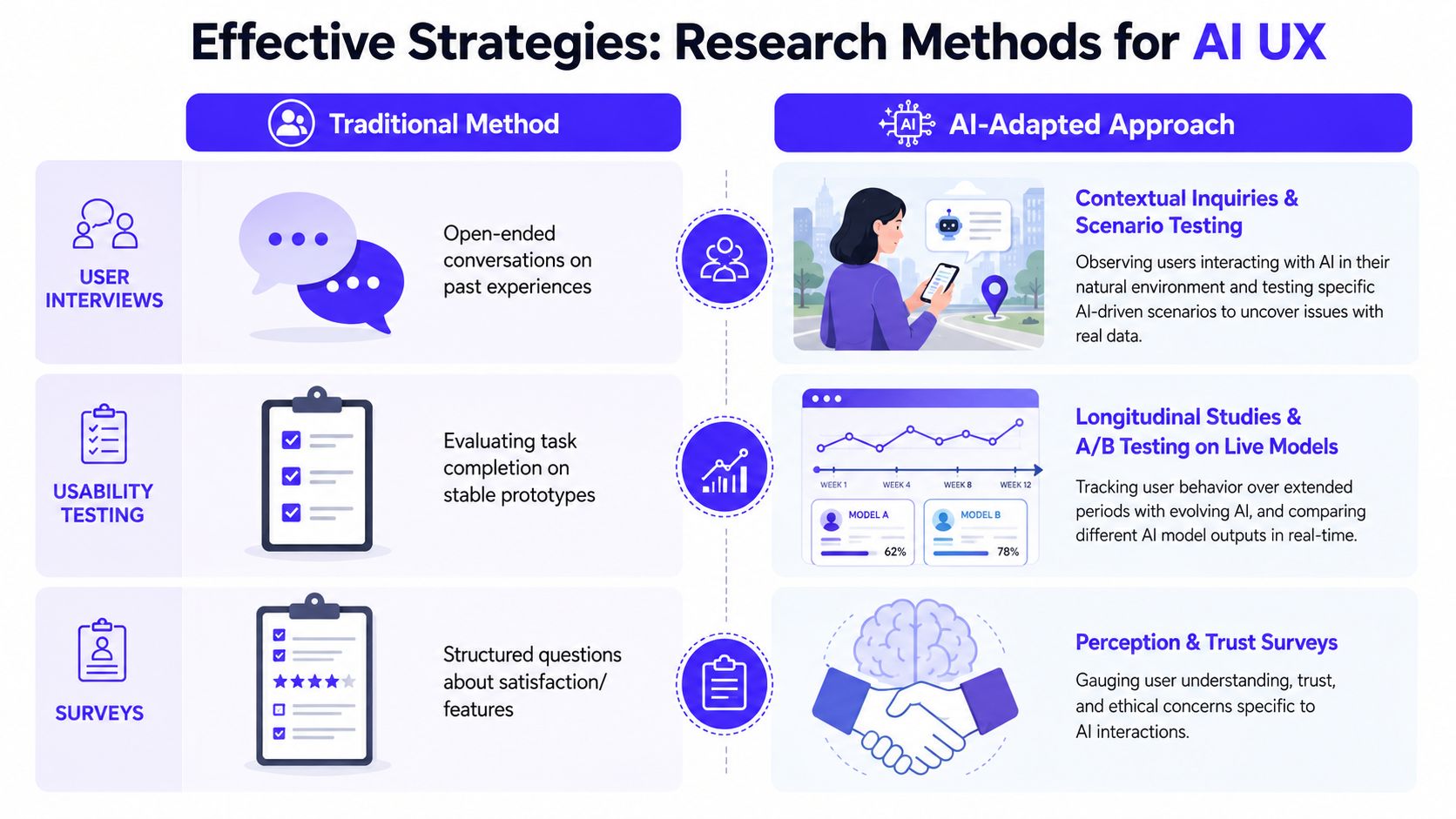
Use low-cost tests before you build the full system
One of the best tools for AI UX research is Wizard of Oz testing. A human simulates the AI behind the scenes while the user believes they're interacting with an automated system. That lets you test the product promise before you sink time into model work.
This is especially useful when a founder wants to validate a high-stakes workflow. For example, before building an AI analyst into a Fintech dashboard, you can test whether users even want proactive recommendations, what level of explanation they expect, and where they want manual override.
Another strong method is a scenario-based trust interview. Don't just ask whether someone likes the product. Put them in realistic situations. Give them a confident but incomplete answer. Give them a hesitant but correct answer. See which one they trust, and why.
If you need a broader baseline, these user research techniques are a useful reference for matching method to question before you adapt them for AI-specific behavior.
A few methods tend to work well in practice:
Wizard of Oz tests: Good for early validation when the AI feature is still a concept.
Longitudinal diary studies: Good for seeing how trust changes after repeated use.
Live output comparison tests: Good for comparing explanations, confidence cues, or fallback states.
Post-task trust surveys: Good for measuring whether users felt appropriately supported, not just whether they finished.
Use AI for scale, not for final judgment
AI-moderated interviews can be a strong way to expand coverage without slowing the team down. AI-moderated interviewing platforms can reduce time-to-insight by 40 to 60 percent, and a human-in-the-loop verification step can reduce false-positive insight generation by 45 percent while keeping the efficiency gain, according to Conveo's overview of AI tools for UX research.
That “human-in-the-loop” part is the key. Let AI handle first-pass clustering, summarization, and pattern finding. Don't let it make final calls on nuanced emotional reactions, regulated workflows, or edge cases that could change a roadmap decision.
Often, teams get sloppy. They use a general-purpose LLM as a research assistant, then treat the output like validated truth. For AI products, that's dangerous. The user's reaction to uncertainty, risk, or explanation quality often lives in small details.
Before you lock a decision, it helps to review a plain-language primer on what user testing is, especially if your product team is still treating testing like a one-off QA step rather than decision support.
A short walkthrough can help teams see these methods in action.
New Metrics for Measuring AI Product Success
Traditional product metrics still matter. Activation, retention, conversion, and task success aren't going away.
But they don't tell the full story for AI products. A user can complete a task and still come away thinking, “I don't trust this enough to use it again.” That's why AI UX research needs a second layer of measurement.
Metrics that matter more than raw task completion
The first metric to watch is trust calibration. Not trust in the abstract. Calibrated trust. Users should rely on the AI when it's likely to help, and question it when the situation calls for caution.
The second is appropriate reliance. If users ignore a useful assistant, you have an under-trust problem. If they accept weak outputs without checking them, you have an over-trust problem. Both are product failures.
The third is the gap between task success and perceived intelligence. Users may finish the workflow, but still think the system is clumsy, random, or hard to steer. That gap often predicts churn better than a clean completion rate does.
A simple working scorecard looks like this:
Metric | What it tells you | Warning sign |
|---|---|---|
Trust calibration | Whether reliance matches real capability | Users either dismiss good output or accept bad output too easily |
Appropriate reliance | Whether users know when to verify | Users stop checking in high-risk moments |
Recovery confidence | Whether users can recover from bad output | Errors create abandonment instead of correction |
Perceived intelligence | Whether the system feels useful and steerable | Users complete tasks but don't return |
How to tie these metrics to business decisions
Measurement matters because research budget always gets questioned. That's normal. Even broadly, proving ROI is still difficult for many teams. At the same time, the ROI on UX design is cited as ranging from $2 to $100 for every $1 invested, and the share of businesses seeing research as essential to all levels of business strategy and operations has grown, according to Maze's UX statistics roundup.
That doesn't mean every AI feature deserves equal investment. It means founders should measure where experience quality changes business behavior.
Board-level translation: Don't report that users “liked the AI.” Report whether they used it appropriately, completed higher-value actions, and needed less intervention.
For an AI SaaS product, that could mean better onboarding completion because guidance feels reliable. For Fintech, it could mean more confidence before submitting an application or taking an automated recommendation. For Web3, it could mean fewer abandoned steps when users face security-sensitive actions.
When those metrics improve, the design work is no longer cosmetic. It's affecting shipped product outcomes.
How Founders Use AI UX Research in the Real World
Theory gets clearer when you look at the decisions founders make.
The pattern is usually the same. A team ships an AI feature based on what seems logical internally. Then user research shows the actual blocker isn't capability alone. It's framing, control, explanation, or risk.
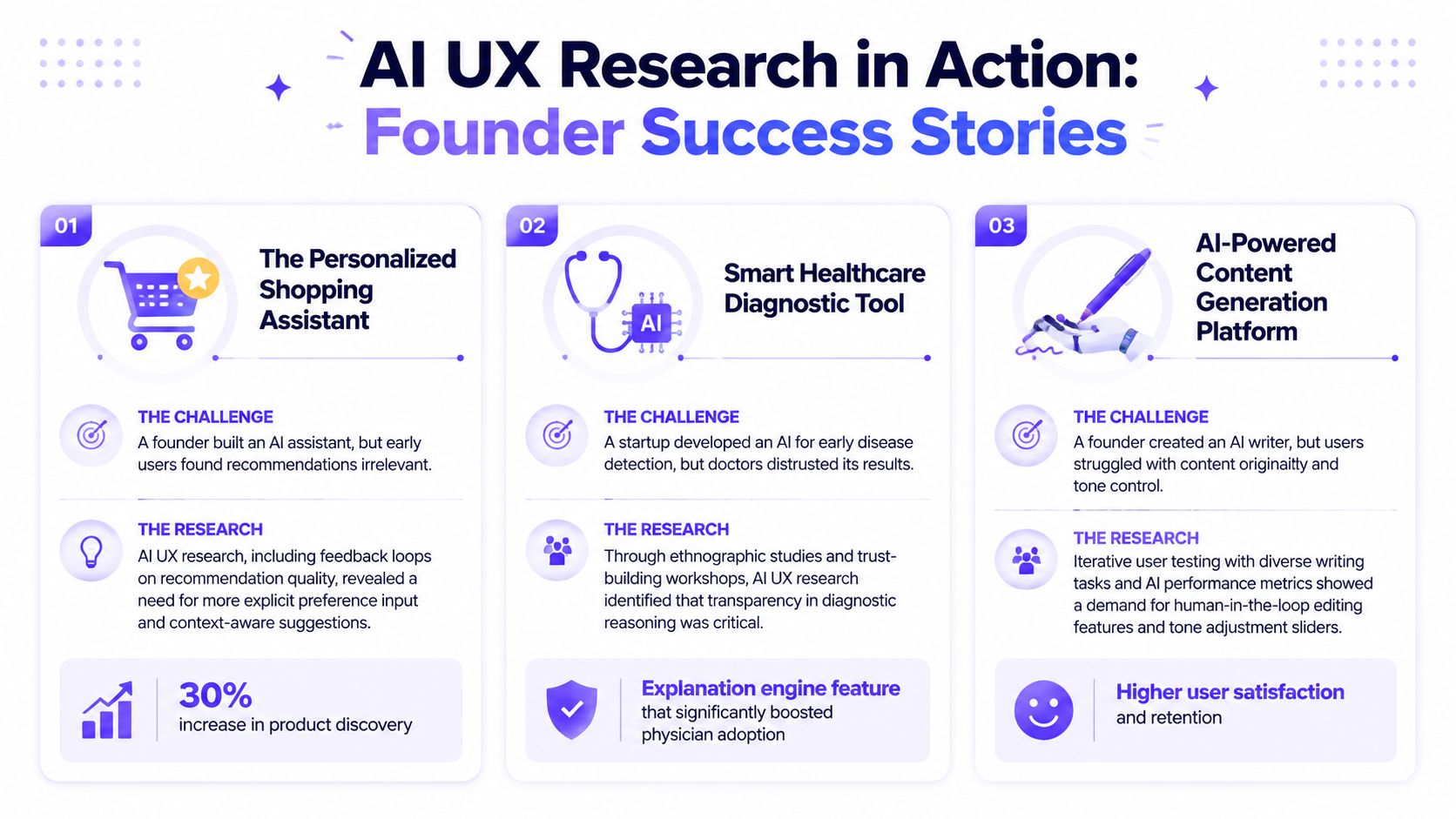
AI SaaS onboarding
An AI SaaS founder launches a workflow assistant meant to shorten setup. Internally, the logic is sound. Ask a few questions, infer the rest, and generate a ready-to-use workspace.
Early users stall anyway. In interviews, they don't complain about the interface. They say they aren't sure what the system is doing with their answers, and they worry that a wrong setup will create more cleanup later.
The fix isn't more automation. It's controlled automation. The team changes onboarding so the assistant shows what it inferred, why it inferred it, and what the user can edit before moving on. The product feels less magical, but more trustworthy.
That's a strong example of where founder tooling matters too. Platforms like Captapi for AI startups can help teams tighten early go-to-market systems around product feedback and user acquisition loops while the core product experience is still being refined.
Fintech trust and explanation
A Fintech founder builds an AI feature that suggests actions based on user financial behavior. The first version presents clean recommendations with a polished interface.
Users hesitate because the output feels too final. They want to know the trade rationale, the assumptions behind the recommendation, and what the system considered. During testing, they trust the product more when it surfaces limited reasoning and gives them a clear path to inspect or override.
The product team doesn't need to turn the UI into a research paper. It needs to expose enough logic for the decision to feel grounded. In high-stakes flows, explanation isn't decoration. It's part of the interaction.
The right explanation is rarely the longest one. It's the shortest one that helps a user decide whether to proceed.
Web3 risk and user confidence
A Web3 founder launches an AI helper inside a wallet-related flow. The assistant is supposed to simplify confusing steps and reduce drop-off.
Testing reveals a different issue. Users treat the assistant as either fully authoritative or totally useless. There's almost no middle ground. Some follow suggestions too quickly in security-sensitive moments. Others refuse to use it because they assume any AI advice around assets is risky by default.
The smart response is to design for caution. The assistant should distinguish between guidance, recommendation, and action. It should surface risk cues plainly. It should also step back in moments where user confirmation matters more than convenience.
These examples all point to the same principle. AI UX research is useful because it exposes the mismatch between what your system can do and what users are willing to trust it to do.
Making AI UX Research Part of Your Process
The biggest mistake is treating AI UX research like a launch checklist.
It works better as an operating habit. Run it before you build, while you prototype, after you ship, and again when the model, prompt stack, or user context changes. AI products don't stand still, so the research can't be static either.
That's especially true when trust is part of the product. A recommendation engine, an AI agent, a financial workflow, or a wallet flow can all look polished on the surface while user confidence erodes underneath. Good teams catch that early because they test for understanding, reliance, explanation quality, and recovery behavior as part of the product cycle.
If you're updating a broader digital experience around these systems, this guide on how to integrate AI in a website is a useful next step because it connects AI features to clearer interface decisions and shipped product behavior.
The founders who do this well don't chase AI for its own sake. They use AI UX research to remove ambiguity, ship with fewer blind spots, and build products people will trust.
925 Studios helps AI SaaS, Web3, and Fintech teams turn complex products into clear, credible experiences. If you need one embedded creative partner that can cover product design, brand design, and frontend build, 925 studios is built for that model.


Let’s keep in touch.
Discover more about high-performance web design. Follow us on Twitter and Instagram.

