
Web App vs Native App: A Founder's Decision Guide

Outrank AI

A founder choosing between a web app and a native app is rarely choosing only a technology stack. They're deciding how quickly users can discover the product, how much platform complexity the team can carry, which device capabilities the product can trust, and how much revenue may pass through an app store. For AI SaaS, Web3, and fintech companies, that decision affects product quality, brand credibility, compliance work, and runway at the same time.
The practical choice is usually web app vs PWA vs native app, with hybrid development as a fourth implementation route. The right answer depends less on fashion and more on the journey your users must complete.
Table of Contents
The Decision Most Founders Get Wrong
A Seed-stage AI SaaS team spends four months building an iOS app because investors keep asking about mobile. The founders assume a native product will look more serious. After launch, they discover that their target users spend most of their working day inside Chrome and Slack. The buyers want to open the product from a sales call, share a link with a colleague, and see improvements without waiting for an app update.
The team hasn't built a bad product. It has built the wrong doorway.
That mistake happens because founders reduce the choice to web app vs native app. They see a browser product as temporary and a mobile app as the finished version. That leaves out the middle option, a Progressive Web App, or PWA. PWAs gained app-like behavior as service workers and installability matured. By 2024, the global PWA market was estimated at USD 2.08 billion, with a projection of USD 21.24 billion by 2033, implying a 29.9% CAGR from 2025 to 2033, according to Grand View Research's PWA market analysis. That growth shows that web delivery has become a serious product channel, not merely a cheaper prototype path.
A PWA can offer offline support, installation, and push notifications while keeping the distribution advantages of the web. It still won't replace native software for every high-engagement mobile experience. The practical split is clearer:
Web apps optimize for reach, linking, rapid updates, and fast validation.
PWAs add installability and selected app behaviors without abandoning web delivery.
Native apps win when hardware access, low-level security, background work, or polished mobile interaction is central.
Hybrid apps provide a cross-platform compromise, with a shared codebase and native binaries.
The useful question: Which capabilities must be native, and which ones only need to feel reliable?
The cost of getting this wrong isn't limited to engineering. It spreads into product design, brand trust, support, analytics, hiring, store operations, and launch focus. A fintech team may need native security signals. A Web3 team may need device-level key protection. An AI SaaS team may need a fast, linkable workspace that works wherever its buyers already work.
The rest of this guide compares the three main product paths, explains the hidden costs, and gives direct recommendations for AI SaaS, Web3, and fintech scenarios.
What Web, Native, PWA, and Hybrid Actually Mean
You should be able to explain your platform choice in one sentence to a customer, investor, or new hire. Start with four simple definitions.
Web apps run through the browser
A web app is a website that behaves like software. Users open it in Chrome, Safari, Edge, or another browser. Your team updates the server, and users receive the latest version without downloading a new package from an app store.
Notion is a useful anchor. Its core workspace runs on the web, which makes it easy to open from a link, use across devices, and update centrally. Web apps suit dashboards, collaboration tools, admin systems, analytics products, and AI interfaces where users already work in a browser.
For a deeper explanation of architecture choices, see this guide to cloud-based app development.
Native apps are written for the operating system
A native app is built specifically for iOS or Android and installed through an app store. Native software can use the operating system's device APIs directly, including sensors, biometrics, cameras, Bluetooth, secure storage, and background services where the platform permits them.
Robinhood is a familiar example of a native-first mobile experience. The product depends on frequent mobile engagement, financial trust, notifications, and device interaction. Native development gives the team more control over those details, but it also introduces platform-specific work and store distribution.
PWAs keep web code and add app behavior
A Progressive Web App is a web app enhanced with a service worker and a Web App Manifest. It can support home-screen installation, offline behavior, caching, and push notifications while continuing to use web technologies.
Starbucks and Twitter Lite are commonly cited examples of PWA-style delivery. Modern browsers support many PWA capabilities. web.dev reports that about 97% of browsers support offline-ready features and about 88% of web users can install a PWA, making installability a meaningful distribution advantage.
The limits matter. A PWA may not provide the same access to NFC, HealthKit, background Bluetooth Low Energy, or advanced background processing as a native app. Before signing a build contract, document the device features your product needs. For commercial terms, security obligations, and ownership questions, founders can also review RNC Group SaaS legal support.
Hybrid apps share code and ship native binaries
A hybrid or cross-platform app uses one main codebase, often with React Native or Flutter, and compiles or packages it for mobile operating systems. Shopify's mobile app is a recognizable example of a cross-platform approach.
Hybrid development can reduce duplicated work while still producing an installable mobile app. The trade-off is that platform polish, performance, debugging, and access to unusual device APIs can require native code anyway. It's a useful middle route, but it isn't a magic way to get every native benefit at web-app effort.
Comparing the Three Paths Side by Side
The table below gives a working model for a Seed-to-Series-B company. It treats hybrid as a separate path because founders often need to compare shared-code mobile development with both browser delivery and fully native apps.
Web App vs PWA vs Native vs Hybrid Side by Side Comparison
Criterion | Web App | PWA | Hybrid, React Native or Flutter | Native, iOS and Android |
|---|---|---|---|---|
Performance | Strong for dashboards, forms, chat, and standard business workflows | Similar to web, with added caching and install behavior | Usually strong, but complex screens may need platform-specific work | Best control for demanding interactions and device-heavy tasks |
Offline behavior | Limited unless deliberately engineered | Good for selected flows with service workers and local storage | Strong when offline data architecture is designed well | Strongest control over local data, sync, and background behavior |
Distribution and discoverability | Best reach, links, search, and immediate access | Web reach plus optional installation | Requires app-store installation | Requires app-store installation and platform-specific listings |
Time to ship | Usually shortest for a focused MVP | Close to web, with extra service-worker and install work | Faster than two separate native apps, slower than a simple web app | Longest when supporting both iOS and Android |
Cost to build and maintain | Lowest platform duplication | Low to moderate, depending on offline and notification needs | Moderate, with shared code plus native maintenance | Highest, because each platform needs dedicated attention |
Security surface | Browser sandbox, centralized updates, server-side controls | Browser security plus service-worker and cache risks | Native storage and APIs, plus framework and bridge risks | Broadest device controls, with more platform code to secure |
Camera, biometrics, NFC, Bluetooth | Basic or browser-dependent access | Broader than a standard site, but still uneven | Good access through libraries, with edge cases | Deepest and most predictable access |
Typical verdict | Wins for reach and experimentation | Wins for install-on-demand products | Wins when mobile matters but two fully separate teams don't fit | Wins for hardware-heavy and trust-critical journeys |
For performance, native wins, hybrid usually follows, and web and PWA are sufficient for conventional business interfaces. A controlled comparison found that native implementations used less energy than web counterparts, alongside lower CPU load, memory load, and network traffic, with statistically significant differences and a large effect size in that study (MOBILESoft research paper). That doesn't make every web dashboard inefficient. It does make native safer for battery-sensitive, always-on, or resource-heavy workflows.
For distribution, web wins because users can arrive through a link without installation. PWA adds an install path without giving up that entry point. Native loses on first contact because the user must find, download, and open an app.
For device access and offline control, native wins, while hybrid can be close when the required APIs are well supported. PWA is the practical middle option for offline-lite experiences. The comparison is descriptive, not prescriptive. Your product's required capabilities should decide the platform, not the table alone.
Cost, Time to Market, and the Hidden Bill of Numbers
Founders often ask for a build quote before they define the product surface. That reverses the order. The platform determines how many screens, states, test environments, release processes, and maintenance paths your team must support.
The ranges below are planning bands, not market facts. They describe how a team might budget a focused MVP with product design, frontend implementation, backend integration, QA, analytics, and launch preparation. The actual figure changes with the number of workflows, integrations, security requirements, and quality bar.
Cost and time to market by platform choice
Platform | MVP cost range | Time to MVP | Hidden annual costs |
|---|---|---|---|
Web app | Lower planning band, one primary delivery surface | Shortest for a focused scope | Browser compatibility, accessibility, hosting, observability, and ongoing product work |
PWA | Slightly above a standard web app | Short to moderate, depending on offline and notification scope | Cache invalidation, service-worker maintenance, browser behavior changes, and support for install flows |
Hybrid, React Native or Flutter | Moderate planning band | Moderate, especially when mobile flows are already defined | Native modules, platform upgrades, store operations, and edge-case testing |
Native, one platform | High planning band for a polished mobile product | Moderate to long | Platform-specific maintenance, store operations, device testing, and release management |
Native, iOS and Android | Highest planning band among these options | Longest because both platforms need complete coverage | Two platform roadmaps, feature parity work, separate testing, and separate release risks |
A web MVP can reach users with one interface and one release system. A PWA adds service-worker behavior, offline states, installation prompts, notification permission flows, and recovery logic. Hybrid development saves duplicated interface work, but it doesn't remove the need to test operating-system behavior. Two native codebases create the largest operational footprint.
The hidden bill also includes app-store economics. In the UK, Apple and Google currently charge a maximum 30% commission on sales of digital goods and services through native apps, with a discounted 15% rate for some smaller developers, according to UK government evidence on app-store commissions. Treat that as a product and pricing constraint, not a footnote.
The costs founders forget
Feature drift: iOS ships a workflow while Android waits for a compatible implementation.
Store review exposure: A broken release may require review and approval before users receive a fix.
Hiring breadth: A native roadmap can require dedicated iOS and Android capability instead of one web-focused product team.
Launch timing: A campaign can lose momentum if one platform trails the other.
Design duplication: A shared brand still needs platform-aware interaction patterns and testing.
Support complexity: Users report different bugs depending on browser, operating system, device, and app version.
A cheaper build becomes the more expensive choice when the missing capability blocks revenue, trust, or a launch window. Before choosing, read the detailed assumptions behind a mobile app design cost guide, then estimate the cost of maintaining every surface after launch, not just producing the first version.
Performance, Offline, Security, and Compliance Tradeoffs
The platform decision becomes serious when the product handles sensitive data, money, hardware, or work that must continue without a reliable connection. An AI SaaS dashboard can tolerate browser constraints that a mobile wallet cannot.
Performance is about the work, not the label
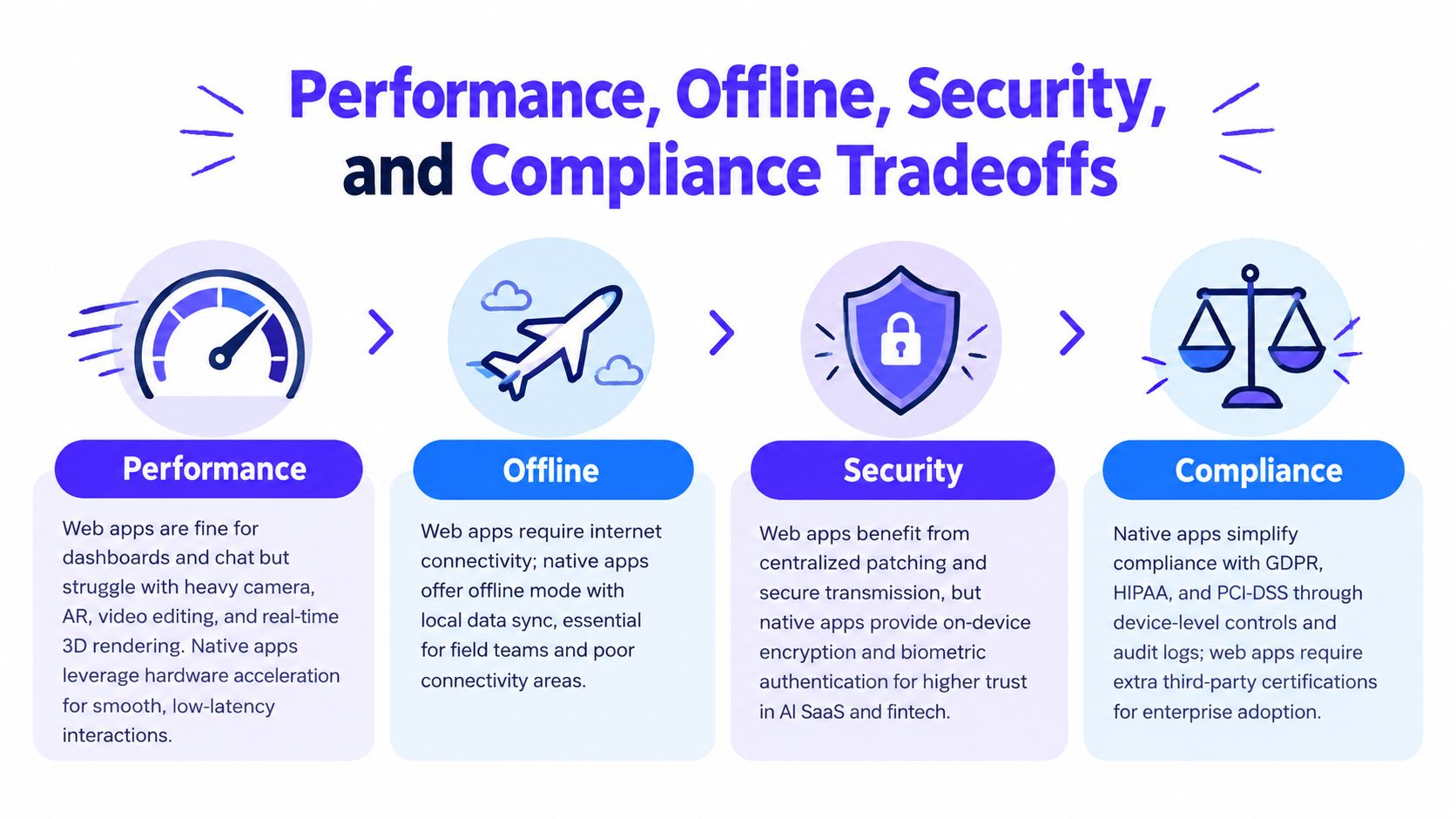
Web stacks handle chat, dashboards, reporting, forms, and standard collaboration well. They become less comfortable when the product depends on heavy camera processing, augmented reality, video editing, real-time 3D rendering, or sustained on-device inference.
Native code gives teams closer control over hardware acceleration, memory, CPU usage, background behavior, and input latency. The controlled comparison referenced earlier found lower resource consumption for native implementations than web implementations, so battery-sensitive workflows deserve a native-first review rather than a generic promise that modern browsers are fast.
Offline behavior needs a product design
Offline support isn't a checkbox. The team must decide what users can read, create, edit, queue, and recover when the connection disappears.
A PWA can cache application resources and selected data. Native apps can offer deeper local storage, background synchronization, and operating-system integration. Both can fail if the product hasn't defined conflict resolution, stale-data warnings, retry behavior, and account recovery.
Security and compliance change the default
Browsers provide sandboxing, centralized server-side patching, and secure transport when implemented correctly. Native apps can add platform keystores, Secure Enclave integrations, biometric authentication, device attestation, and jailbreak or root detection. Those controls don't make a native app automatically secure, but they give the team more device-level signals and enforcement options.
Fintech teams working with payments, identity, or regulated workflows should examine PCI DSS, SOC 2, HIPAA, and PSD2 requirements with their security and compliance specialists. A web app may still be the right choice for investor dashboards or internal operations. Consumer banking, KYC, payment approval, and high-risk account actions often justify native or high-fidelity cross-platform delivery because trust signals are part of the product.
Before committing, answer these questions:
Data exposure: What sensitive data reaches the device, and what remains server-side?
Authentication: Do you need biometrics, hardware-backed keys, attestation, or certificate pinning?
Offline rules: What happens when the user approves, signs, or edits while disconnected?
Device access: Do you need NFC, Bluetooth, camera processing, HealthKit, or background services?
Auditability: Can your team explain every important action to a customer, auditor, or regulator?
Recovery: What happens after a lost phone, compromised device, failed sync, or revoked credential?
What AI SaaS, Web3, and Fintech Founders Should Pick
Different categories have different default answers because their users trust different surfaces and perform different jobs.
AI SaaS should start on the web
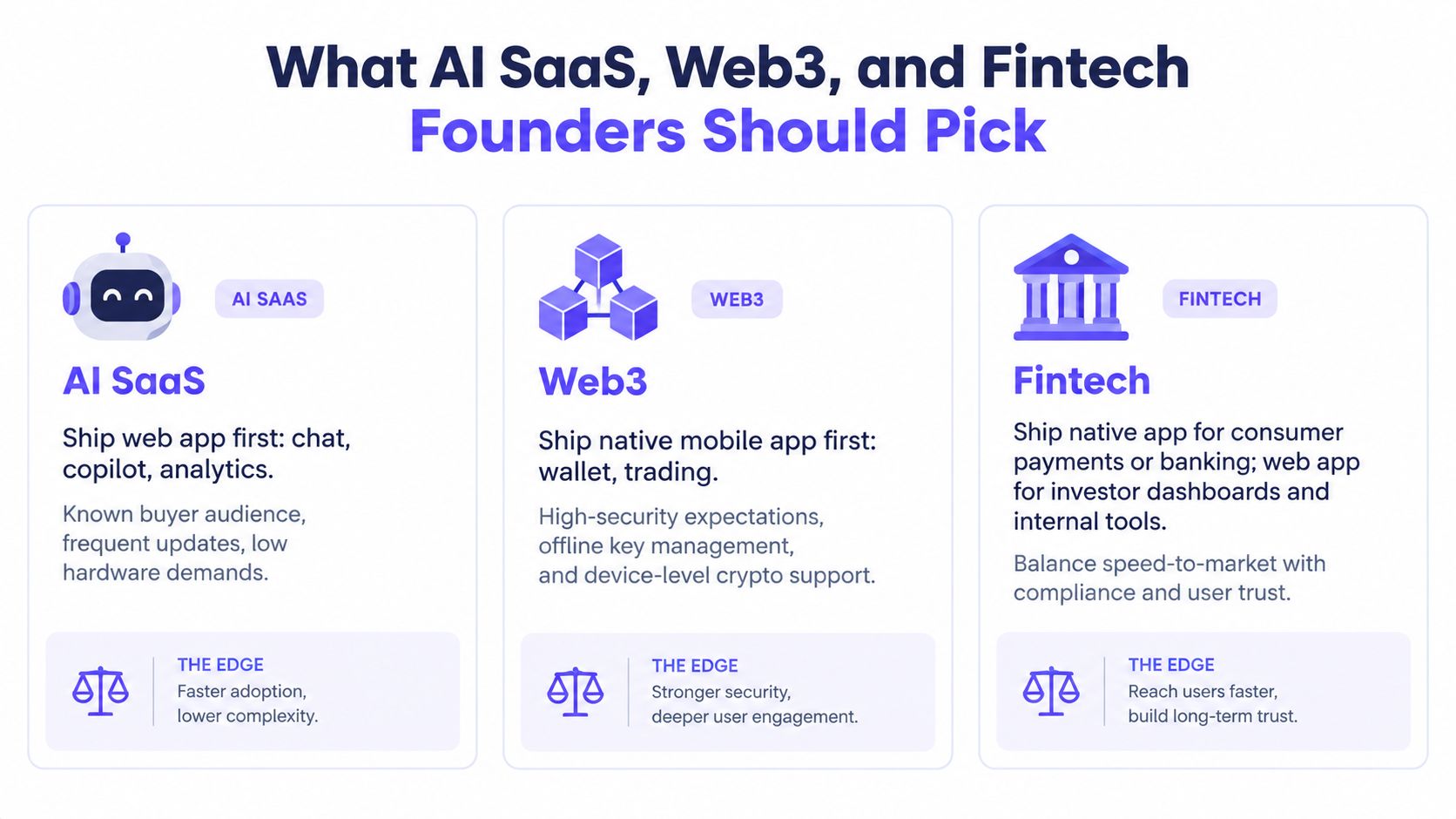
For an AI chat product, copilot, analytics workspace, or team knowledge tool, ship a web app first. Your buyers often discover the product through a link, use it alongside browser tabs and Slack, and expect the product team to improve prompts, workflows, and model behavior frequently.
Add PWA capabilities for power users who want an installed workspace, selected offline access, or push notifications. Move to native when the product's value depends on on-device inference, voice capture, camera input, or deep mobile workflows. Don't build a mobile shell just to signal maturity.
Deciding question: Does the product need mobile hardware, or does it need to be available wherever the buyer already works?
Web3 should separate access from key custody
A wallet-connected web app is usually the fastest way to let users explore a protocol, connect an existing wallet, and understand the product before installation. That makes web delivery a strong default for exchanges, marketplaces, governance tools, and protocol interfaces that don't need device-level key custody.
Native becomes the stronger choice for a self-custody wallet, mobile trading product, biometric signing flow, or application where offline key management is central. Those products carry a higher expectation around secure storage, signing clarity, recovery, and device trust.
Deciding question: Is your product connecting to a wallet, or is it responsible for protecting and using the user's keys?
Fintech should treat trust as a product requirement
Fintech founders handling payments, KYC, account access, or regulated decisions should consider native or high-fidelity cross-platform development early. Device-level authentication, fraud signals, secure storage, and a polished approval flow can influence whether users trust the product enough to move money.
A web app remains a strong choice for investor dashboards, finance operations, reporting, and internal tools. Consumer payments and banking journeys need a more deliberate platform decision because compliance and trust aren't later polish tasks. For inspiration on designing these experiences, review fintech app design examples focused on trust.
Deciding question: Which user action would create unacceptable risk if the device, browser session, or connection were compromised?
Your Decision Matrix and Next Step
Use this matrix in your next product meeting. It forces the decision back onto users, workflows, and constraints instead of team preference.
Founder decision matrix pick by product user and budget
Your situation | Recommended path | Why it wins | Watch out for |
|---|---|---|---|
You need to test demand, sell to known business buyers, or support browser-based work | Web app | Broad reach, linkable access, quick updates, and low platform duplication | Weak offline behavior and limited deep device access |
Users want installation, notifications, or selected offline access without a full mobile rebuild | PWA | Keeps web distribution while adding app-like behavior | Browser support differences, cache logic, and incomplete hardware access |
Mobile is important, but two separate native teams don't fit the budget | Hybrid | Shared code can reduce duplicated interface work while producing mobile binaries | Native modules, platform edge cases, and framework maintenance |
The core journey uses biometrics, NFC, Bluetooth, camera processing, secure keys, or heavy background work | Native iOS and Android | Deepest operating-system integration and control | Highest maintenance burden and app-store dependency |
The product handles regulated money, identity, or high-risk approvals | Native or high-fidelity hybrid | Device trust, authentication, and security controls can support the journey | Compliance still requires architecture, process, and specialist review |
Run the five-minute version before you commission design or development:
Write the three actions users must complete most often.
Mark each action as browser-friendly, offline-sensitive, hardware-dependent, or trust-critical.
Identify whether users arrive through links or return through an installed app.
List the device APIs and security signals you need.
Choose the lightest platform that supports those actions without weakening trust.
If every core action works in a browser, start with a web app. If installation and offline-lite behavior matter, add PWA capabilities. If hardware, key custody, biometric approval, or regulated money define the experience, choose native or a carefully scoped hybrid build.
925 Studios can help founders turn that choice into a clear product system, covering product design, brand identity, frontend implementation, and design systems as one creative partner instead of three separate hires. Visit 925 studios when you need the platform decision translated into a credible interface and a shipped product.


Let’s keep in touch.
Discover more about high-performance web design. Follow us on Twitter and Instagram.

