
Master What Is UX Writing: Founders' 2026 Playbook

Yusuf
Founder and lead designer at 925studios

UX writing is the product work of crafting the words inside an interface so users can complete tasks with less friction. It directly affects business outcomes, and precise UX design that includes UX writing can lift conversion rates by up to 400%.
If you're a founder, you've probably seen the symptoms already. Users sign up, hit a confusing step, abandon the flow, then your team calls it a funnel problem, a UX problem, or a support problem. A lot of the time, it's a language problem inside the product.
That's what UX writing fixes. It covers the buttons, labels, prompts, error messages, empty states, onboarding hints, and confirmations that guide people after they arrive. This is a product design function, not a marketing function. Marketing copy gets someone interested. UX writing helps them succeed once they're in the product.
For AI SaaS, Web3, and Fintech, the stakes are even higher. These products ask users to trust systems they may not fully understand. If the interface language is vague, people hesitate. If it's clear, specific, and calm, they move.
Table of Contents
What UX Writing Actually Is
UX writing is the practice of writing the words people use inside a digital product. Not blog posts. Not ad headlines. Not homepage campaigns. The text in the interface itself.
Think of a complex product like an airport. Marketing is the billboard that got you to book the flight. UX writing is the signage that gets you to the right gate without stress. If the signs are vague, you miss the flight. If the interface copy is vague, users miss the action.
Think of it as in-product guidance
The cleanest definition comes from product behavior. UX writing shapes the conversation between the product and the user at the exact moment a decision has to be made. Nielsen Norman Group describes it as contextual microcopy embedded in the experience, things like buttons, prompts, tooltips, and error messages that reduce friction by removing ambiguity in the moment users need help most, as explained in NN/g's UX writing study guide.
That distinction matters. A founder who treats UX writing as leftover copy almost always ends up shipping friction into the interface.

If you're already thinking about layout, flow, and scanability, you're already thinking about language whether you realize it or not. Copy and interface structure work together, which is why a concept like visual hierarchy in product design directly affects whether users understand what the product is asking them to do.
Good UX writing doesn't decorate a screen. It removes the extra second where a user stops and wonders what happens next.
What good UX writing is made of
In practice, strong UX writing tends to follow a few hard rules:
Clear first: Users shouldn't have to interpret what a button, field, or message means.
Concise second: Shorter is better only if meaning stays intact.
Contextual always: A tooltip, confirmation, and error state should not sound the same.
Empathetic under pressure: Error copy should help, not blame.
Consistent across flows: The product shouldn't call the same action three different names.
UXWritingHub puts this in business terms that founders understand well. UX writing is a product-focused role that directly drives retention, usability, and revenue, and salaries are 20 to 30% higher than traditional copywriting because companies classify it as product work rather than marketing work, as noted in UXWritingHub's explanation of UX writing.
That salary premium isn't about trendy job titles. It's a signal that companies have learned where the value sits. If better microcopy helps users complete tasks, avoid mistakes, and stay in the product, then the words are part of the product itself.
Why Founders Should Care About UX Writing
Founders usually notice UX writing when something breaks. Activation drops. Trial users don't reach setup completion. Support gets the same question over and over. A settings page creates hesitation. A payment flow feels risky.
Those aren't separate problems. They're often the result of unclear product language.
Words change business metrics
The business case is straightforward. If users understand what to do, more of them do it. Adobe, citing Forrester, notes that intentional UX design, including precise UX writing, can increase conversion rates by up to 400% in the right conditions, which you can review in Adobe's piece on user experience design statistics.

That doesn't mean swapping a few labels guarantees a massive jump. It means friction compounds. Every unclear CTA, every weak empty state, every vague permission prompt adds drag. Clear copy removes drag at the point of action.
A founder should look at UX writing the same way they look at onboarding logic or pricing page structure. It's part of conversion infrastructure.
For teams that need a business lens for design decisions, this breakdown of how to measure UX design ROI for startups is useful because it forces the right question: what changed in user behavior after the product got easier to understand?
This matters more in complex products
Simple products can survive mediocre interface copy for a while. Complex products can't.
AI SaaS products need to explain model behavior, confidence, limits, and next steps without overwhelming the user. Web3 products need to clarify wallet actions, permissions, and irreversible outcomes. Fintech products need to lower anxiety around money movement, verification, and failure states.
Here's the trade-off commonly mishandled:
More information isn't more clarity. Long explanations inside modals often slow users down.
Less information isn't always cleaner. If a user is about to move money or grant access, vague brevity damages trust.
The right amount depends on risk. A low-risk tooltip can be short. A high-risk confirmation needs specificity.
Practical rule: The more risk, money, or irreversibility in the action, the more precise your UX writing needs to be.
This is why founders should care early, not after launch. If the product language is weak, users don't just feel confused. They stop, delay, abandon, or contact support. Those are measurable business outcomes.
UX Writing vs Copywriting The Critical Difference
A lot of startup teams blur these roles. They ask a marketer to write the onboarding flow, or they ask a product designer to "make it sound better" at the end. Sometimes that works for a sprint. It rarely holds up across a product.
They work at different moments
Marketing copywriting persuades someone to care. UX writing helps someone complete an action they've already decided to take.
That sounds subtle. It isn't.
If your homepage says "Automate compliance in minutes," that's marketing copy. If your onboarding asks for API credentials and needs to explain why, what happens next, and how to recover from an error, that's UX writing.
If you want a broader language framework, this overview of copywriting vs content writing is useful because it shows how different writing disciplines serve different business moments. UX writing deserves the same clarity.
A side-by-side comparison
Dimension | UX Writing | Marketing Copywriting |
|---|---|---|
Primary goal | Help users complete a task | Persuade people to click, sign up, or buy |
User context | Inside the product, during action | Outside or before the product experience |
Main surfaces | Buttons, labels, forms, onboarding, tooltips, errors | Ads, landing pages, emails, sales pages |
Success metric | Task completion, fewer errors, lower friction | Acquisition, click-through, signup intent |
Tone | Clear, direct, calm, useful | Persuasive, aspirational, differentiated |
Bad outcome | Users stall or make mistakes | Prospects ignore the message |
Best question to ask | "Does the user know what to do next?" | "Does the prospect want this enough to act?" |
The mistake founders make is importing persuasive language into places that need precision. A flashy CTA can work on a landing page. In a settings panel or a financial flow, it can create uncertainty.
If a user is already inside the product, persuasion matters less than comprehension.
That's the line. Marketing promises value. UX writing helps the product deliver it.
Real Examples of UX Writing That Works
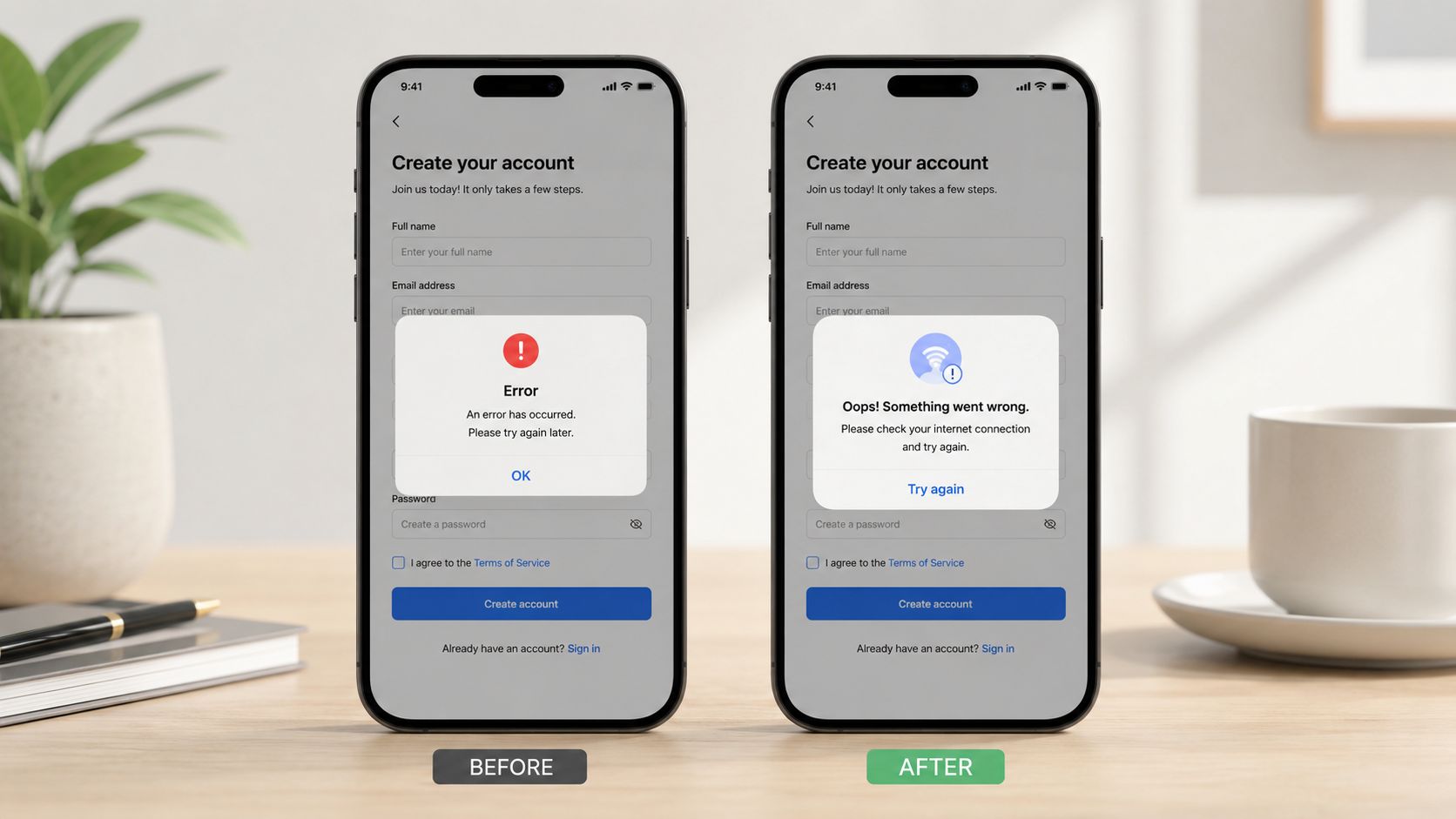
A founder reviews a flow, sees nothing obviously broken, and ships it. A week later, activation is soft, support tickets spike, and users abandon the step that looked "clear enough" in design review. In practice, UX writing fails in small places that carry business risk. A vague button lowers conversion. A generic error message increases drop-off. A weak confirmation screen creates doubt at the exact moment a user needs confidence.
Error messages that keep users moving
Error copy has one job. Preserve momentum.
That matters most in products where trust and complexity collide. In Fintech, users are moving money. In Web3, they are approving irreversible actions. In AI products, they are deciding whether the system handled their data or prompt the way they expected. If the product says "Something went wrong," the user has to guess what failed, whether it is safe to continue, and what to do next. Many will leave instead.
The stronger pattern is specific and operational. State what happened. State what it means for the user. Give the next step.
A few before-and-after examples:
Before: Payment failed
After: Your card was declined. Try a different card or contact your bank.Before: Invalid wallet
After: This wallet address format doesn't look right. Check the address and try again.Before: Something went wrong
After: We couldn't connect to your bank right now. Try again in a moment.Before: Model error
After: We couldn't generate a response from this prompt. Edit the prompt or try again.
The trade-off is real. More detail helps completion, but too much detail can overwhelm the screen or create legal risk in regulated products. Good teams solve that by keeping the core message short, then adding a link, tooltip, or expandable detail only where the user needs it.
Empty states, buttons, and confirmations
Founders often underestimate these surfaces because they look small. They are not small. They shape action.
An empty state can either stall the user or start the next step. A button can either signal the exact outcome or force the user to pause and interpret it. A confirmation message can either reassure the user or create last-second doubt.
Compare the difference:
Before: No data available
After: You haven't added a data source yet. Connect Stripe or upload a CSV to see revenue here.Before: Get started
After: Connect your workspaceBefore: Are you sure?
After: Delete this API key? Apps using it will stop working.
Each rewrite reduces ambiguity. That is not a branding improvement. It is a conversion improvement.
This is especially important in AI, Web3, and Fintech products because the product is often asking users to trust a system they do not fully understand. Clear UX writing closes that gap. In AI, it can explain what the model will do with uploaded content, why output quality may vary, or what happens after a user retries a task. In Web3, it can explain approvals, fees, and permanence before a wallet signature. In Fintech, it can explain timing, risk, and account impact before money moves.
If you're refining trust signals around signup, checkout, or feature activation moments, these examples of social proof strategies are worth reviewing. Social proof helps after the interface explains the action itself.
One more shift is happening in AI products. UX writers are starting to influence model behavior, not just interface text. The prompt, fallback response, refusal language, and clarification question are all product writing decisions that affect trust, retention, and support volume. In AI products, UX writing increasingly shapes both the interface and the system response.
A fast way to spot weak microcopy is simple. Ask someone outside the team what they expect to happen before they click. If they hesitate, predict the wrong outcome, or ask a clarifying question, the product language is not carrying its weight.
This walkthrough is a useful companion for spotting those moments in real interfaces:
The best microcopy reduces uncertainty before uncertainty becomes abandonment.
A Lightweight UX Writing Process for Startups
A founder ships a strong product, traffic arrives, and users still stall in onboarding, abandon a wallet step, or hesitate before linking a bank account. In early-stage products, that gap is often language, not functionality. A lightweight UX writing process helps teams fix that before drop-off turns into a retention problem.
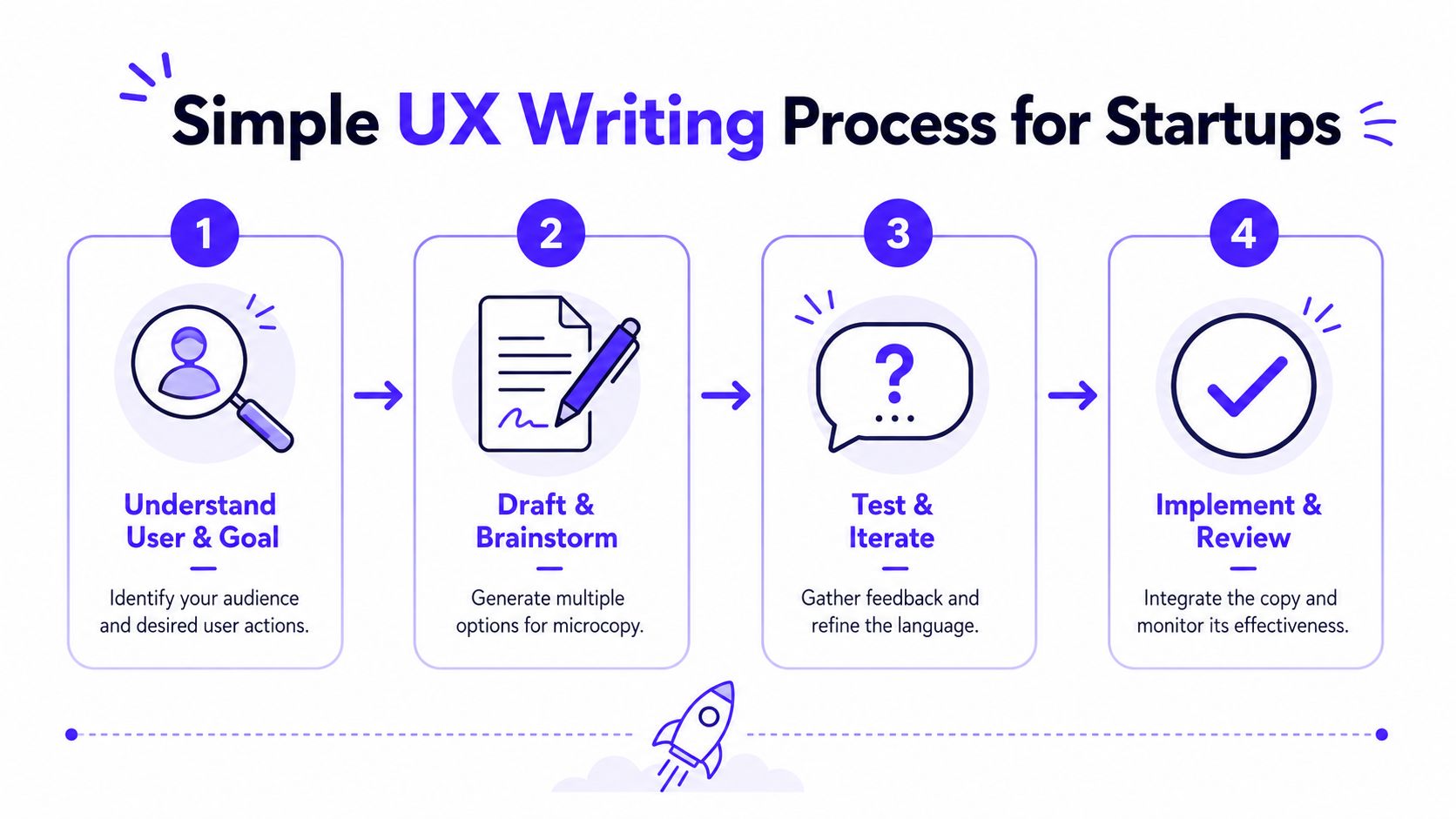
The process is simple: define the user decision, draft in the interface, review with product and design, then measure what changed after release. Keep it light, but treat it like product work. That matters even more in AI, Web3, and Fintech, where unclear wording creates trust issues, support load, and lower conversion.
Understand the decision
Start with the decision the user has to make at that moment. Good UX writing supports decisions under uncertainty.
In an AI SaaS onboarding flow, the primary question is often whether the product is safe to connect to company data. In Web3, the user wants to know what a signature approves and whether the action can be reversed. In Fintech, the user needs to know when money moves, what fees apply, and what changes after confirmation.
A practical way to frame this step:
Define the action: What exact task is the user trying to complete?
List the risk: What could cause hesitation, confusion, or mistrust?
Collect real language: Pull wording from sales calls, support tickets, demo notes, and user interviews.
Mark the business metric: Is this moment tied to activation, conversion, retention, or support deflection?
That fourth point gets missed. Startups often review copy for tone and clarity, but skip the metric. If the screen affects account creation, first deposit, wallet connection, or AI feature activation, the writing needs an owner and a success measure.
Draft in context
Write inside the product UI, not in a separate document. Figma works well because space, hierarchy, button labels, warnings, and helper text all affect comprehension.
Draft more than one version for high-risk moments. A short label may look cleaner, but if it increases uncertainty, it costs more than it saves. I usually test options that trade off brevity against reassurance, then choose based on the job that screen has to do.
For example, a button that says Continue may be fine in a low-risk step. In a Fintech flow that triggers a transfer, Review transfer details sets a clearer expectation and reduces bad clicks. In an AI product, Generate answer and Use company documents to answer lead to different trust outcomes.
Teams using AI tools can speed up early drafts. The value is in generating options quickly, not in handing over judgment. If your team wants background on the mechanics, this guide on how AI writing tools work is useful context. The final decision still belongs to the team that owns conversion and user trust.
Review with the people who ship the product
UX writing should be reviewed in the same working session as layout, interaction, and edge cases. If copy review happens later, weak language ships because nobody revisits the flow.
A simple review pass should cover:
Clarity: Can a new user explain what happens next?
Consistency: Does the same action use the same label across screens?
Risk disclosure: Are fees, approvals, timing, limits, or irreversible actions stated before commitment?
Failure states: Does the error explain what went wrong and what the user can do next?
Implementation fit: Will the copy still work in the live product, with truncation, loading states, and localization constraints?
This is also where AI products need a wider definition of UX writing. The interface text matters, but so do the system prompt, fallback response, refusal wording, and clarification questions. Those choices influence trust, task completion, and even training quality over time.
If a startup needs outside support to set up this process, this guide to hiring a UX agency for product and content work can help frame the decision.
Measure after launch
Post-launch review is where UX writing becomes a business function instead of a polishing step.
Check funnel drop-off, support tickets, retries, abandoned steps, and activation rates around the moments you changed. If users still hesitate, the wording may be unclear, the interaction may be weak, or the product may be asking for trust too early. Those are different problems. The process should help the team tell them apart.
One sentence can improve completion. It can also expose a deeper product issue. Both outcomes are useful.
Hiring or Partnering for UX Writing
At some point, founders need to decide whether UX writing stays distributed across the team or becomes a dedicated capability.
When to hire
A full-time UX writer makes sense when the product has enough complexity and surface area to justify ongoing ownership. That usually means multiple onboarding paths, a mature design system, a growing set of transactional states, and close coordination across product, design, research, and engineering.
The role is also changing. UX Content notes that UX writers now contribute to AI model training by refining system prompts and structuring outputs around UX standards, while 72% of AI SaaS companies report inconsistent AI responses due to poor prompt engineering, as discussed in UX Content's overview of modern UX writing. If your product includes AI-generated responses, that work belongs close to product strategy, not as an afterthought.
When a partner makes more sense
Early-stage teams usually don't just need a writer. They need aligned decisions across interface, brand, and implementation. That's why hiring one specialist too early can still leave gaps in the shipped experience.
A partner is often the better first move when you need:
Cross-functional judgment: Product language has to fit the interface and the build.
Senior review quickly: Founders need someone who can spot trust issues in the flow, not just edit words.
Coverage across launch work: Messaging, UI states, onboarding, and frontend details often move together.
If you're weighing that route, this guide on how to choose a UX agency in 2026 gives a practical framework for evaluating fit.
UX writing looks small on the screen. In the business, it isn't. It's one of the clearest places where product decisions turn into user behavior.
If your team needs sharper onboarding, clearer product flows, and interface copy that supports conversion, 925 Studios is built for that kind of work. We act as one creative partner that replaces three hires, a product designer, a brand designer, and a frontend developer, so AI SaaS, Web3, and Fintech teams can ship polished products without building the whole function in-house.


Let’s keep in touch.
Discover more about high-performance web design. Follow us on Twitter and Instagram.

